6. DAILY USE
WARNING!
Refer to the Safety chapters.
6.1 Navigating the menus
Operation of the menus:
1.
Activate the appliance.
2.
Press or to select the menu
option.
3.
Press OK to move to submenu or ac-
cept setting.
At every point you can get back to the
main menu with
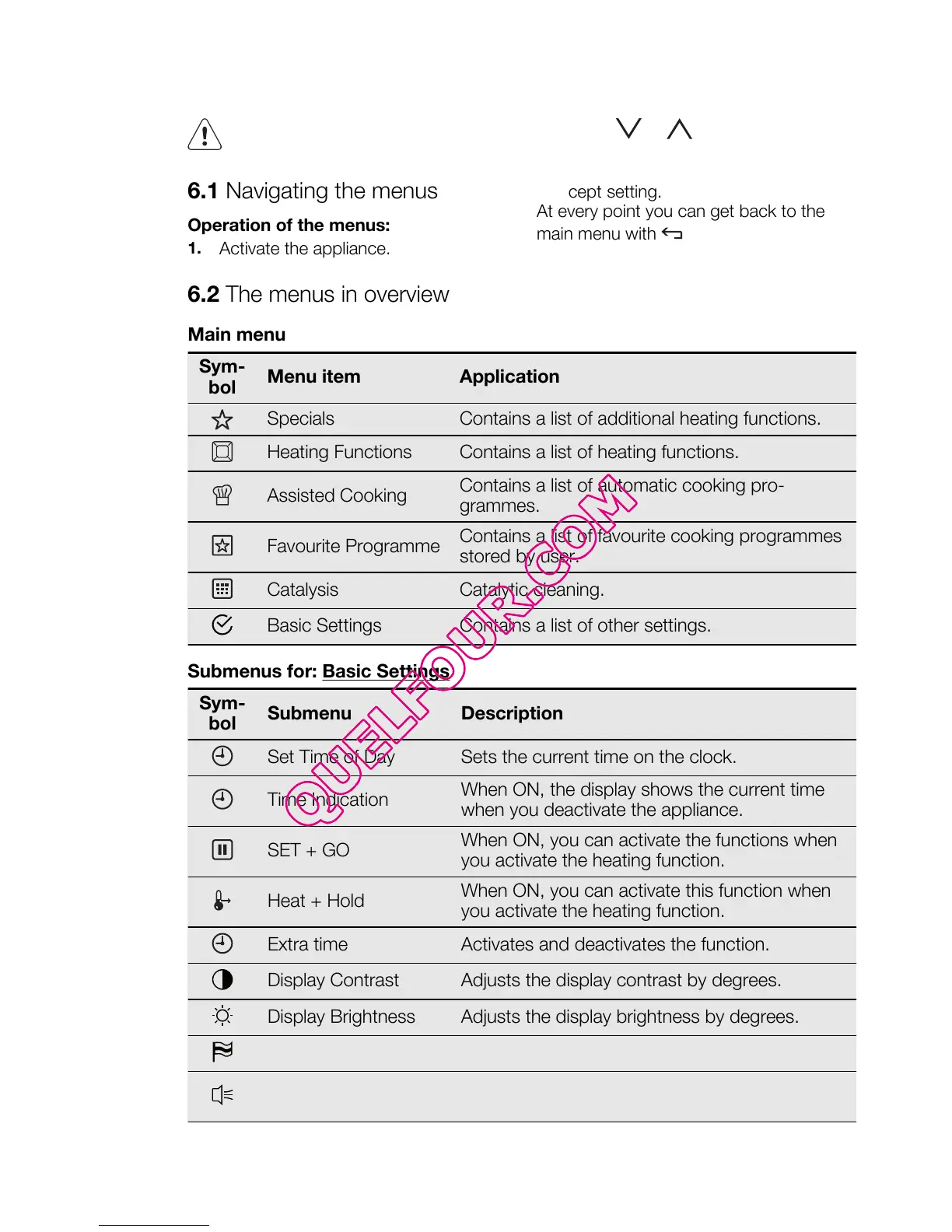
6.2 The menus in overview
Main menu
Sym-
bol
Menu item Application
Specials Contains a list of additional heating functions.
Heating Functions Contains a list of heating functions.
Assisted Cooking
Contains a list of automatic cooking pro-
grammes.
Favourite Programme
Contains a list of favourite cooking programmes
stored by user.
Catalysis Catalytic cleaning.
Basic Settings Contains a list of other settings.
Submenus for: Basic Settings
Sym-
bol
Submenu Description
Set Time of Day Sets the current time on the clock.
Time Indication
When ON, the display shows the current time
when you deactivate the appliance.
SET + GO
When ON, you can activate the functions when
you activate the heating function.
Heat + Hold
When ON, you can activate this function when
you activate the heating function.
Extra time Activates and deactivates the function.
Display Contrast Adjusts the display contrast by degrees.
Display Brightness Adjusts the display brightness by degrees.
Set Language Sets the language for the display.
Buzzer Volume
Adjusts the volume of press-tones and signals
by degrees.
ENGLISH 9




 To Next Page