12
Oven switch on and off
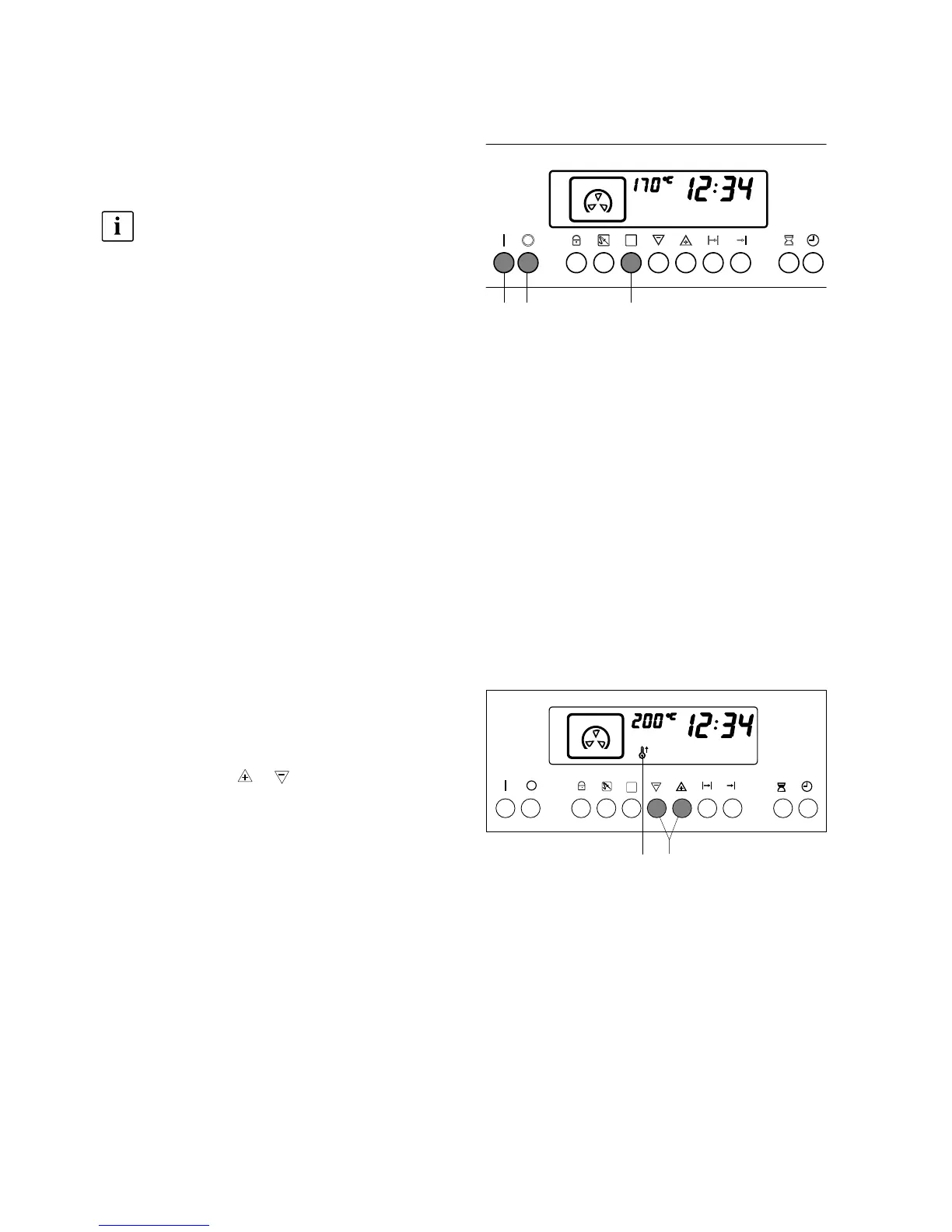
– Switch on the oven with button 1.
Prior to settings of function and temperature the
switch–on button 1 has to be pushed.
Exception: Timer.
A triple short sound signal refers you to wrong
settings. In such a case push button 2 and re-
start with button 1.
The cooking methods and oven temperatures are
switched on with the electronic control system and
switched off at the time desired either manually with
button 2 or automatically at the end of a programmed
sequence.
– Switch off the oven with button 2.
Oven functions setting
The functions steam–cooking, interval–cooking, hot
air, pizza setting, surface grill and top –/bottom heat
may alternatively be utilized for various preparations.
– Select the required oven function by pressing but-
ton 5 several times. The symbol for the desired
function comes on in the display.
A practice–oriented temperature value is related to
each method of cooking. Without any different temper-
ature setting the function will be switched on after 4 se-
conds.
Oven temperature
setting
Together with the oven function a preset temperature
shows up in the display.
– Set with button 6 or a temperature between
40 and 230°C.
The desired temperature shows up in the display. To-
gether with the functions hot air, pizza setting and top
–/bottom heat the symbol «Heating phase» 12 flashes.
When the temperature is reached, a signal tone
sounds and the «Heating phase» symbol 12 is extin-
guished.
521
612



 To Next Page