When you use this function the lamp
automatically turns off after 30 sec.
For the cooking instructions refer to "Hints
and tips" chapter, Moist Fan Baking. For
general energy saving recommendations
refer to "Energy Efficiency" chapter, Energy
Saving.
8. CLOCK FUNCTIONS
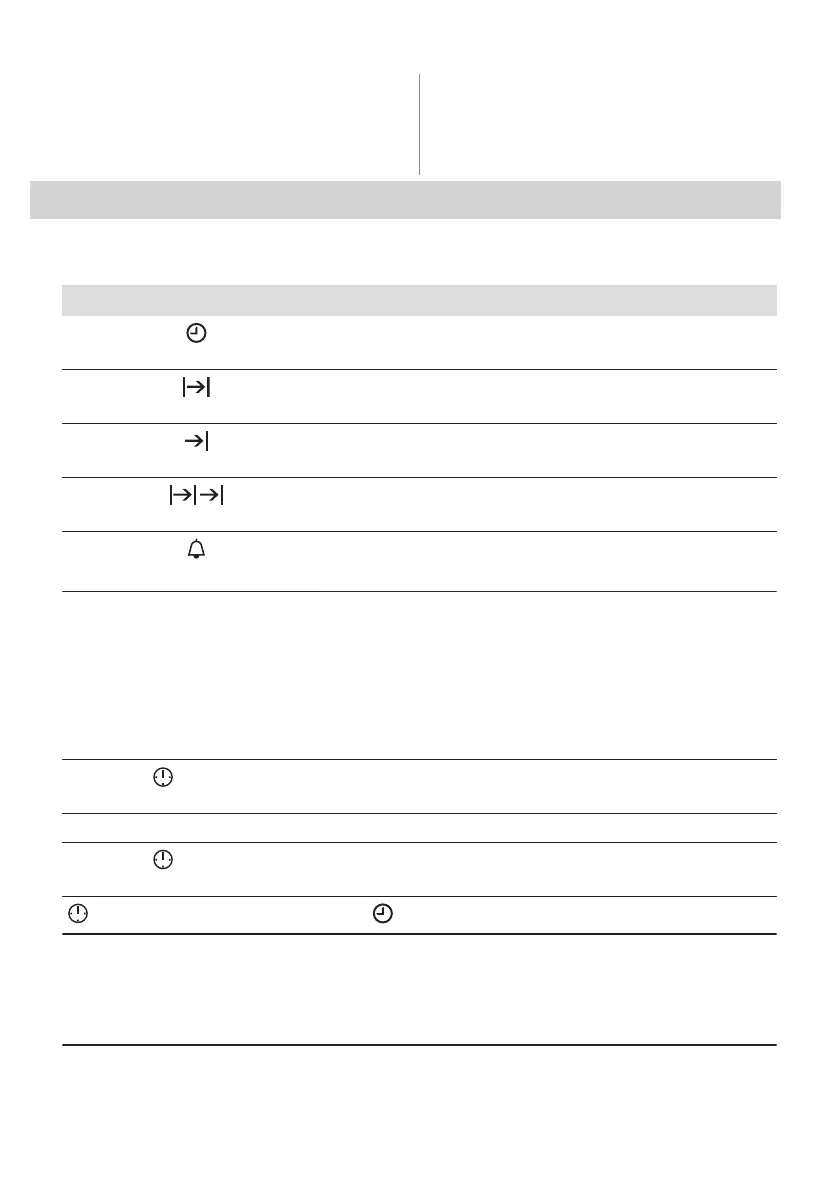
8.1 Clock functions table
Clock function Application
Time of Day
To show or change the time of day. You can change the time of day
only when the oven is off.
Duration
To set the length of cooking. Use only when a heating function is set.
End Time
To set the oven turn-off time. Use only when a heating function is set.
Time Delay
Combination of functions: Duration, End Time.
Minute Minder
To set a countdown time. This function has no effect on the operation
of the oven.
Minute Minder - can be set at any time, also if the oven is off.
8.2 How to set: Time of day
After the first connection to the mains, wait
until the display shows: hr, 12:00. 12 -
flashes.
Step 1 Turn the knob for the temperature to set the hour.
Step 2
- press to confirm.
The display shows the set hour and: min. 00 - flashes.
Step 3 Turn the knob for the temperature to set the minutes.
Step 4
- press to confirm.
The display shows the set time.
- press repeatedly to change the time of day. - flashes in the display.
8.3 How to set function: Duration
Step 1 Set a heating function.
ENGLISH 13








 To Next Page