Step 7 Press any button to stop the signal.
Step 8 Turn the knobs to the off position.
8.6 How to set function: Minute
Minder
Minute minder can be both set when the
oven is turned on and off.
Step 1
- press repeatedly. , 00 - flash.
Step 2 Turn the knob for the temperature to set the seconds and then the minutes.
When the time you set is longer than 60 min, hr flashes.
Step 3 Set the hours.
Minute Minder - starts automatically after 5 sec.
After 90% of the set time the signal sounds.
Step 4
When the set time ends the signal sounds for 2 min. 00:00, - flash. Press any button to stop the
signal.
9. USING THE ACCESSORIES
WARNING!
Refer to Safety chapters.
9.1 Using the core temperature
sensor
The core temperature sensor measures the
core temperature of the meat. When the
meat is at the set temperature, the oven
turns off.
There are two temperatures to be set:
• The oven temperature. Refer to the table
for roasting.
• The core temperature. Refer to the table
for the core temperature sensor.
CAUTION!
Only use the core temperature
sensor supplied with the oven, or
genuine replacement parts.
1. Set the oven function and the oven
temperature.
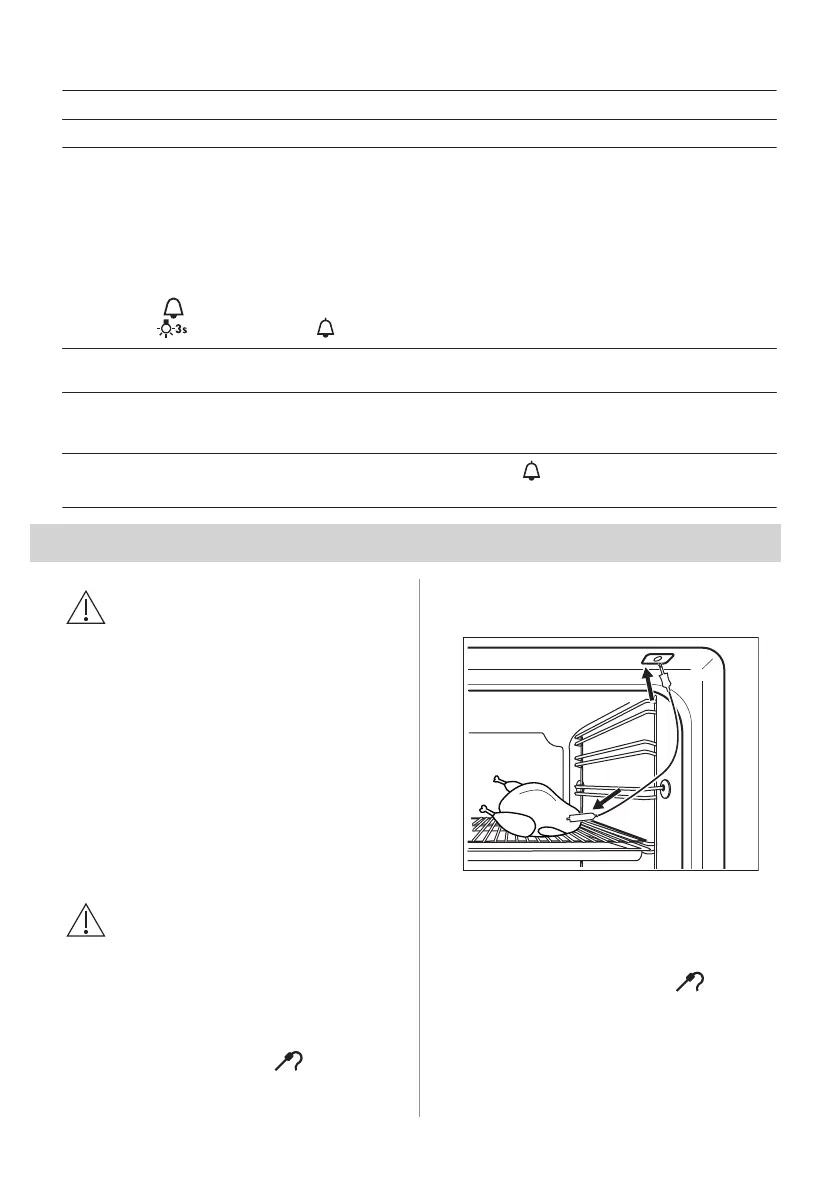
2. Put the point of the core temperature
sensor (with the symbol
on the
handle) into the centre of the meat.
3. Put the plug of the core temperature
sensor into the socket on the top of the
cavity.
Make sure that the core temperature
sensor stays in the meat and in the
socket during the cooking.
When you use the core temperature
sensor for the first time, the default core
temperature is 60 °C. While flashes,
you can use the knob for the temperature
to change the default core temperature.
The display shows the symbol of the core
temperature sensor and the default core
temperature.
ENGLISH 15








 To Next Page