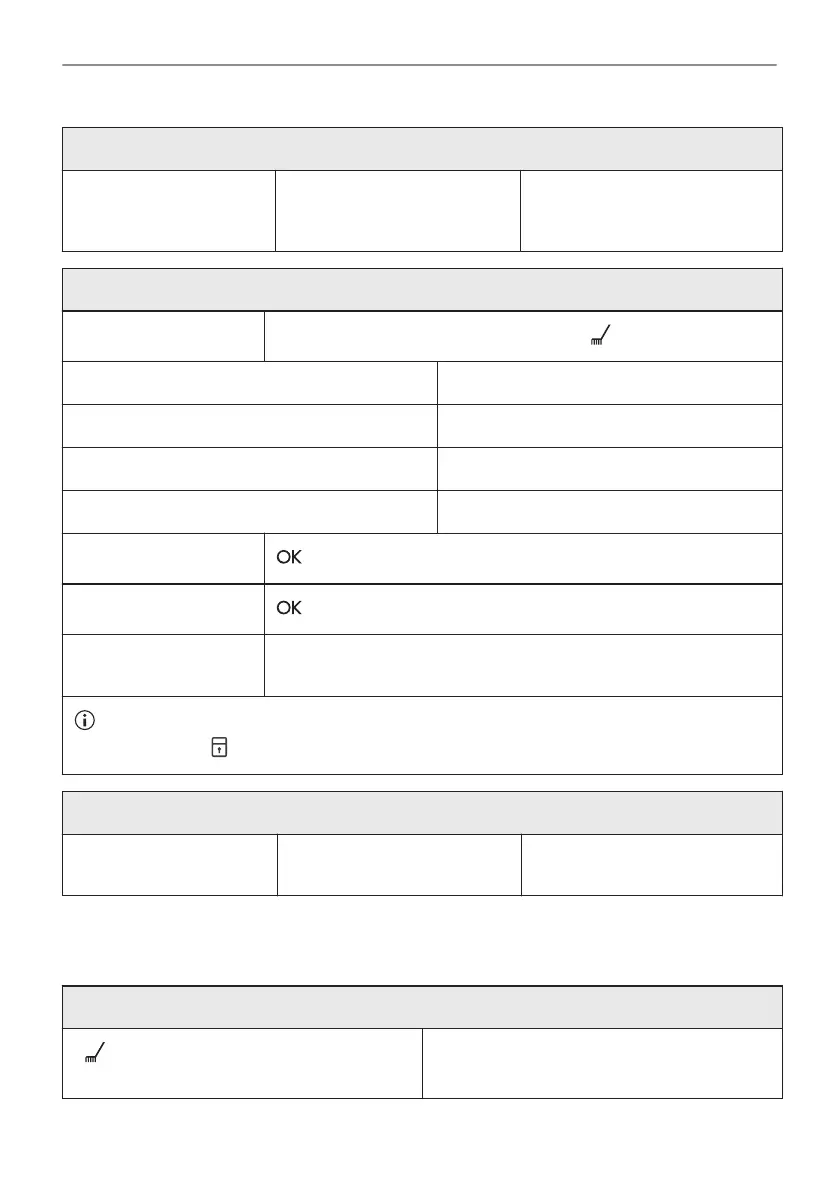
Before the Pyrolytic Cleaning:
Turn off the oven and wait
until it is cold.
Remove all accessories. Clean the oven floor and the in‐
ner door glass with warm water,
a soft cloth and a mild detergent.
Pyrolytic Cleaning
Step 1
Enter menu: Cleaning .
Option Duration
C1 - Light cleaning 1 h
C2 - Normal cleaning 1 h 30 min
C3 - Thorough cleaning 2 h 30 min
Step 2
- press to select the cleaning programme.
Step 3
- press to start the cleaning.
Step 4 After cleaning, turn the knob for the heating functions to the off posi‐
tion.
When the cleaning starts, the oven door is locked and the lamp is off. Until the door unlocks
the display shows: .
When the cleaning ends:
Turn off the oven and wait
until it is cold.
Clean the cavity with a soft
cloth.
Remove the residue from the
bottom of the cavity.
12.5 Cleaning Reminder
The oven reminds you when to clean it with pyrolytic cleaning.
flashes in the display for 5 sec after each
cooking session.
To turn off the reminder enter the Menu and
select Settings, Cleaning Reminder.
30/40
CARE AND CLEANING



 To Next Page