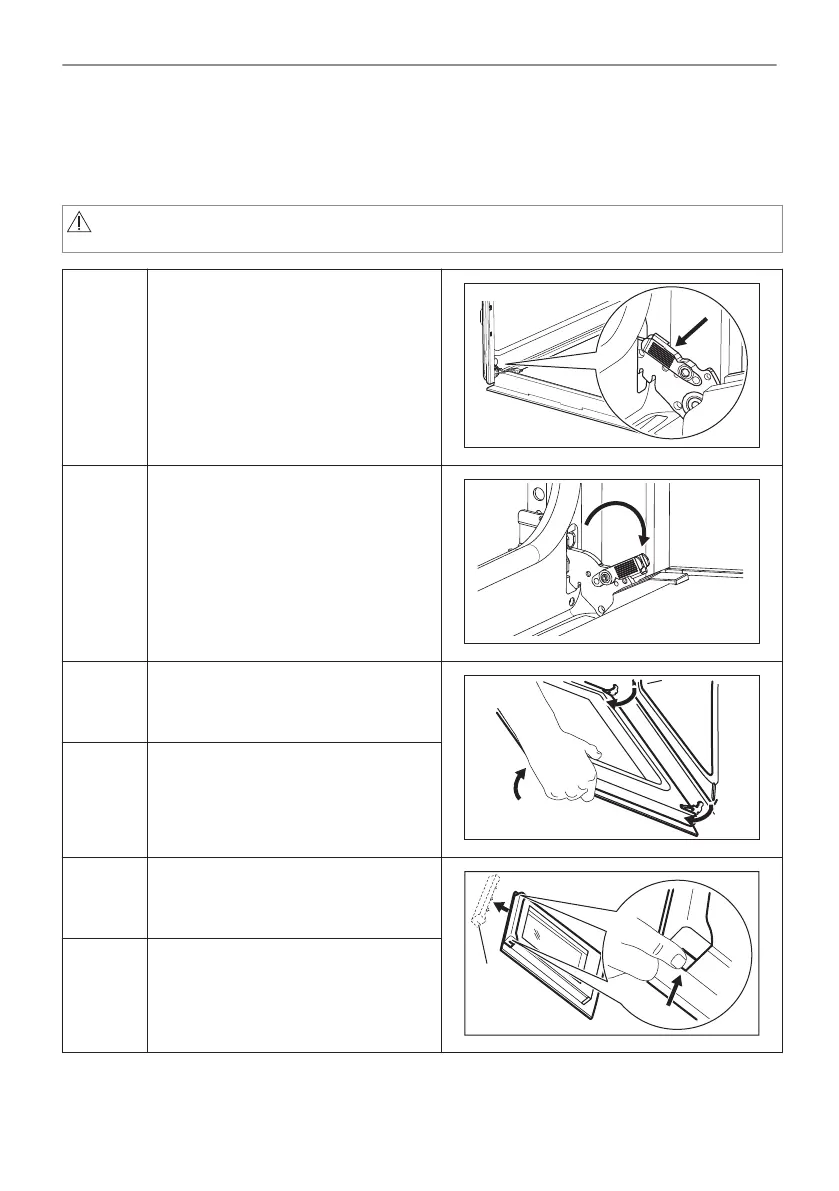
12.6 How to remove and install: Door
The oven door has three glass panels. You can remove the oven door and the internal glass
panels to clean them. Read the whole "Removing and installing door" instruction before you
remove the glass panels.
CAUTION!
Do not use the oven without the glass panels.
Step 1 Open the door fully and hold both
hinges.
Step 2 Lift and pull the latches until they
click.
Step 3 Close the oven door halfway to the
first opening position. Then lift and
pull to remove the door from its seat.
Step 4 Put the door on a soft cloth on a sta‐
ble surface.
Step 5 Hold the door trim (B) on the top edge
of the door at the two sides and push
inwards to release the clip seal.
Step 6 Pull the door trim to the front to re‐
move it.
31/40
CARE AND CLEANING



 To Next Page