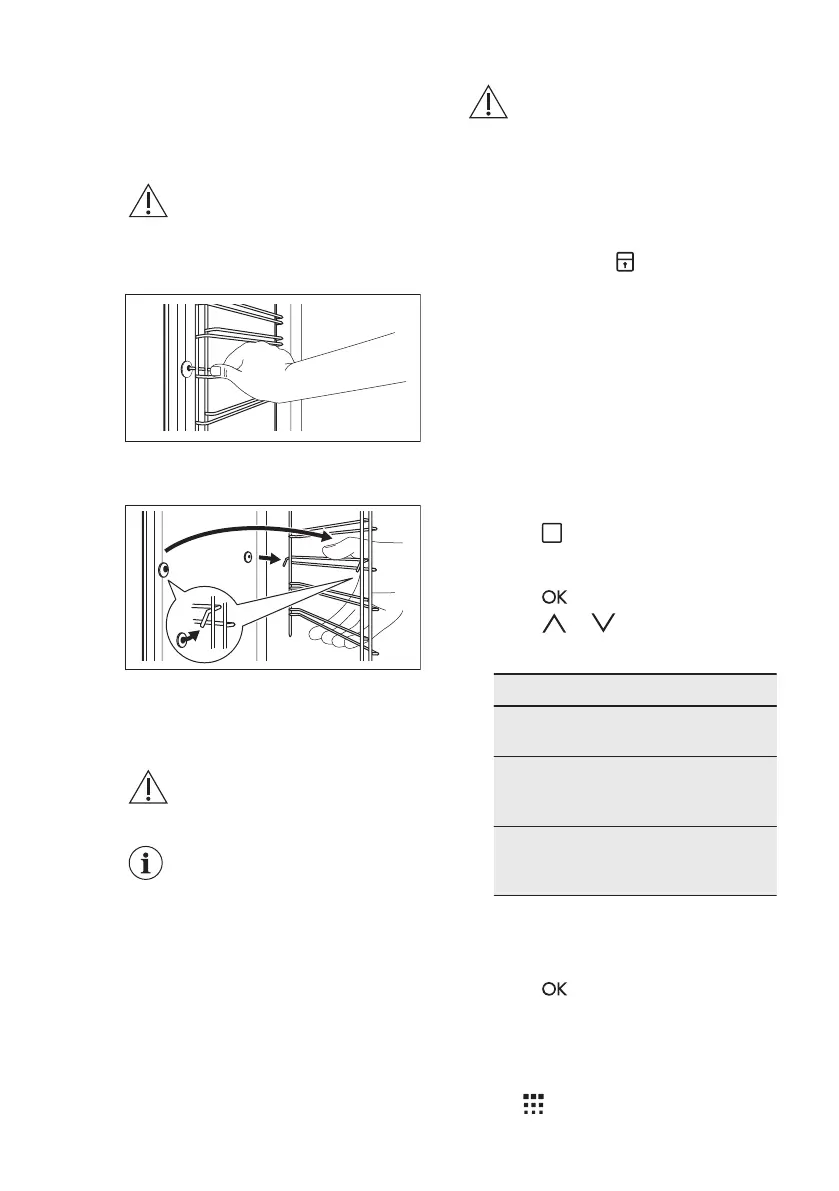
12.3 Removing the shelf
supports
To clean the oven, remove the shelf
supports.
CAUTION!
Be careful when you remove
the shelf supports.
1. Pull the front of the shelf support
away from the side wall.
2. Pull the rear end of the shelf support
away from the side wall and remove
it.
Install the removed accessories in the
opposite sequence.
12.4 Pyrolysis
CAUTION!
Remove all accessories and
removable shelf supports.
The pyrolytic cleaning
procedure cannot start:
• if you did not fully close
the oven door. In some
models, the display
shows "C3" when this
error occurs.
CAUTION!
If there are other appliances
installed in the same
cabinet, do not use them at
the same time as the
Pyrolysis function. It can
cause damage to the oven.
During the pyrolytic cleaning the door is
locked. The symbol and the bars of
the heat indicator come up, until the door
unlocks. The door unlocks when the
temperature inside the oven is under
safety conditions and the pyrolytic
cleaning finishes.
During the pyrolytic cleaning the lamp is
turned off.
1. Remove the worst dirt manually.
2. Clean the inner side of the door with
hot water, so that the residues do not
burn from the hot air.
3. Turn on the oven.
4. Press
again and again until the
display shows "Pyro" and the number
of the cleaning programme.
5. Press .
6. Press or to set the duration of
the cleaning procedure:
Option Description
1 1:00 for a
light cleaning
2 1:30 for a
standard
cleaning
3 2:30 for a
thorough
cleaning
You can use the End function to
delay the start of the cleaning
procedure.
7. Press to confirm.
12.5 Cleaning reminder
To remind you that the pyrolytic cleaning
is necessary, the cleaning reminder
symbol flashes in the display after
www.electrolux.com30



 To Next Page