EasyManua.ls Logo

Electrolux EPT-800 - Operation; Control Panel Overview

Electrolux EPT-800
13 pages
Print Icon
To Next Page IconTo Next Page
To Previous Page IconTo Previous Page
Loading...
&
Been
Ca
SUC
Gc
bane
aL
ina
een
on
Con
an
cL
Lau
a
eat
ECL
ac
a
a
ae
a
areca
ean
Seu
SLC
nan
tae
Te
ar
ee
Se
GC
NLC
von
RT
et
oe
Leas
EE
eC
USC
Se
GT
Lie
L)
OPERATION
ON-UNIT
CONTROL
AND
DISPLAY
PANEL
In
order
to
obtain
maximum
comfort
and
economy,
please
make
sure:
¢
Doors
and
windows
of
room
to
be
conditioned
are
closed.
¢
Unit's
outlet
and
inlet
openings
are
obstruction-free.
¢
Shade
the
room
from
direct
sun-rays
and
avoid
excessive
heat
sources
in
the
room.
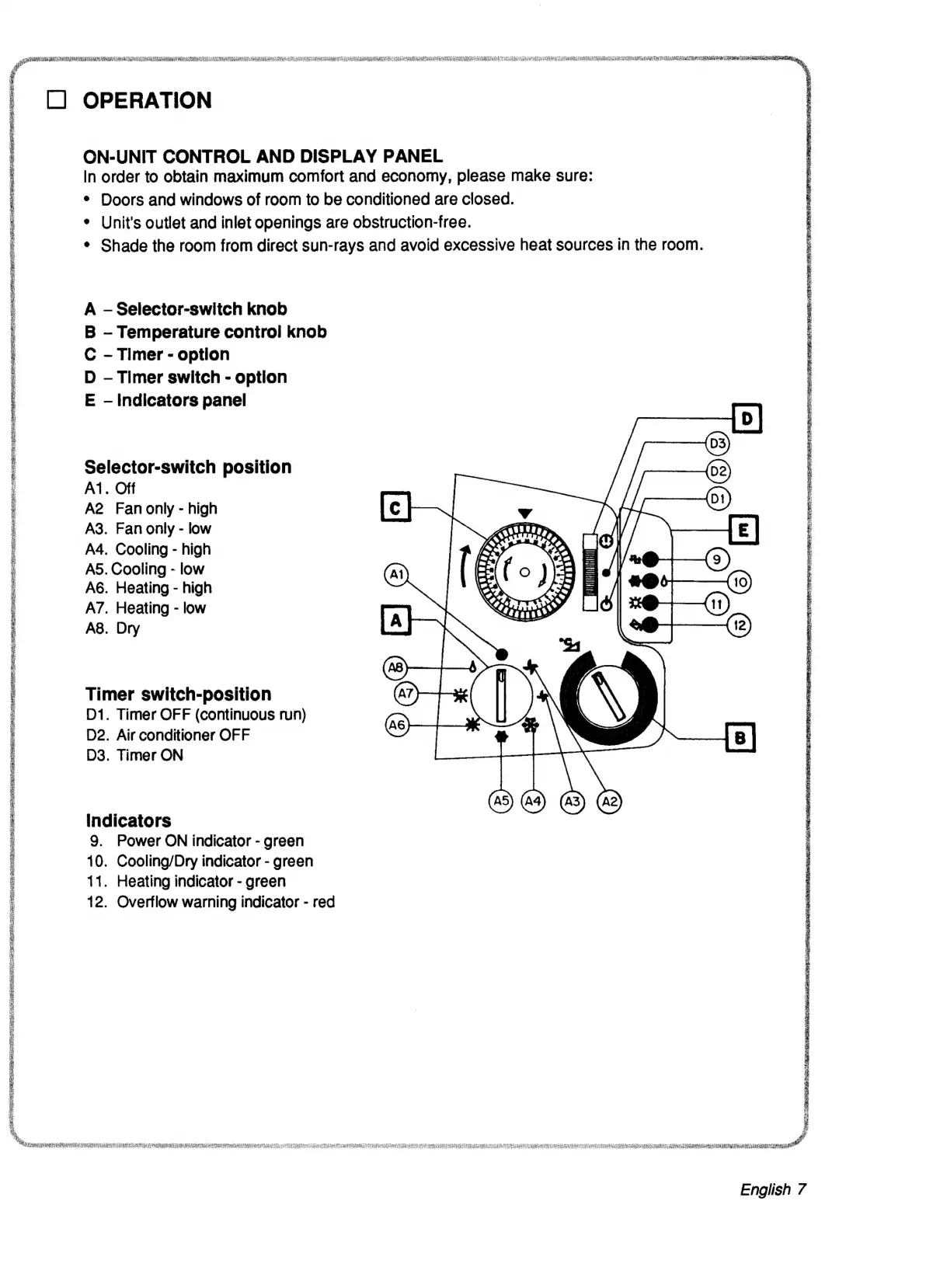
A
Selector-switch
knob
B
Temperature
control
knob
C
-
Timer
-
option
D
Timer
switch
-
option
E
Indicators
panel
Selector-switch
position
A1.
Off
A2
Fanonly
-
high
A3.
Fan
only
-
low
A4.
Cooling
-
high
A5.
Cooling
-
low
A6.
Heating
-
high
A7.
Heating
-
low
A8.
Dry
Timer
switch-position
D1.
Timer
OFF
(continuous
run)
D2.
Air
conditioner
OFF
D3.
Timer
ON
O2®2H®
EF
indicators
9.
Power
ON
indicator
-
green
10.
Cooling/Dry
indicator
-
green
11.
Heating
indicator
-
green
12.
Overflow
warning
indicator
-
red
a.
Ps
Se
ee
Ce
ee
ee
ee
ee
ee
er
er
ial
English
7

Related product manuals