EasyManua.ls Logo

Electrolux TD50 - Troubleshooting Network Errors (E21)

Electrolux TD50
70 pages
Print Icon
To Next Page IconTo Next Page
To Previous Page IconTo Previous Page
Loading...
61
Troubleshooting
E 21 - Network error, no polling CMIS
Error description
The error code is displayed if the tumble dryer is connected in a CMIS system and the
computer does not communicate with the tumble dryer (no call) within 10 seconds (factory
timeout setting).
Note! This is a warning and the dryer will operate even though the error has been
activated.
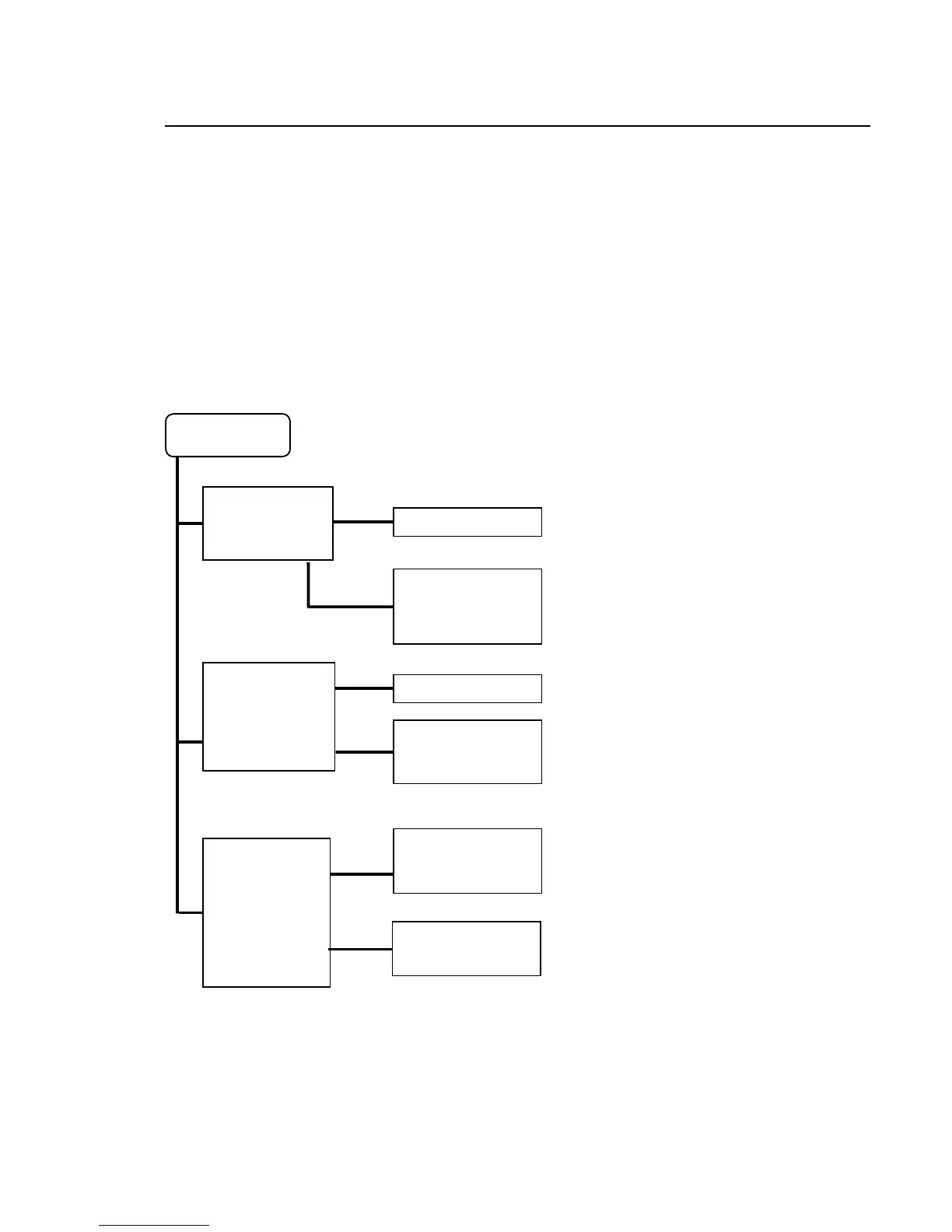
Error analysis
E – 21
Start the CMIS
program on the PC
which is connected
to the ELS Network.
Go to step 2.
NO
YES
1. Has CMIS
been started on
the PC?
3. Has the ELS
Network been
set up correctly
reg. Baud rate,
addresses and
time out. An
address cannot
be used twice.
NO
YES
2. Has the ELS
Network been
connected
correctly.
NO
YES
Go to step 3.
Mount the ELS
Network cables
correctly.
Make an error
diagnosis in the
CMIS system.
Adjust menus 5-6-1,
5-6-2, 5-6-3.

Other manuals for Electrolux TD50

Related product manuals