Lesson 5 Digital Inputs
Overview
In this lesson, you will learn to use push buttons with digital inputs to turn an LED
on and off.
Pressing the button will turn the LED on; pressing the other button will turn the LED
off.
Component Required:
(1) x Elegoo Mega2560 R3
(1) x 830 Tie-points Breadboard
(1) x 5mm red LED
(1) x 220 ohm resistor
(2) x push switches
(7) x M-M wires (Male to Male jumper wires)
Component Introduction
PUSH SWITCHES:
Switches are really simple components. When you press a button or flip a lever, they
connect two contacts together so that electricity can flow through them.
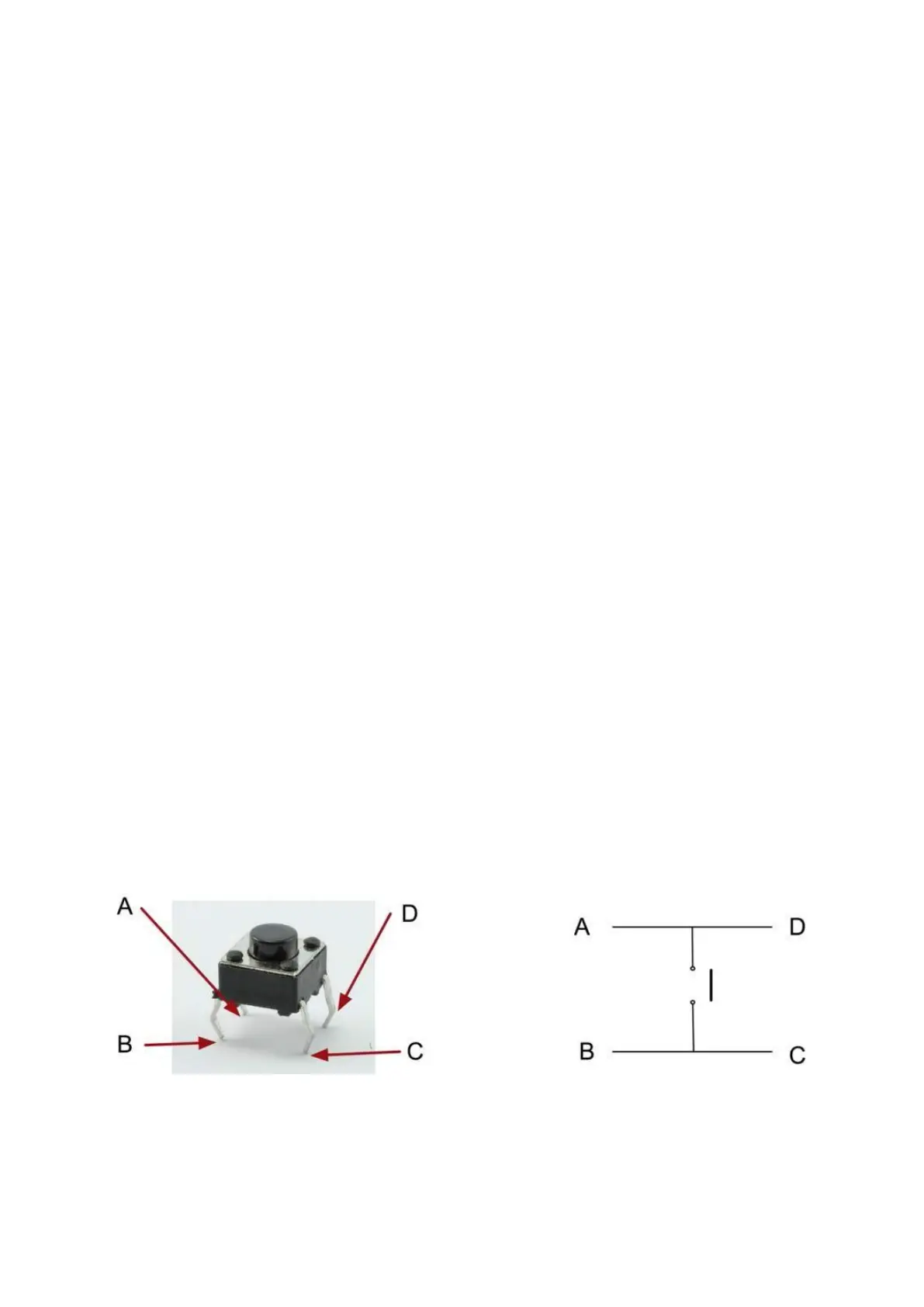
The little tactile switches that are used in this lesson have four connections, which
can be a little confusing.
Actually, there are only really two electrical connections. Inside the switch package,
pins B and C are connected together, as are A and D.


 To Next Page