11
CUSTOMIZING TV SETTINGS
Source
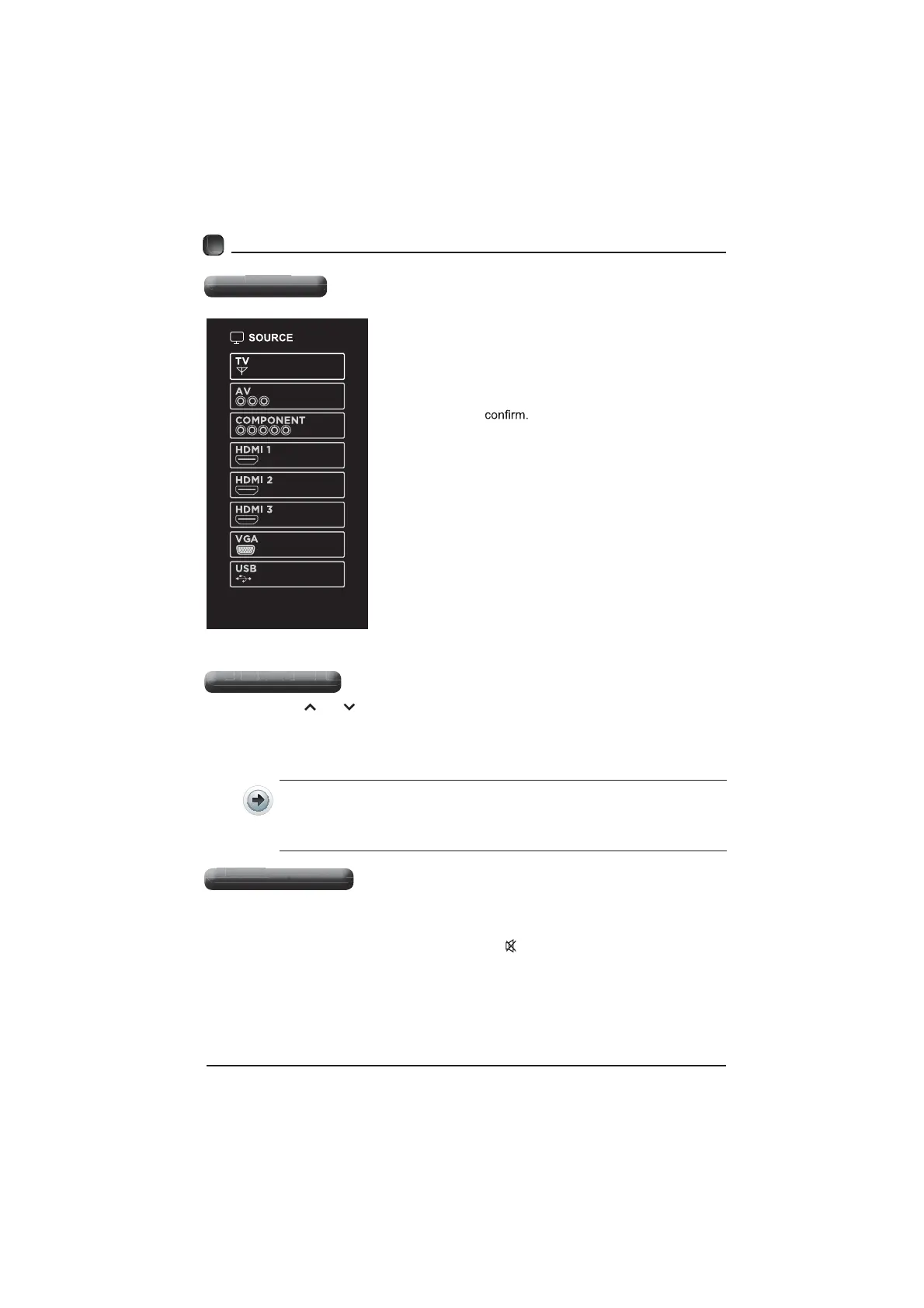
Press SOURCE on the remote control or on
the main unit to display the source menu, then
use the Arrow buttons to cycle among the
different input sources: TV/AV/COMPONENT/
HDMI/VGA/USB, then use the Arrow buttons
to highlight the desired source and press OK
to
Channel Selection
Press the CH /CH buttons on the main unit or on the remote control repeatedly
to select the channel.
Press the 0-9 buttons on the remote control to select the channel directly.
Press "4", and then press OK button to select channel 4.
Press "4" and "5", and then press OK button to select channel 45.
Press "1", "2" and "3", and then press OK button to select channel 123.
Press the VOL+/- buttons on the main unit or on the remote control to adjust the
volume.
If you wish to switch the sound off, press the MUTE button again or the VOL+
button to resume the sound.
Volume Adjustment
Source
Channel Selection
Volume Adjustment



 To Next Page