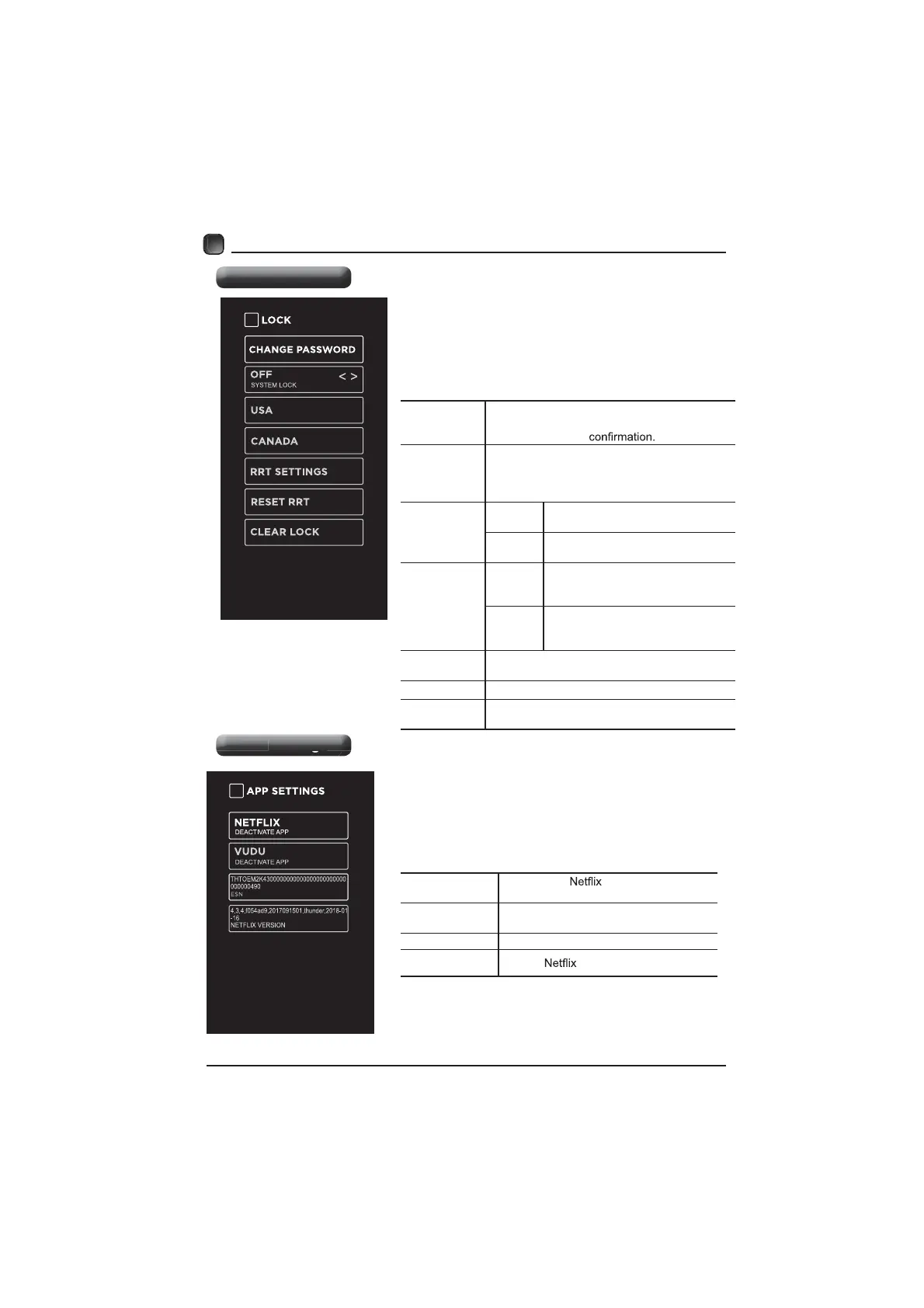
Lock Settings
APP Settings
21
CUSTOMIZING TV SETTINGS
Press MENU to display the main interface, then
use the Arrow buttons to highlight TV Settings.
Use the Arrow buttons to cycle among different
options and select Lock to enter and adjust each
option setting.
Note: the default password is “0000”.
CHANGE
PASSWORD
Use 0-9 buttons to input the old password and
then input the new 4-digit password. Re-enter
new password for
SYSTEM
LOCK
Select to turn On/Off system lock. The
following options (USA, Canada, RRT Setting
and Reset RRT) will only be accessible when
you turn the system lock on.
USA
TV
TV RATING: Press OK button to
lock or unlock TV rating.
MPAA
Select MPAA rating : N/A,G, PG,
PG-13, R, NC-17,or X.
CANADA
Canada
English
Select MPAA rating for English-
speaking Canada : E, C, C8+, G,
PG, 14+, 18+.
Canada
French
Select MPAA rating for Quebec
Canada : E, G, 8 ans+, 13 ans+,
16 ans+, 18 ans+.
RRT
SETTING
Set Rating Region Table.
RESET RRT Select to reset the RRT setting.
CLEAR
LOCK
Clear all lock settings.
Settin
s
Press MENU to display the main interface, then
use Arrows to highlight TV Settings. Use Arrows
to cycle among different options and select App
Settings to enter and adjust each option setting.
DEACTIVATE
APP
Deactivate
and clear the account
information.
DEACTIVATE
APP
Deactivate Vudu and clear the account
information.
ESN Electronic Serial Number.
NETFLIX
VERSION
Show
Version


 To Next Page