~05~
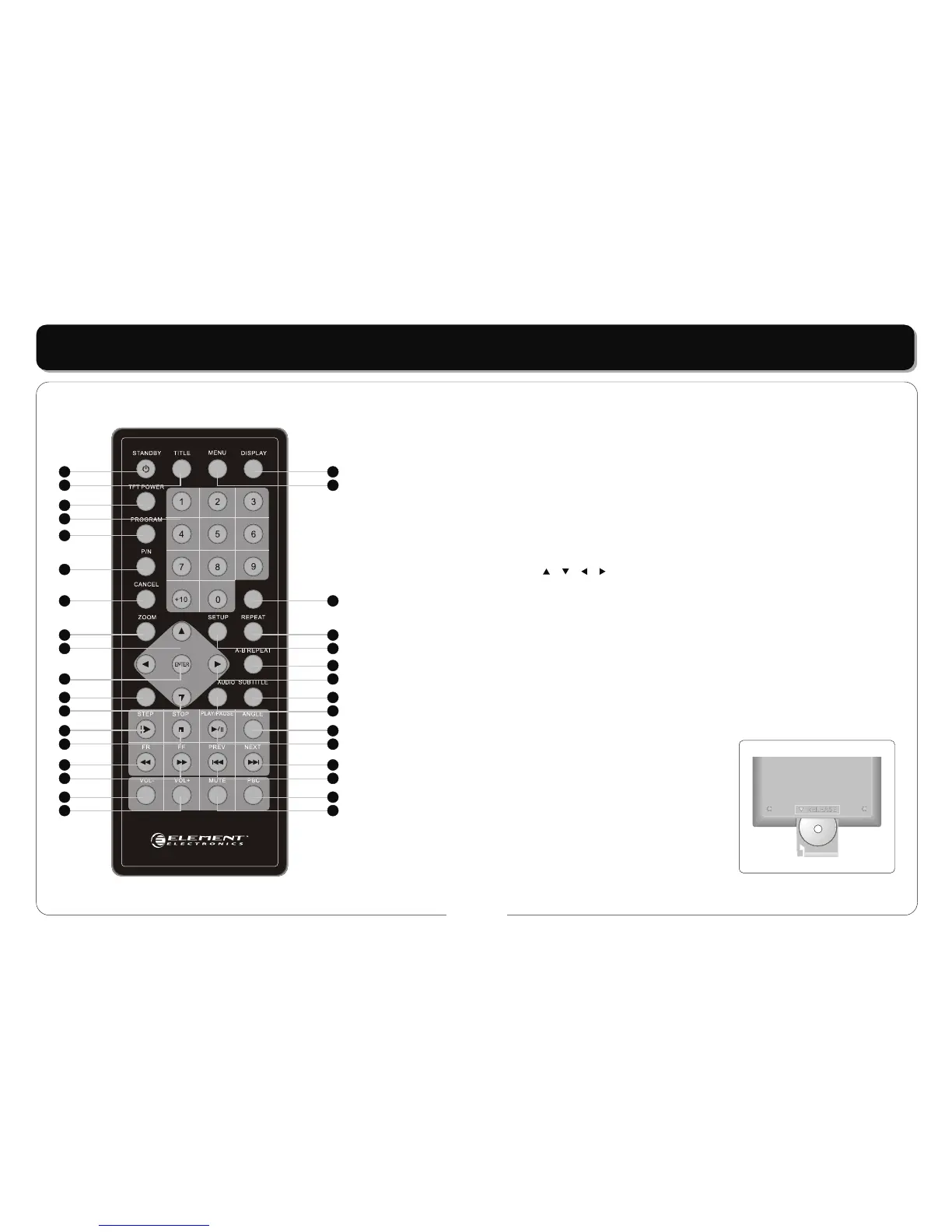
Remote Control Layout and Functions:
REMOTE INTRODUCTION
1
2
3
4
5
6
7
8
9
1. STANDBY button
2. TITLE button
3. TFT POWER button
4. NUMERIC button
5. PROGRAM button
6. PAL / NTSC button
7. SOURCE button
8. ZOOM button
9. DIRECTION button ( / / / )
10. ENTER button
11. SLOW button
12. STEP button
13. STOP button
14. FAST BACKWARD button
15. FAST FORWARD button
16. VOLUME- button
10
11
12
13
14
15
16
17
18
20
21
22
23
24
25
26
27
28
29
30
31
32
33
19
REMARKS:
Battery Fitment: Should the battery in the Remote
Control need to be replaced then proceed as follows:
Squeeze the clip on the Battery Carrier inwards and
pull the carrier out of the unit.
Replace the battery with a type Cr2025 or equivalent
ensuring the negative pole of the
battery faces towards the button side of the remote
Control. See diagram right:
+
17. VOLUME+ button
18. DISPLAY button
19. MENU button
20. SEARCH button
21. REPEAT button
22. SETUP button
23. A-B REPEAT button
24. SUBTITLE button
25. AUDIO button
26. ANGLE button
27. PLAY/PAUSE button
28. NEXT button
29. PREVIOUS button
30. PBC button
31. MUTE button



 To Next Page