6
Your new TV is heavy, please consult with professional
wallmount installer to perform this installation.
PREPARATIONS
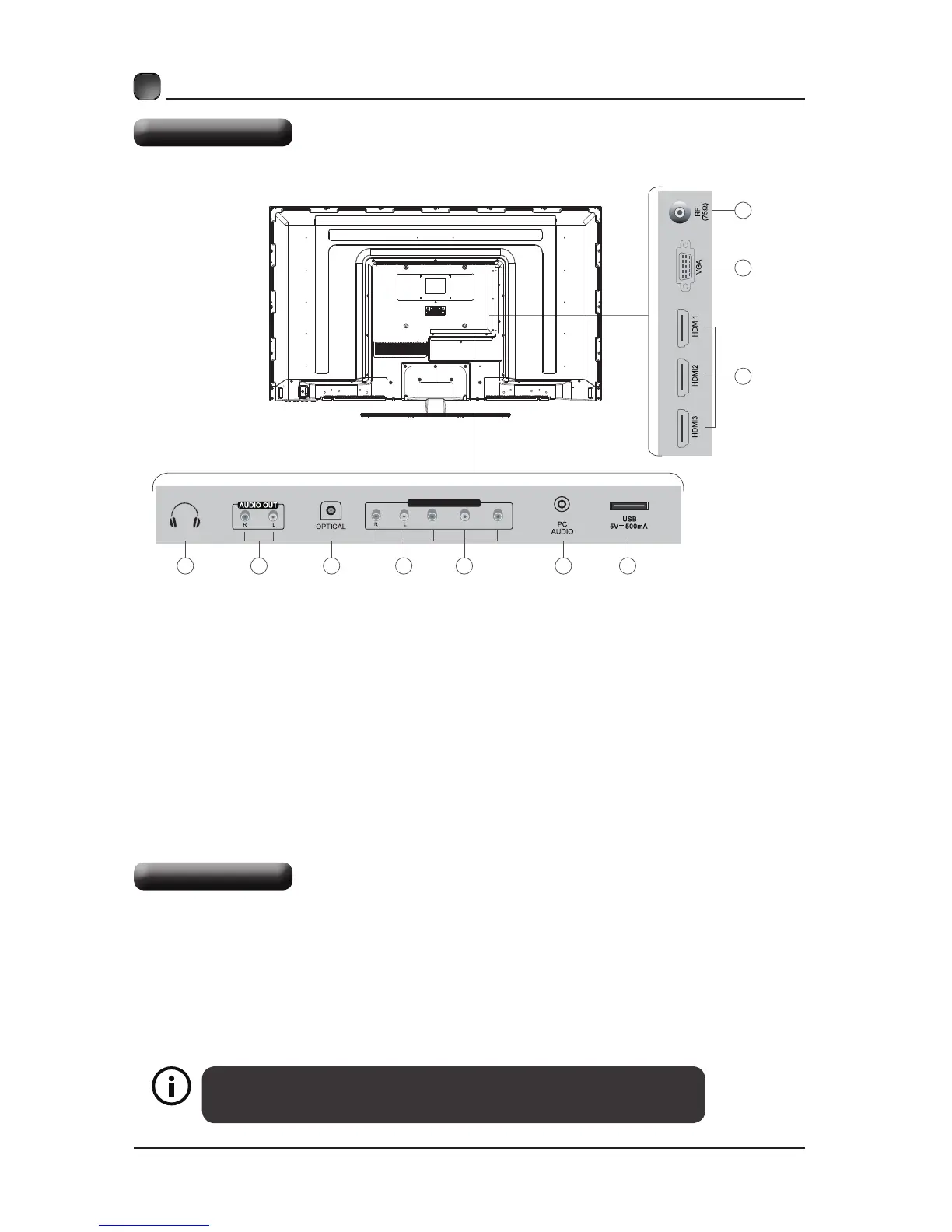
Rear View
The TV is provided with mounting holes for a VESA approved wall mounting bracket (Not
Supplied).Removethescrewsholdingthebasetothebasebracketandliftthebaseaway
(donotremovethebasemountingbrackets).MounttheVESAbracketusing4*M6isometric
threadedscrews(NotSupplied).
Wall Mounting
CVBS/Y Pb Pr
AV IN/ COMPONENT
1 32 4 5 6 7
8
9
10
1. Headphone output
2. Audio Output
3. Optical Output
4. AV Input
5. Component input
6. PC Audio Input
7. USB Input
8. HDMI1/ HDMI2/HDMI3 Input
9. VGA Input
10. Antenna Input (75Ω VHF/UHF)



 To Next Page