6
Your new TV is heavy, please consult with professional
wallmount installer to perform this installation.
PREPARATIONS
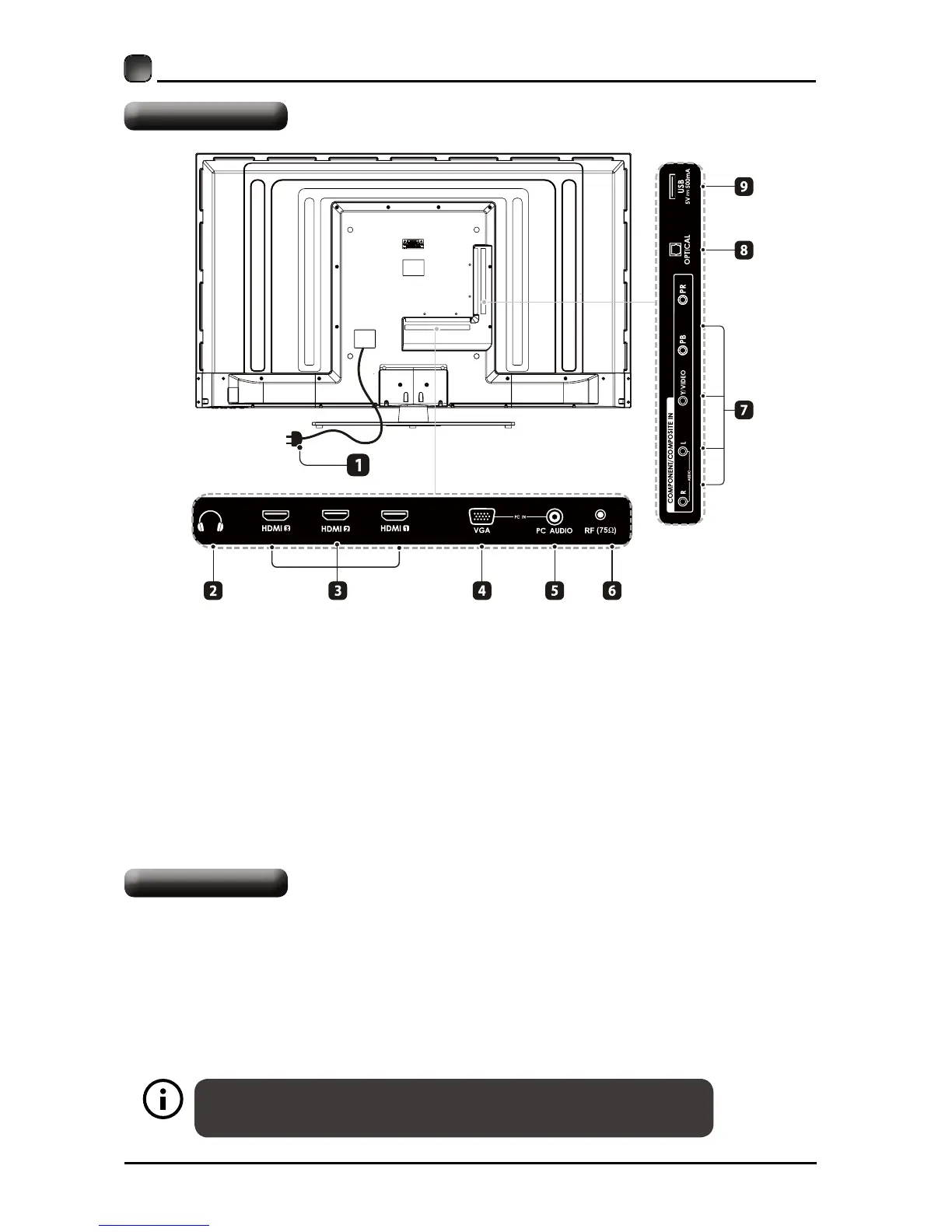
Rear View
The TV is provided with mounting holes for a VESA approved wall mounting bracket (Not
Supplied).Removethescrewsholdingthebasetothebasebracketandliftthebaseaway(do
notremovethebasemountingbrackets).MounttheVESAbracketusing4*M6*20isometric
threadedscrews(NotSupplied).Donotusescrewslongerthan20mm,damagewilloccurto
the internal parts.
Wall Mounting
1. Power Cord
Connect to AC power outlet.
2. Headphone Socket
Connect to the Headphones.
3. HDMI Inputs
ConnecttoaHigh-Denition(HD)signal
input device.
4. VGA Input
Connect to a computer or other devices
with a VGA interface.
5. PC AUDIO Input
Connect to a computer audio output.
6. RF (75Ω) Input
Connecttotheantenna(75ΩVHF/UHF)
socket with the RF coaxial cable.
7. COMPONENT Input
Connect to AV devices with component(Y/
Pb/Pr)videoandaudioinputsockets.
8. OPTICAL
Connect a digital sound system to
thisjack.
9. USB Port
Connect to a USB storage device to
playphotoles.(USBmode).VCRorDVD
player).



 To Next Page