16
CUSTOMIZING TV SETTINGS
General
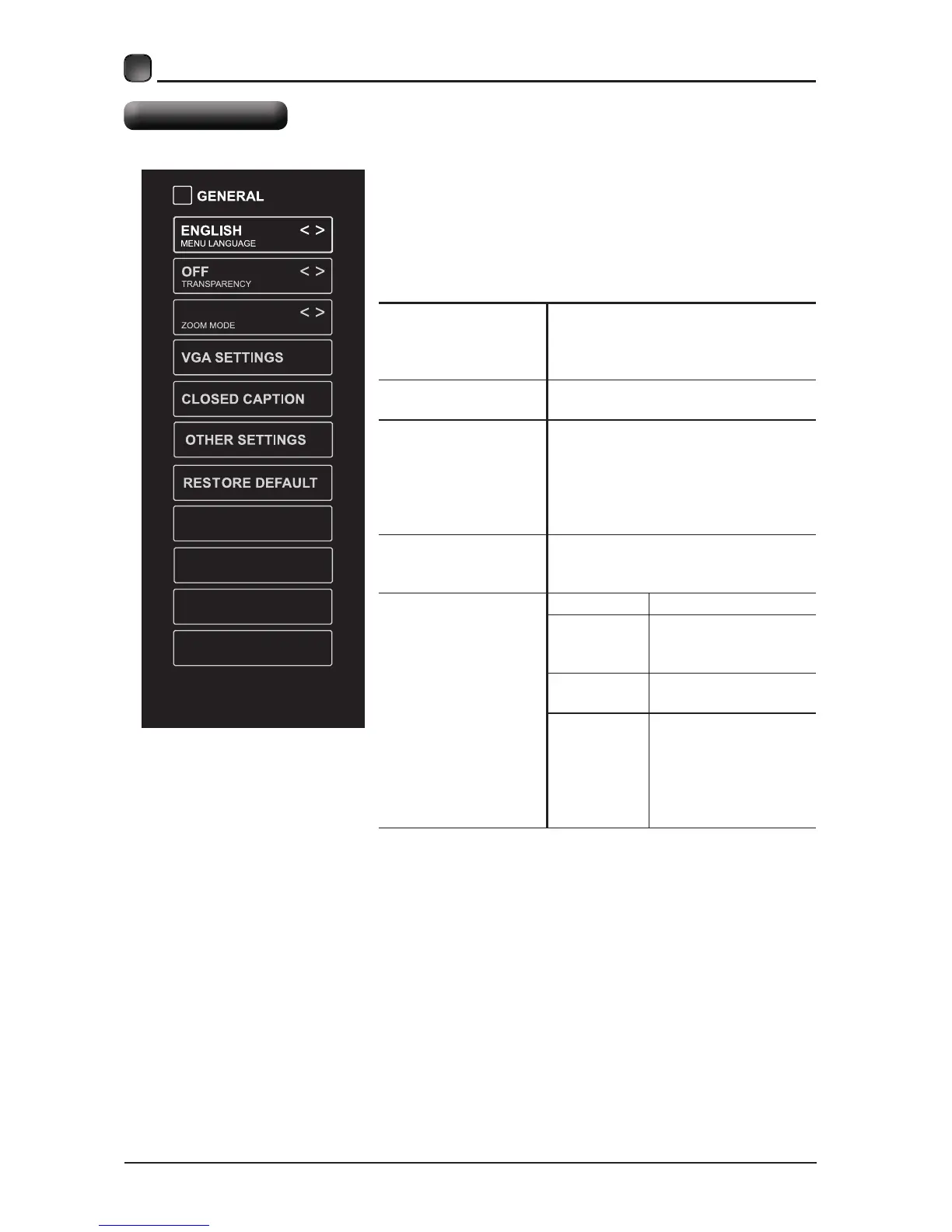
Press MENU to display the main interface, then
use the Arrow buttons to highlight TV Settings
and press OKthe Arrow buttons
to cycle among different options and select
General to enter and adjust each option setting.
MENU LANGUAGE
Select the menu language among
English, Français or Español. The
default on-screen menu language is
English.
TRANSPARENCY
Select to turn On/Off transparency
function.
ZOOM MODE
Select zoom mode:
Wide/Wide Zoom/Zoom/Standard/
Note: With a different input source,
the zoom mode options may differ.
VGA SETTINGS
$GMXVWDGYDQFHGRSWLRQ¶VVHWWLQJ
+3269326&ORFN3KDVHRU
$XWRRQO\DYDLODEOHLQ9*$PRGH
CLOSED CAPTION
CC mode On/Off/CC on Mute.
Basic
Selection
CC1, CC2, CC3,
CC4, TEXT1, TEXT2,
TEXT3, TEXT4,OFF.
Advanced
Selection
Service1/Service2.../
Service6/OFF.
Option
Mode, Font Style,
Font Size, Font Edge
Style, Font Edge
Color, FG_ Color,
BG_ Color, FG_
Opacity, BG_Opacity.
WIDE
View End-User License
Software Update(Network
Software Information


 To Next Page