18
CUSTOMIZING TV SETTINGS
Picture Settings
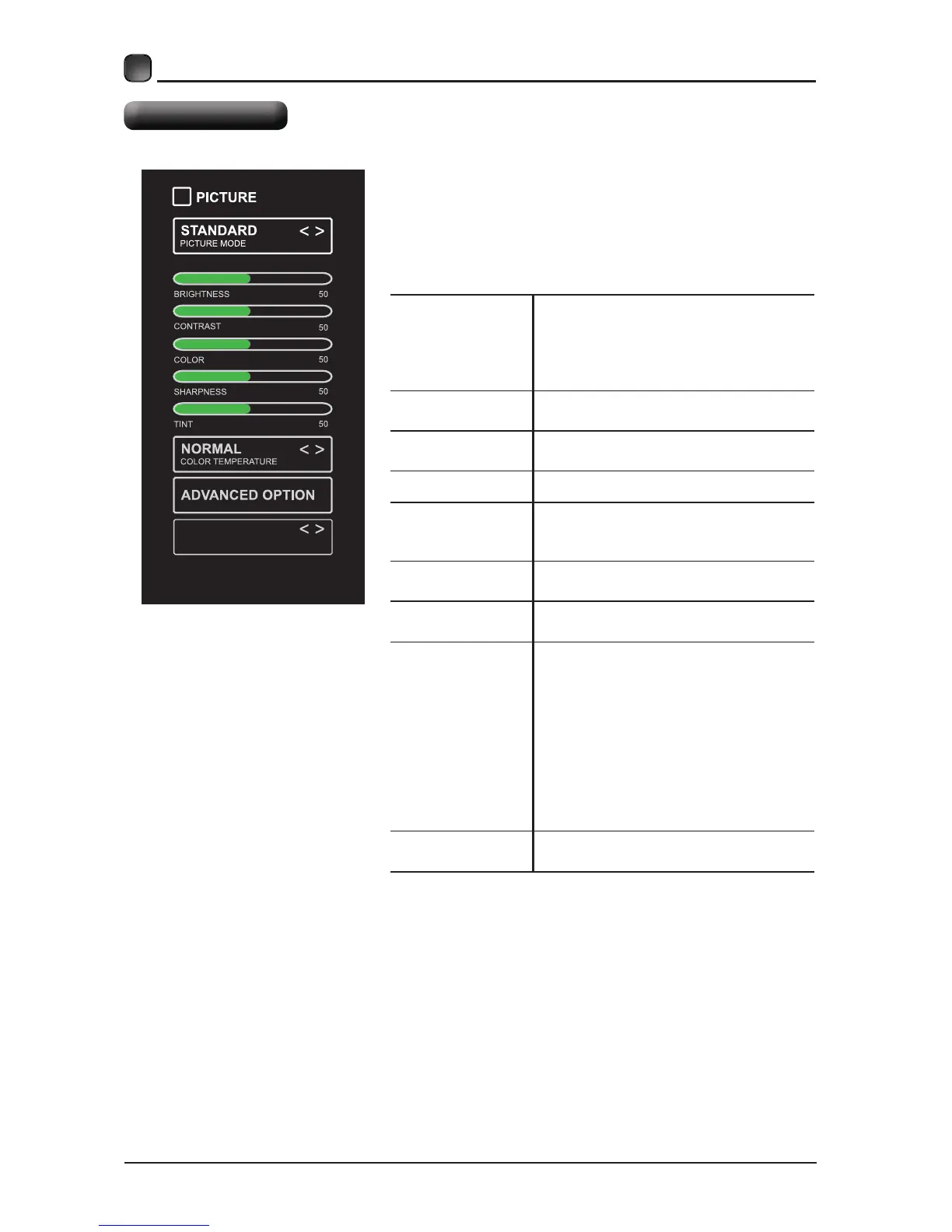
PICTURE MODE
&\FOHDPRQJSLFWXUHPRGHV
'\QDPLF6WDQGDUG0RYLH8VHU
$OWHUQDWLYH3UHVV302'(EXWWRQRQ
UHPRWHFRQWUROWRVHWWKHSLFWXUHPRGH
GLUHFWO\
BRIGHTNESS
,QFUHDVHRUGHFUHDVHWKHDPRXQWRI
ZKLWHLQWKHSLFWXUH
CONTRAST
$GMXVWWKHGLIIHUHQFHEHWZHHQOLJKW
DQGGDUNOHYHOVLQWKHSLFWXUHV
COLOR &RQWUROWKHFRORULQWHQVLW\
SHARPNESS
$GMXVWFULVSQHVVOHYHOLQHGJHV
EHWZHHQOLJKWDQGGDUNDUHDVRIWKH
SLFWXUH
TINT
Adjust the balance between red and
green levels.
COLOR
TEMPERATURE
Cycle among color temperatures:
Normal/Warm/COOL.
ADVANCED
OPTION
Set the following options:
Noise Reduction: Reduce the noise
level of the connected device: OFF/
WEAK/MEDIUM/STRONG.
White Balance: To set the different
options of white balance.
R-GAIN/G-GAIN/B-GAIN/R-OFFSET/
G-OFFSET/B-OFFSET.
Backlight: To set the value of
backlight.
OPEN HDR
Cycle among picture modes:
OFF/AUTO/LOW/MIDDLE/HIGH
Press MENU to display the main interface, then
use the Arrow buttons to highlight TV Settings
and press OKArrow buttons
to cycle among different options and select
Picture to enter and adjust each option setting.
AUTO
OPEN HDR


 To Next Page