10
CUSTOMIZING TV SETTINGS
Initial Setup
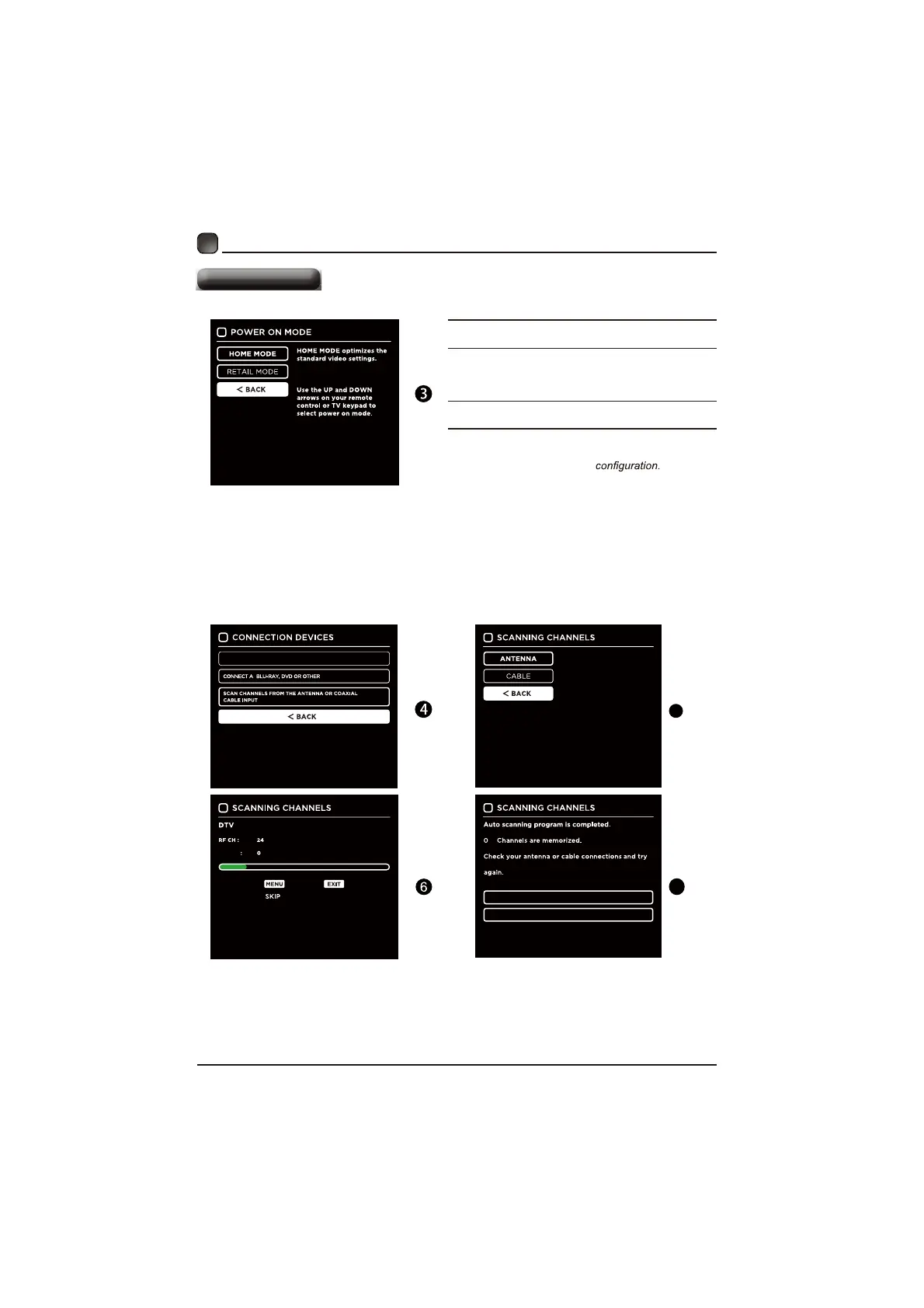
Home Mode :The picture mode will be Standard if you
select this mode.
Retail Mode:Select Dynamic Mode if you would like
your picture to be brighter. At
times this mode may use
more energy to operate the Volume/Sound Mode and
Picture Mode.
The SLEEP-MODE power consumption should be less
than 0.5W.
Followthenextscreens.Usethearrowkeyson
theremotecontrolandthenpressOKbuttonto
customizeyourTVchannel
Afterthechannelscan,yourTVchannelswillbeset
up.
Use the UP and DOWN
arrows on your remote
control or TV keypad to
select the channel scan type.
RETURN TO SCAN CHANNELS PROGRAM
CONNECT A BLU-RAY, DVD OR OTHER DEVICES
QUIT
FOUND
CONNECT TO THE INTERNET
DEVICES
Ifchannelscannotbefound,thisframe
willbedisplayedautomatically.
5
7


 To Next Page