19
CUSTOMIZING TV SETTINGS
Channel Settings
T
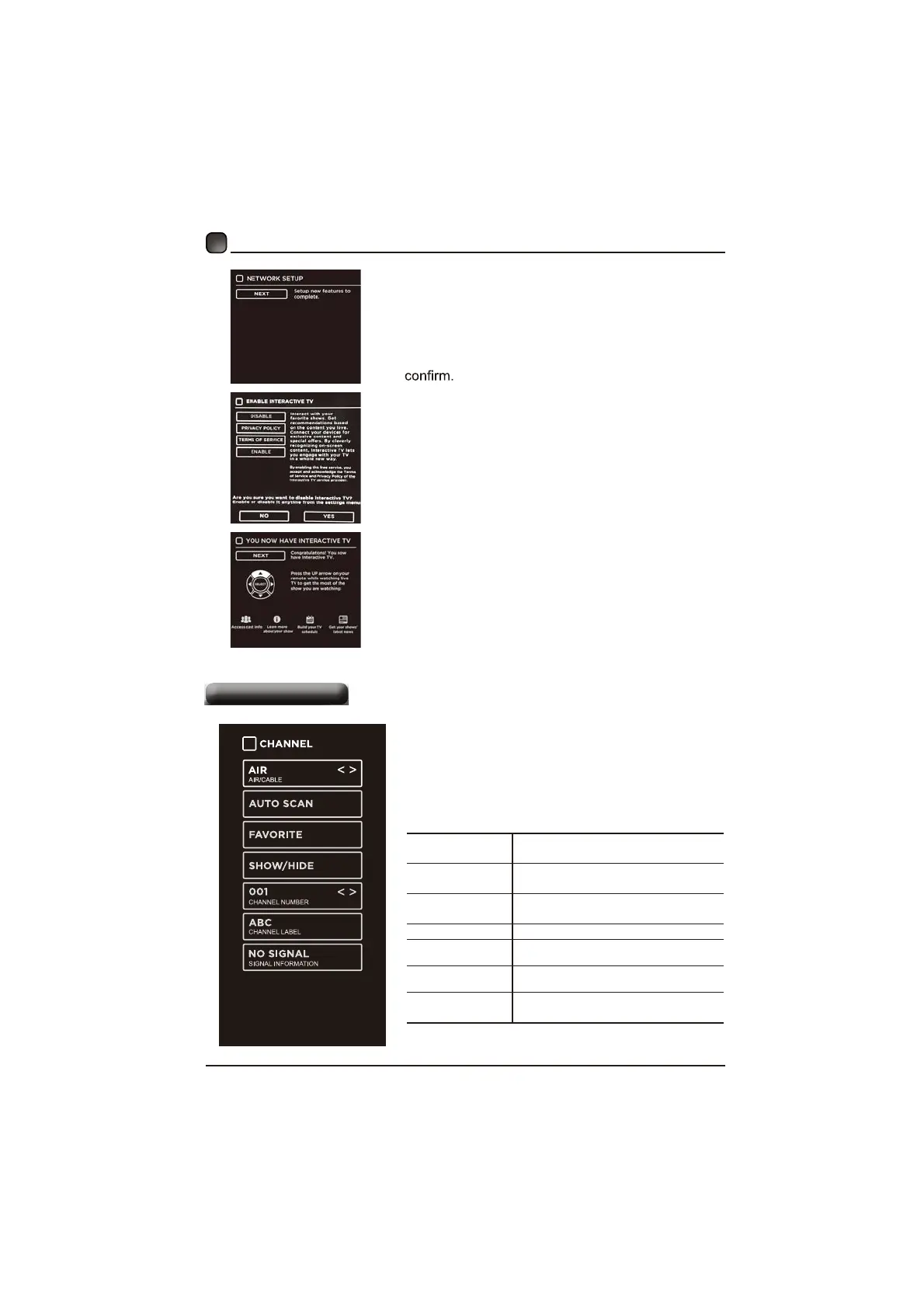
hefirsttimewhenconnectingthenetworN
andmakeconnectionsuccessfully,NETWORK
SETUPmenuwillpopup,andconfirmNEXT
toenterENABLE INTERACTIVE TVmenu
ThenusetheArrowbuttonstoselectENABLE/
DISABLEWhe,nteractiveTVandpressOKbuttoQ
to
T h e n youwille n t e r N O W YOU HAVE
INTERACTIVE TVmenu,anduseUParrowoQ
remotecontroltogetthemostoftheshowyoX
DUHZDWFKLQJ
AIR/CABLE
6HOHFWDQWHQQDEHWZHHQ$LUDQG
Cable.
AUTO SCAN
6HOHFWWKH$XWR6FDQIHDWXUHWRVFDQ
\RXUDYDLODEOH$LUDQGFDEOHFKDQQHOV
FAVORITE
6HWWKHVHOHFWHGFKDQQHODVDIDYRULWH
channel.
SHOW/HIDE 6KRZ+LGHWKHVHOHFWHGFKDQQHO
CHANNEL
NUMBER
'LVSOD\WKHFXUUHQWFKDQQHOQXPEHr.
CHANNEL
LABEL
'LVSOD\WKHFXUUHQWFKDQQHOODEHO
SIGNAL
INFORMATION
'LVSOD\WKHLQIRUPDWLRQRIFXUUHQW
signal.
PressMENUtodisplaythemaininterface,theQ
useWKHArrowbuttonstoKLJKOLJKWTV Settings
UsetKHArrowbuttonstocycleamongdiffHUHQW
optionsandselectChanneltoenterandadjusW
HDFKRSWLRQVHWWLQJ


 To Next Page