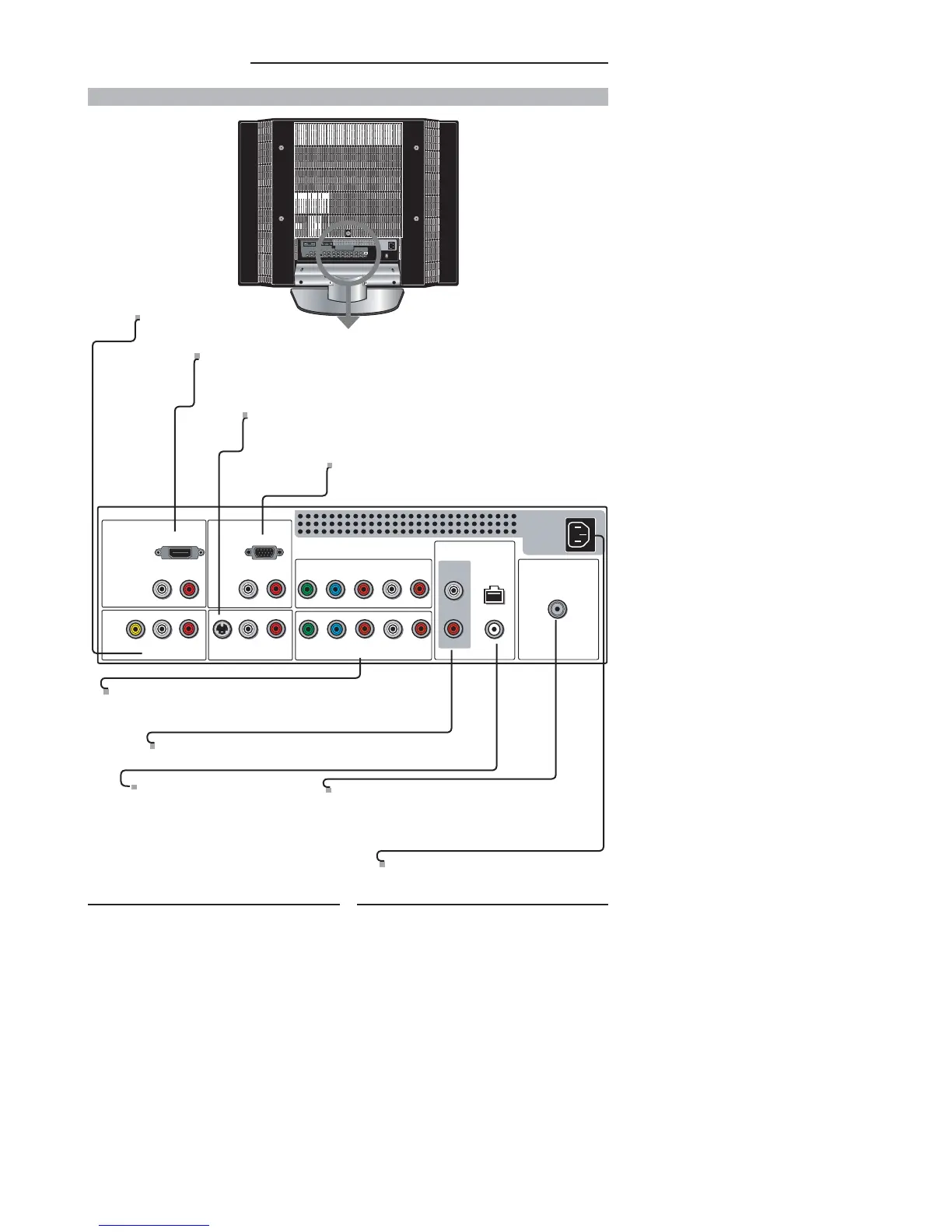
HDMI IN
AUDIO
LR
LR LR
LR
L
R
LR
LR
AUDIO
VGA IN
VIDEO2 IN
VIDEO AUDIO
S-VIDEO IN
S-VIDEO AUDIO
YPbPr1 IN
AUDIO OUT
STEREO
DIGITAL
OPTICAL
COAXIAL
Air/Cable
VHF/UHF IN
HDTV/TV
YPbPr AUDIO
YPbPr2 IN
YPbPr AUDIO
VGA IN
Connects the PC, or other AV equipment with VGA and
AUDIO(L/R) output jacks.
YPbPr1 IN/YPbPr2 IN
Connects to the DVD player, Digital Set-Top-Box, or other AV
equipment with component(YPbPr) video and audio output jacks.
VIDEO2 IN
Connects to the composite VIDEO and AUDIO(L/R) output jacks on external video equipment.
HDMI IN
Connects the all digital AV equipment with HDMI connector.HDMI supports enhanced,
high-defi nition video and two-channel digital audio. The AUDIO(L/R) of HDMI IN is for
DVI connection.
AC IN
Connects to the AC power cord.
S-VIDEO IN
Connects to the S-VIDEO and AUDIO(L/R) output jacks on external
video equipment.
AUDIO OUT-STEREO
Connects to the AUDIO(L/R) input jacks on AV equipment.
AIR/CABLE IN
Connects RF input from VHF/UHF antenna or cable
to receive high/standard defi nition television.
AUDIO OUT-DIGITAL-OPTICAL/
COAXIAL
Connects to the DIGITAL AUDIO
jack on digital/standard 5.1 audio
system.
12
Chapter 1 Introducing the LCD TV
Rear View and Jacks



 To Next Page