* Dependent on feed water as part of our policy of continual improvement we reserve the right to alter the specications given
in this document.
Electrical Requirements
Model
PURELAB®
Chorus 2
PC210DIXXM3
PURELAB®
Chorus 2
PC210DIBPM3
PURELAB®
Chorus 2
PC220DIXXM3
PURELAB®
Chorus 2
PC220DIBPM3
Mains Input 100-240 Vac
50-60 Hz
100-240 Vac
50-60 Hz
100-240 Vac
50-60 Hz
100-240 Vac
50-60 Hz
System control voltage 24V dc 24V dc 24V dc 24V dc
Power consumption (peak
demand)
60VA 60VA 60VA 60VA
Reservoir Level Connection RJ45 RJ45 RJ45 RJ45
Noise level <45dBA <45dBA <45dBA <45dBA
Dimensions & Weight
Model
PURELAB®
Chorus 2
PC210DIXXM3
PURELAB®
Chorus 2
PC210DIBPM3
PURELAB®
Chorus 2
PC220DIXXM3
PURELAB®
Chorus 2
PC220DIBPM3
Height 435mm 435mm 435mm 435mm
Width 375mm 375mm 375mm 375mm
Depth 340mm 340mm 340mm 340mm
Supply Weight 17kg(37lb) 20kg(44lb) 17kg(37lb) 20kg(44lb)
Operating Weight 22kg(49lb) 22kg(49lb) 22kg(49lb) 22kg(49lb)
Installation Bench/Wall/
Floor
Bench/Wall/
Floor
Bench/Wall/
Floor
Bench/Wall/
Floor
It’s possible to customize your Chorus by downloading additional features and changing your
current settings. To nd out more, please visit: https://elgalab.discovertheweb.co.uk
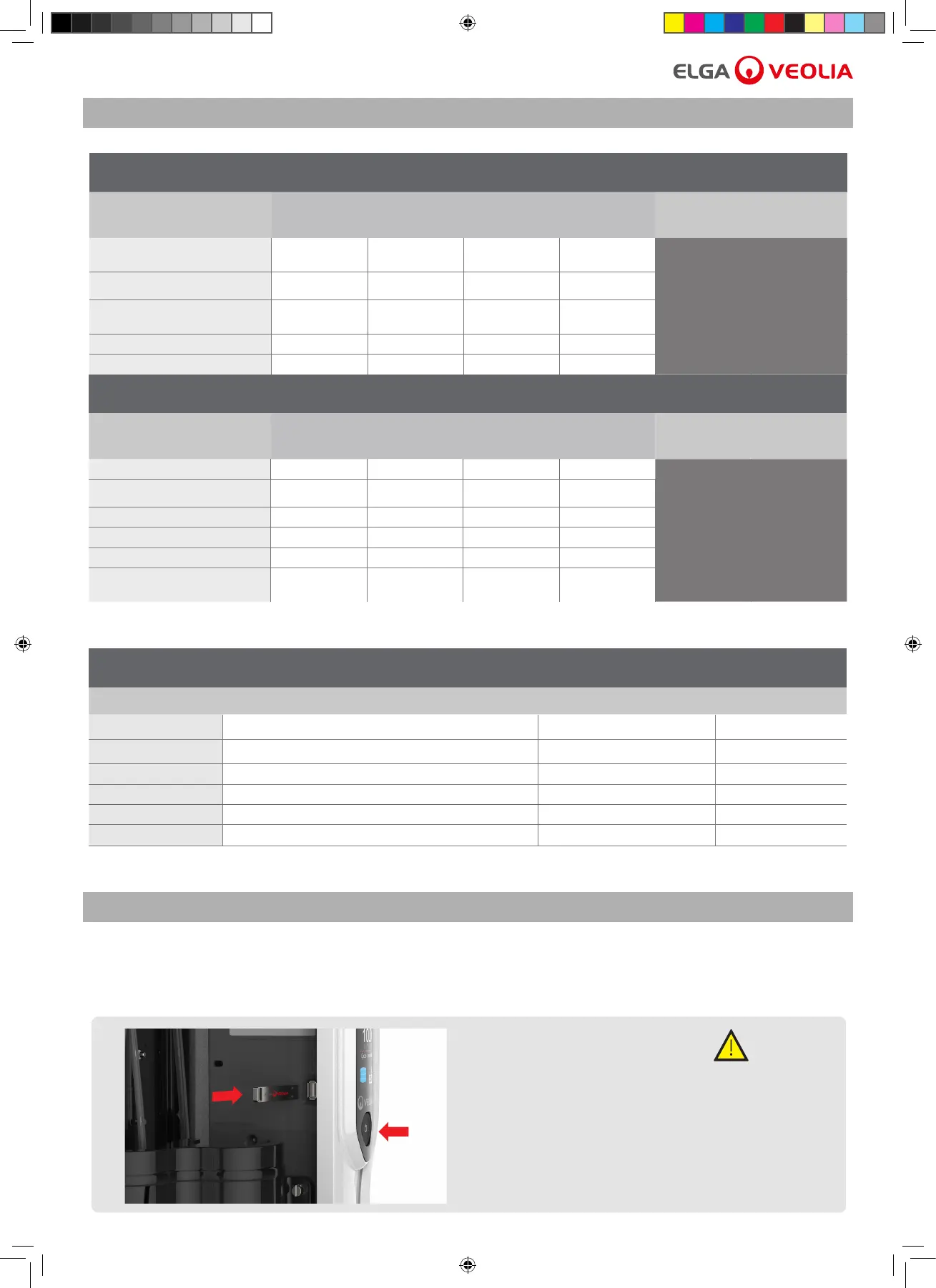
8.1 USB Data logging To download technical data please follow instructions.
Consumables
Part No. Description Typical Service Life * Max. Shelf Life
LC241 Pre-treatment Pack 6 Months (4380 hours) 2 years
LC240 RO Module 2 years 2 years
LC234 Purication Pack 12 Months (8760 hours) 2 years
LC216 Composite Vent Filter 6 Months 2 years
CT1 Tablets 1 every 6 months 2 years
Effersan
™
Tablets 1 every 6 months >8 Months
*Service life is an estimate only, and will depend on the application and feed water quality.
Please take care to ensure your order is the correct consumables items.
1. Insert a blank USB and press the process
button.
2. To stop recording data, press process button
(OFF) before removing the USB.
Chorus 2 Operator Manual MANU40003 Version 03 3/19 Page 13
USE A BLANK USB.
CAUTION!
7. TECHNICAL SPECIFICATIONS
8. CUSTOMIZED OPERATION



 To Next Page