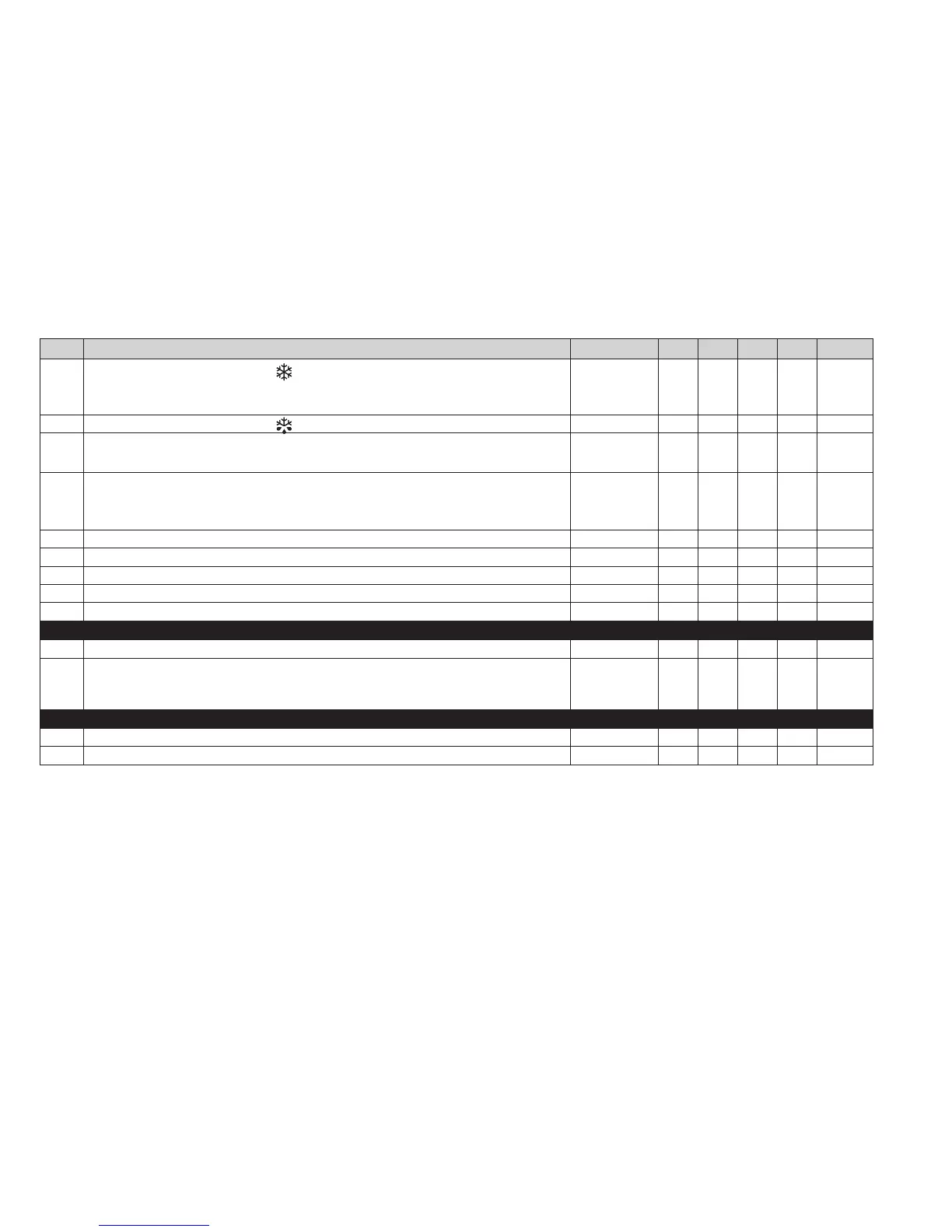
PAR. DESCRIPTION RANGE App1 App2 App3 App4 M.U.
H21
Configurability of digital output 1 (
).
0 = disabled; 1 = compressor; 2 = defrost; 3 = fans;
4 = alarm; 5 = AUX; 6 = Standby
0 ... 6 1 1 1 1 num
H22
Configurability of digital output 2 (
). Same as H21.
0 ... 6 2 2 3 4 num
H25
Enable/Disable buzzer.
0=Disabled; 4=Enabled; 1-2-3-5-6-7-8=not used
0 ... 8 0 0 0 4 num
H31
Configurability of UP key.
0 = disabled; 1 = defrost; 2 = AUX; 3 = economy Setpoint; 4 = Standby;
5 = reset HACCP alarms; 6 = disable HACCP alarms; 7 = Deep Cooling.
0 ... 7 1 1 1 1 num
H32 Configurability of DOWN key. Same as H31 0 ... 7 0 0 0 0 num
H42 Evaporator probe present. n = not present; y = present n/y y n y n flag
H43 Probe 3 present. n = not present; y = present n/y n n n n flag
reL Device version. Read-only parameter / / / / / /
tAb tAble of parameters. Reserved: read-only parameter / / / / / /
COPY CARD (“FPr” folder)
UL Programming parameter transfer from instrument to Copy Card / /
/ / /
/
Fr
Format Copy Card. Erase all data contained in the Copy Card.
NOTE: If parameter “Fr” is used, the data entered will be permanently lost.
This operation cannot be cancelled.
/ / / / / /
FUNCTIONS (“FnC” folder)
rAP Reset pressure switch alarms / / / / / /
rES Reset HACCP alarms / / / / / /
NOTE: If one or more parameters marked with (!) are modified, the controller MUST be switched off and then switched on again to ensure correct operation.


 To Next Page