ES 50 – ES 80
27
If during part one the receiver does not report an obstacle, the photo-cell is faulty and an error code is
shown on the Diag.-LED (flashes 6 times). If during part two the obstacle is still being reported (the
controller assumes a real obstacle being present), the barrier will not close. No error code is shown.
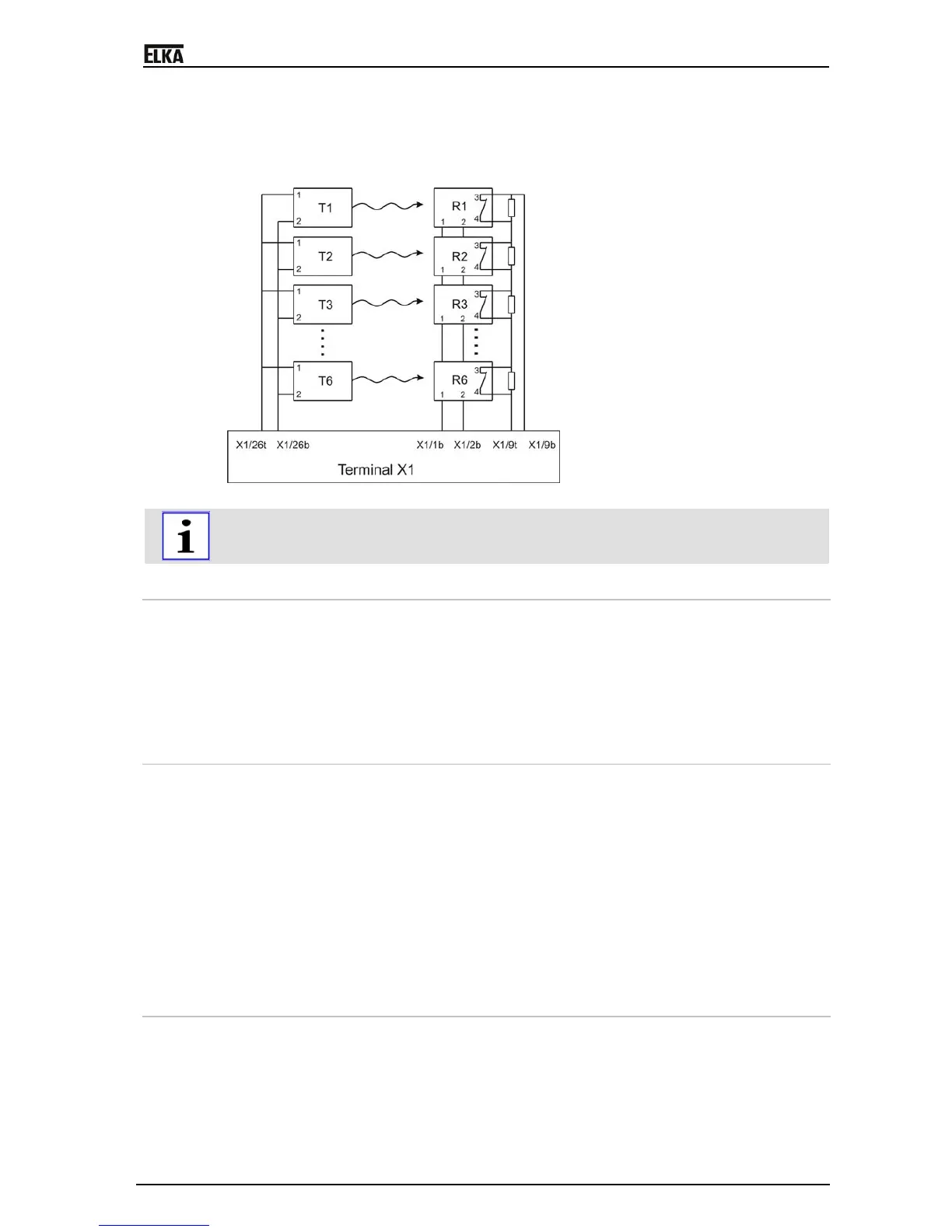
Max. 6 photo-cells can be connected to the controller MO63 and be tested. For the testing of more than
one photo-cell the relay connections of the receivers have to be connected in series. Parallel to the
relay connections a resistor of 1kOhm each has to be connected.
Drawing 10
For the photo-cell test the controller MO 63 has to learn the quantity of photo-cells which are
connected, by activating the dip switch S9 = on and learning the running time again.
9.6 Programming
The controller has to learn the following parameters:
Running time for opening and closing
Torque power for reversal on hitting an obstruction
Quantity of photo-cells when the photo-cell test is activated
Time to stay open for automatic closure
Personal code for radio remote control
9.6.1 Running time and automatic closure
1. Push the learn button approx. 3 seconds – the red Diag.-LED starts flashing.
2. Push the learn button again. When the photo-cell test is activated (S9=on) the controller learns
how many photo-cells are connected. During learning the Diag.-LED flashes at 1 second intervals,
then the learning of the running time starts automatically. When the photo-cell test is not activated
(S9=off) the learning of the running time starts immediately.
3. The Diag.-LED is lit during the learning of the running time. The barrier closes if it is not closed
already. If it is closed then it opens and learns the running time for opening. Then the Diag.-LED
flashes at 1 second intervals and the controller learns the stay open time.
4. After the required stay open time push the learn button again. The barrier closes automatically and
learns the running time for closing and the torque power for the reversing on obstruction. The
learnt values are stored even if power failure occurs and the Diag.-LED turns off.
9.6.2 Personal code for radio remote
9.6.2.1 Setting personal code for radio remote
Push the learn button approx. 3 seconds – the red Diag.-LED starts flashing. Push the corresponding
button on your transmitter. The controller learns the code - the red Diag.-LED is lit while a signal is
received. Release the button. The code is stored even if power failure occurs and the Diag.-LED turns
off.



 To Next Page