EasyManua.ls Logo

ELNA 3003 - To Rem Ove and Attach the Foot Holder; Seam Guide; Changing the Needle

ELNA 3003
35 pages
Print Icon
To Next Page IconTo Next Page
To Previous Page IconTo Previous Page
Loading...
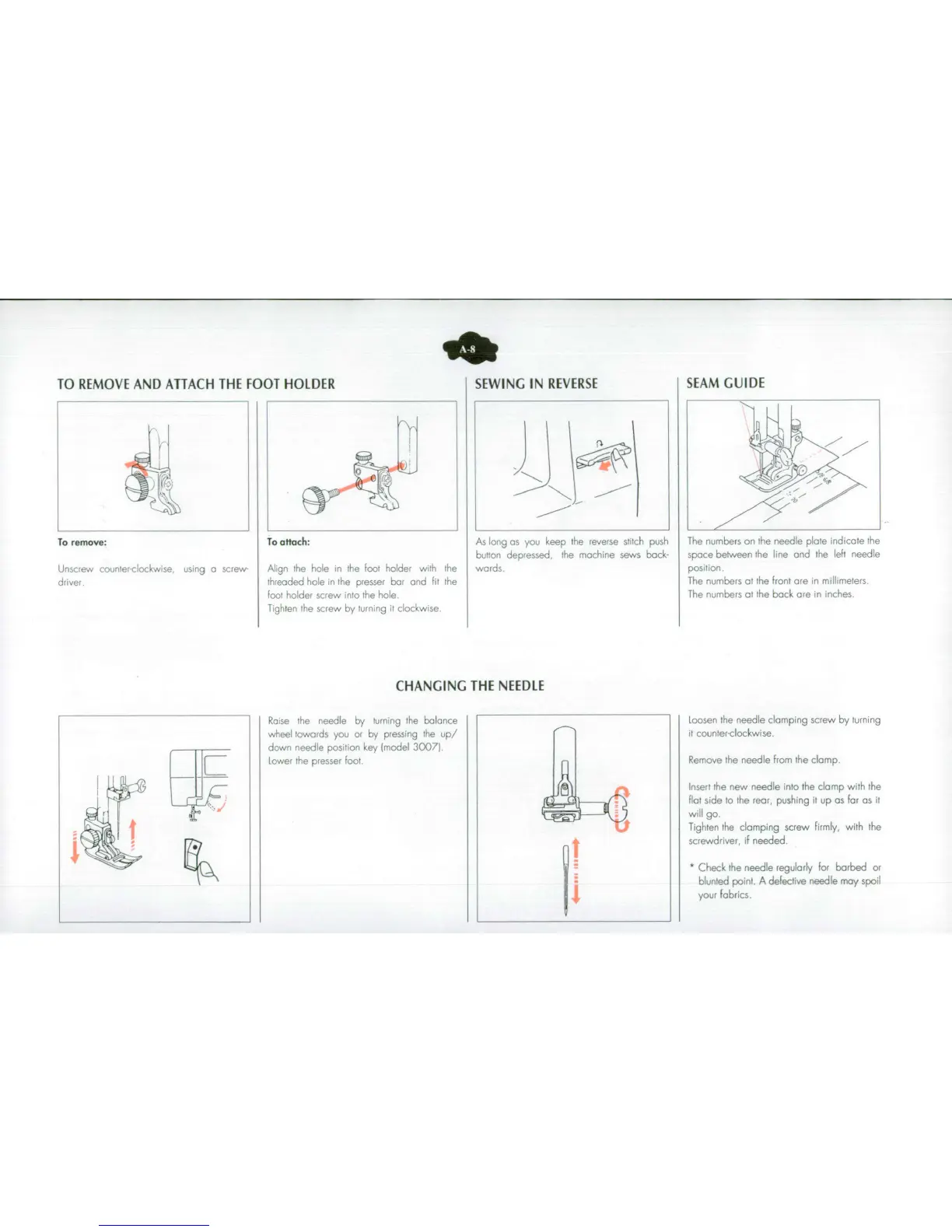
TO
REMOVE
AND
ATTACH
THE
FOOT
HOLDER
SEWING
IN
REVERSE
SEAM
GUIDE
To
remove:
To
attach:
As
long
as
you
keep
the
reverse
stitch
push The
numbers
on
the
needle
plate
indicate
the
button
depressed,
the
machine
sews
back- space
between
the
line
and
the
left
needle
Unscrew
counterclockwise
using
a
screw
Align
the
hole
in
the
foot
holder
with
the
wards
position.
driver,
threaded
hole
in
the
presser
bar
and
fit
the
The
numbers
at
the
front
are
in
millimeters.
foot
holder screw
into
the
hole.
The
numbers
at
the
back
are
in
,nches.
Tighten
the
screw
by
turning
it
clockwise
CHANGING
THE
NEEDLE
Raise
the
needle
by
turning
the
balance
Loosen
the
needle
clamping
screw
by
turning
wheel
towards
you
or
by
pressing
the
up/
it
counter-clockwise.
down
needle
position
key
(model
30071
L
I
Lower
the
presser
foot
Remove the
needle
from
the
clamp.
Insert
the
new
needle
into
the
clamp
with
the
flat
side
to
the
rear, pushing
it
up
as
far
as
it
will
go.
Tighten
the
clamping
screw
firmly,
with
the
screwdriver,
if
needed.
*Check
the
needle
regularly
for
barbed
or
blunted
point.
A
defeclive
needle
may
spoil
your
fabrics.

Related product manuals