Page 34
A half reset will not:
` Adjust, change or alter any of the parameters, or their values, as set by the OEMs or Brands.
` Fix any issues with cable connection
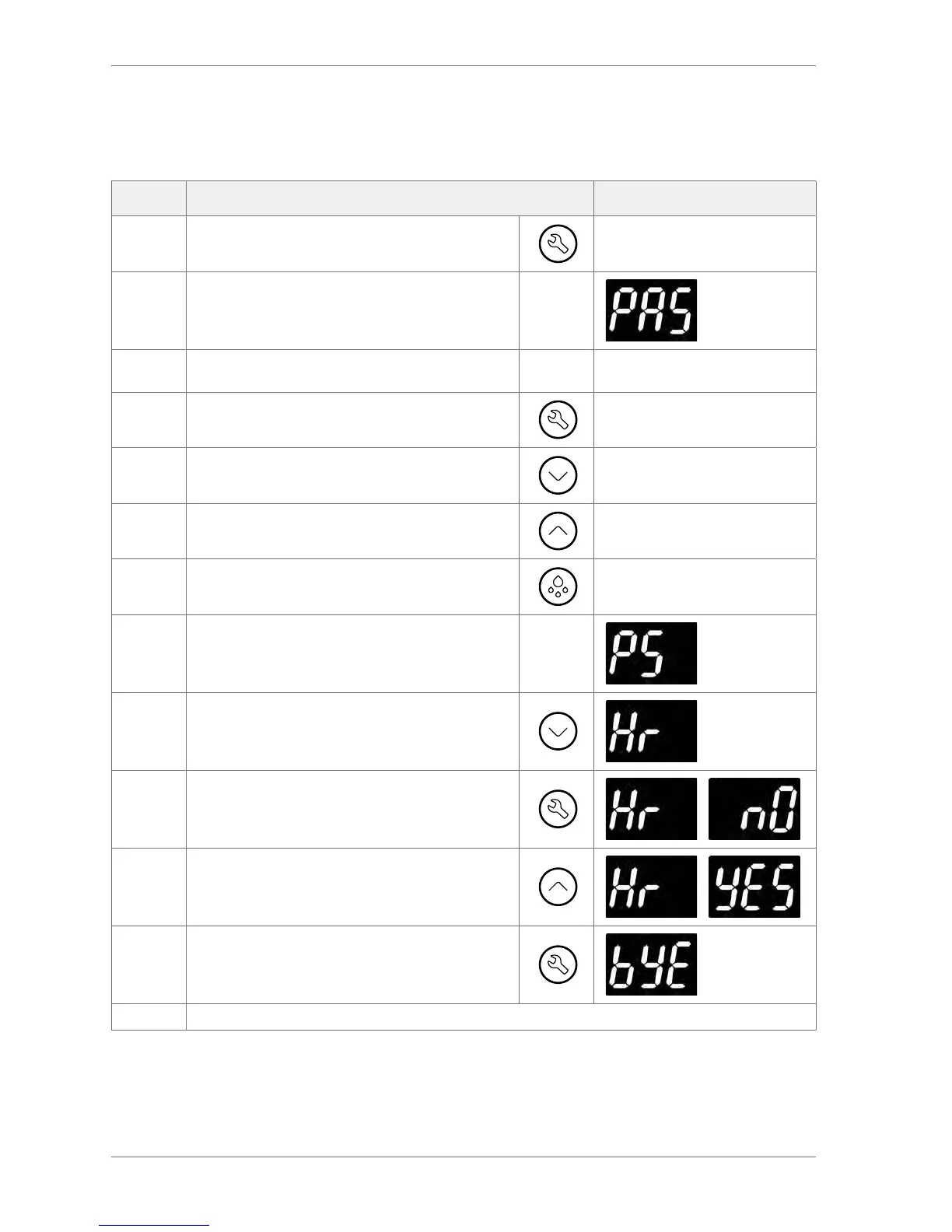
Step Action Display
1 Press the Set button.
2 The displays shows:
3
Enter the button sequence of the main menu entry
password
4 Press the Set button three times (x 3)
5 Press the Down button once (x 1)
6 Press the Up button twice (x 2)
7 Press the Defrost button four times (x 4)
8 The display shows:
9
Press the Down button to scroll to the half re-set
option:
10
Press the set button to select the half reset option.
The display will alternate between ‘Hr’ and ‘nO’
/
11 Press the Up button to change ‘nO’ to ‘yES’
/
12 Press the set button to perform half reset
The controller should reset and begin the power-up sequence.



 To Next Page