Page 33
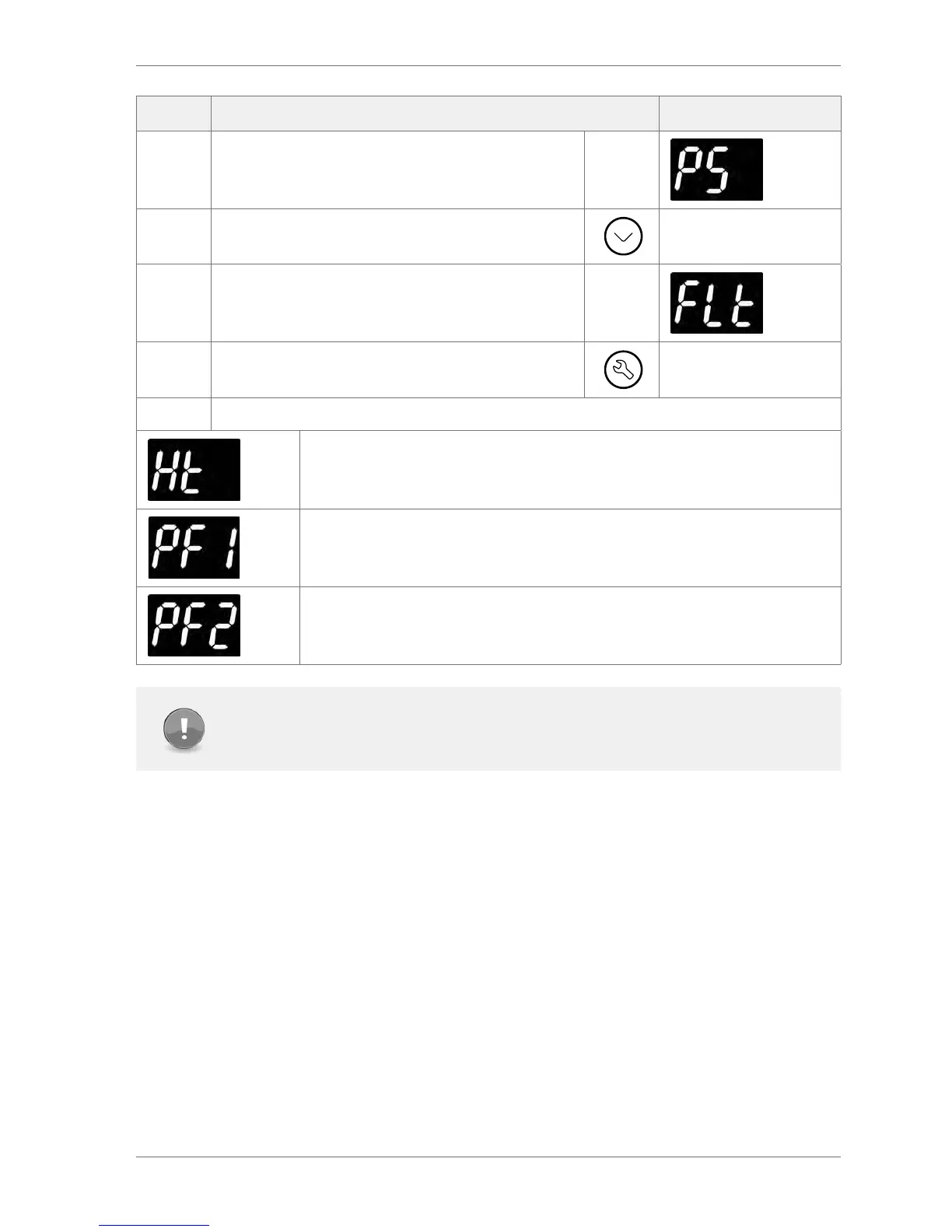
Step Action Display
4 The display shows:
5 Press the Down button and scroll to FLt
6 The display shows:
7 Press the Set button to select
The last three faults, or alarms, to occur are displayed for example:
A condenser high temperature alarm has occurred
An appliance sensor alarm has occurred
A Condenser Sensor alarm has occurred
Note
The alarms may have been cleared, or cancelled, by the retail outlet operators pressing
the Down button.
3.10 Half reset (Hr)
Half resets are used to clear controller’s self learning matrix in the event that the controller has learned
incorrect opening times due to being unable to detect activity correctly.
The matrix may require clearing for reasons such as:
` The cooler has been moved from one store, to another - with dierent opening times
` The cooler has been prevented from learning due to an obstruction in front of the motion
sensor
` The cooler is in saving mode when it is expected to be in ready mode
` The cooler does not appear to be going into the saving mode when expected



 To Next Page