Tinyhawk III Plus
11.4.3 Binding Key Modification
To change the binding key, follow these steps:
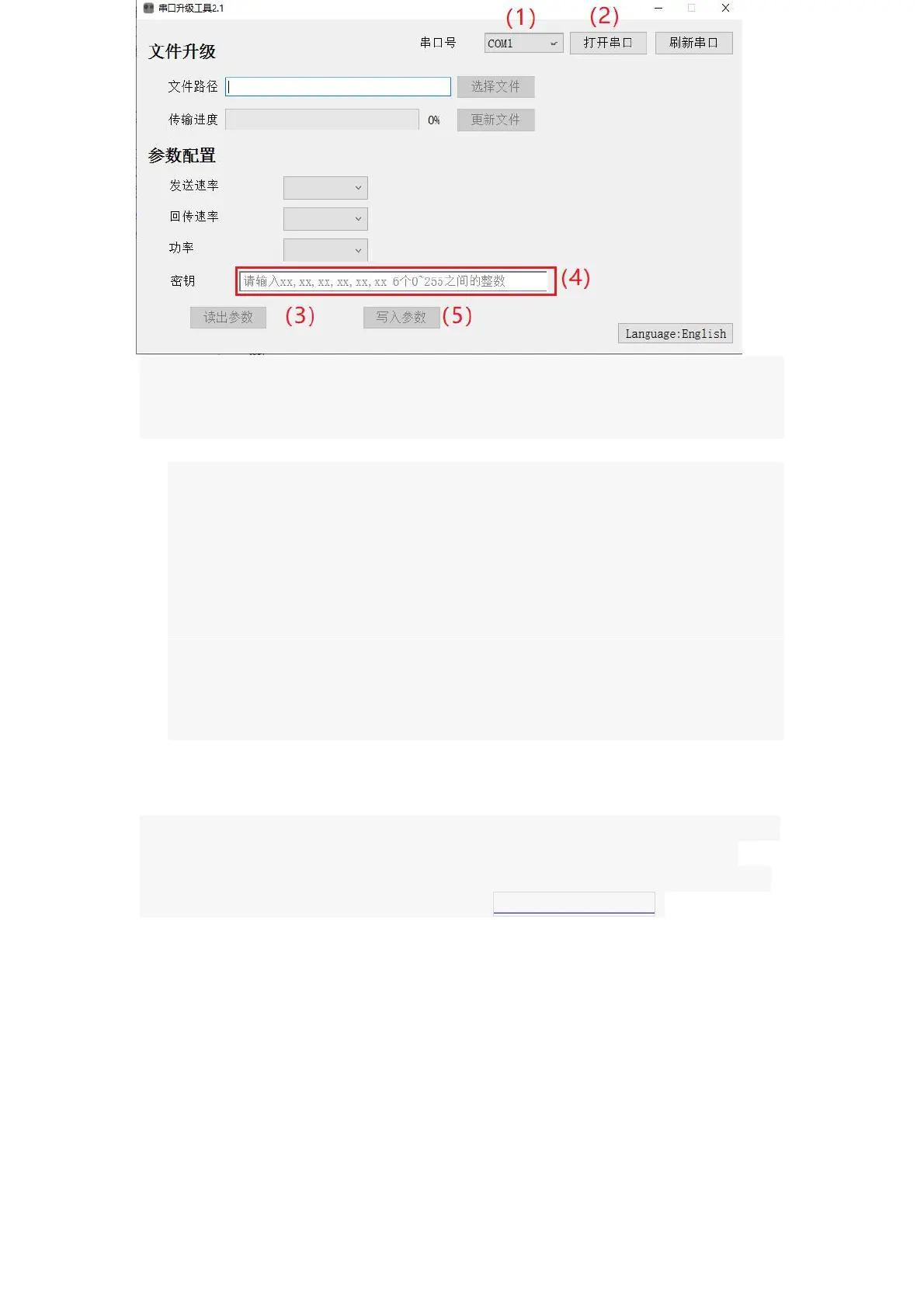
1. Follow steps (1) from the Firmware Update and Upgrade section.
2. Follow steps (2) from the Firmware Update and Upgrade section.
3. In the parameter configuration section of the upgrade tool, click on
"Read Parameters." This will display the current binding key configured
for the transmitter.
4. If you need to change the binding key, enter the corresponding key in
the dialog box next to the existing key. Please note that the key format
should be XX, XX, XX, XX, XX (six integers between 0 and 255).
5. After entering the new binding key, click on "Write Parameters." If the
writing process is successful, you will receive a confirmation indicating
that the binding key has been modified successfully.
(1)
Note: Obtaining the Serial Update Tool: After extracting the "release" file, locate
the file named "serial_bootloader.exe." Double-clicking this file will directly
launch the tool. You can download the relevant compressed files and firmware
update files from the EMAX official website (www.emax-usa.com).















 To Next Page