EMC® VNX5300™ Hardware Information Guide
12
EMC® VNX5300™ Hardware Information Guide
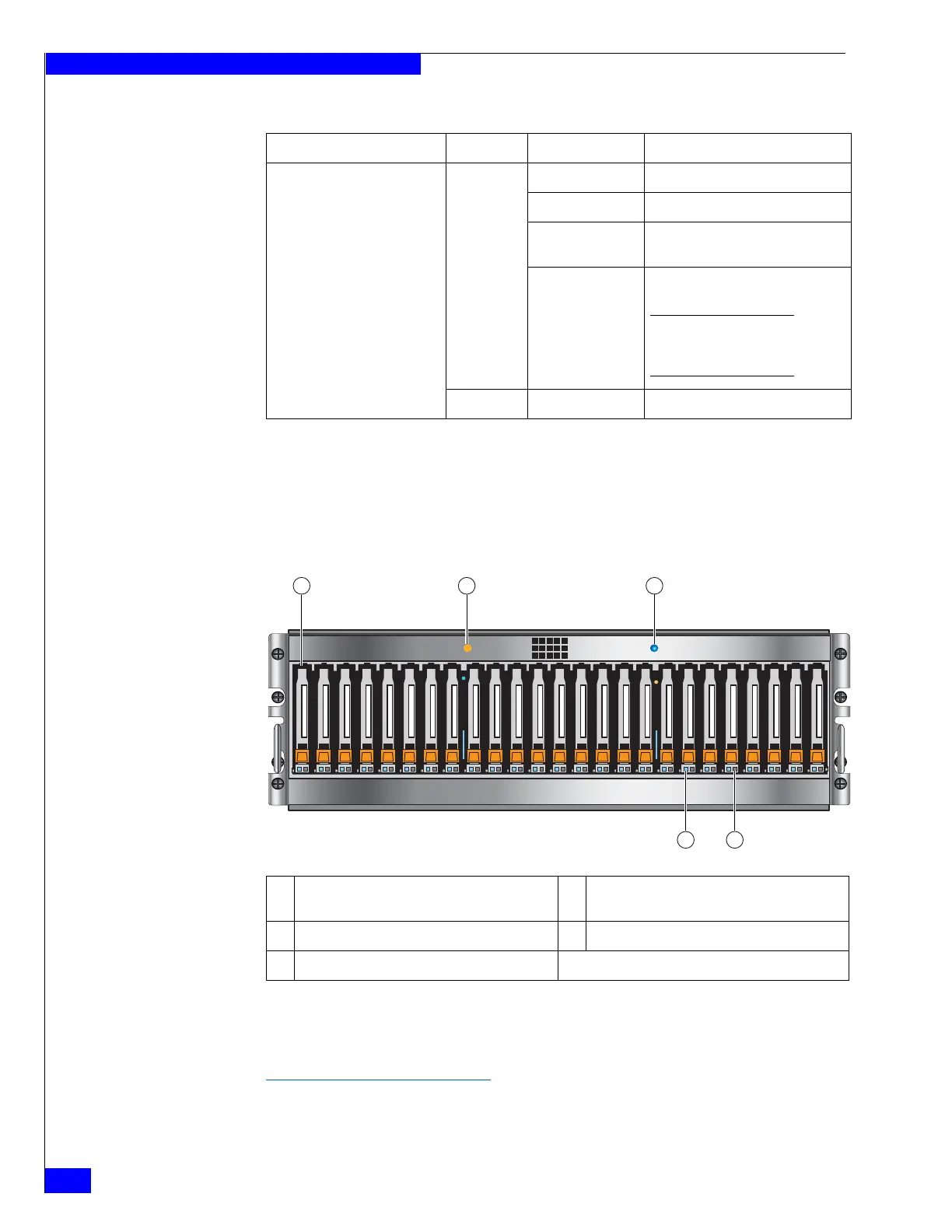
3U, 25 DPE front view On the front, viewing from left to right, the Block and File VNX5300 platform 3U, 25
(2.5-inch) disk drive DPE includes the following:
◆ 2.5-inch 6-Gb/s SAS or 6-Gb/s NL-SAS drives (hot-swappable)
6
◆ Status LEDs
Figure 5 shows the location of these disk drives and status LEDs.
Figure 5 VNX5300 platform 3U, 25 DPE carrier (front view)
Table 3 describes the Block and File VNX5300 platform 3U, 25 DPE and disk drive
status LEDs.
Disk drive on/activity (location 5) Green On Powering and powered up
Blinking, mostly on Disk drive is on with I/O activity
Blinking at constant
rate
Disk drive is spinning up or down
normally
Blinking, mostly off Disk drive is powered up but not
spinning
Note: This is a normal part of the
spin-up sequence, occurring during
the spin-up delay of a slot.
— Off Disk is powered down
Table 2 VNX5300 platform 3U, 15 DPE and disk drive LEDs (continued)
LED Color State Description
6. You can add or remove a disk drive while the DPE is powered up, but you should exercise
special care when removing disk drives while they are in use. Disk drives are extremely
sensitive electronic components.
1 2.5-inch 6-Gb/s SAS or 6-Gb/s NL-SAS disk
drives
4 Disk drive fault LED (amber)
2 DPE fault LED (amber) 5 Disk drive status/activity (blue)
3 DPE power status LED (blue)
24
0
12345678910 11 12 13 14 15 16 17 18 19 20 21 22 23 24
0
1
2
45
VNX-000281
3


 To Next Page