System component description
23
EMC® VNX5300™ Hardware Information Guide
SP AC power supply
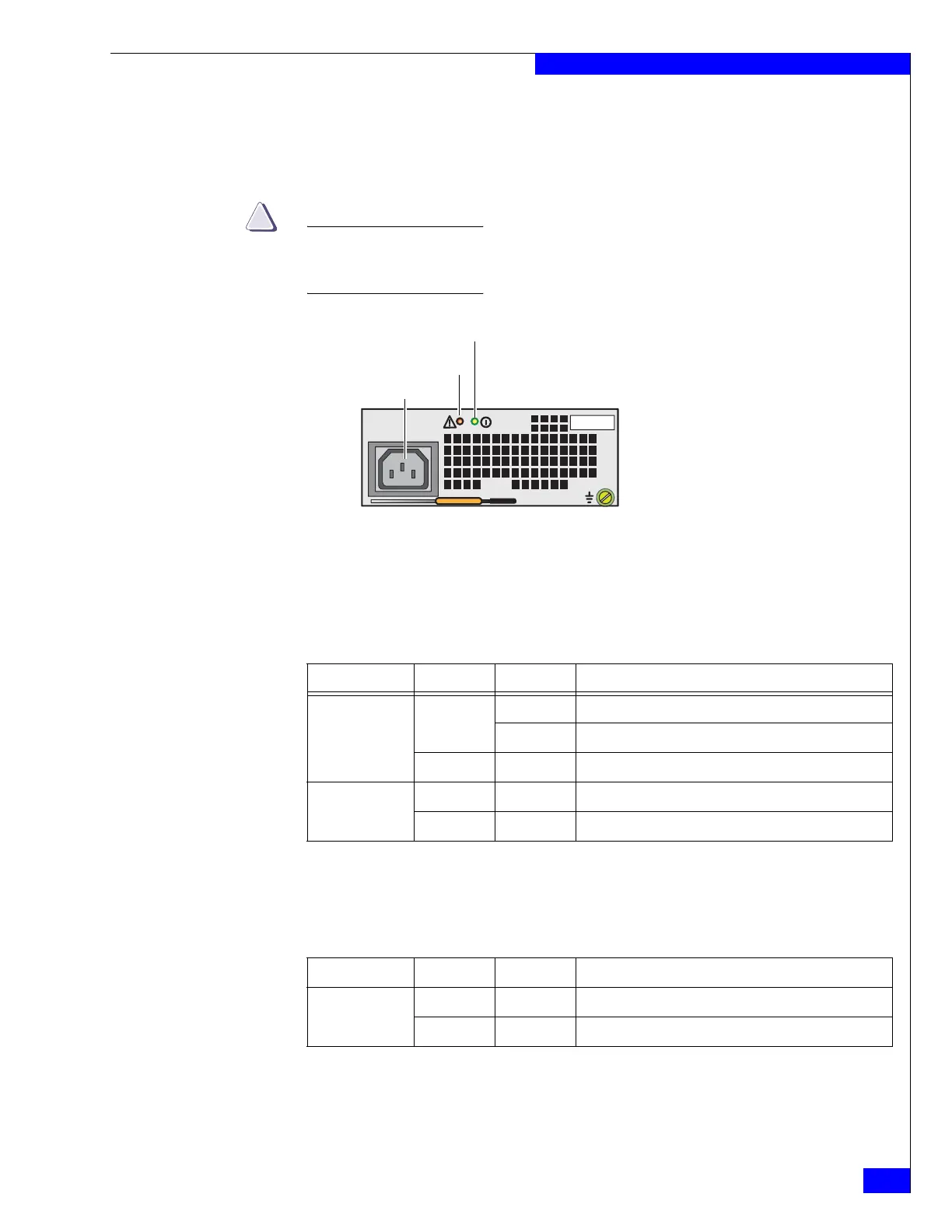
Figure 17 shows an example of the SP AC power supply/cooling module with a
power in (recessed) connector (plug) and status LEDs. The SP is cooled by this power
supply on top.
Do not remove the SP power supply/cooling module while the SP is plugged in.
Power supply module removal for more than a few minutes can cause the SP to
shut down due to lack of cooling.
Figure 17 SP AC power supply module power in (recessed) connector (plug) and status LEDs
Table 11 describes the power supply module (fault and power on) LEDs.
Table 12 describes the SP LEDs. The locations in Table 12 are shown in Figure 16 on
page 22.
Power fault LED
Power supply in
Power on LED
VNX-000108
Table 11 SP AC power supply/cooling module (fault and power on) LEDs
Led Color State Description
Fault Amber On Power supply or backup fault, check cable connection
Blinking BIOS, POST and OS booting up or system overheating
— Off No fault or power off
Power Green On Power on
— Off Power off, verify source power
Table 12 SP LEDs
Led Color State Description
Unsafe to remove
(location 10)
White On Do not remove SP
— Off Safe to remove SP


 To Next Page