System component description
35
EMC® VNX5300™ Hardware Information Guide
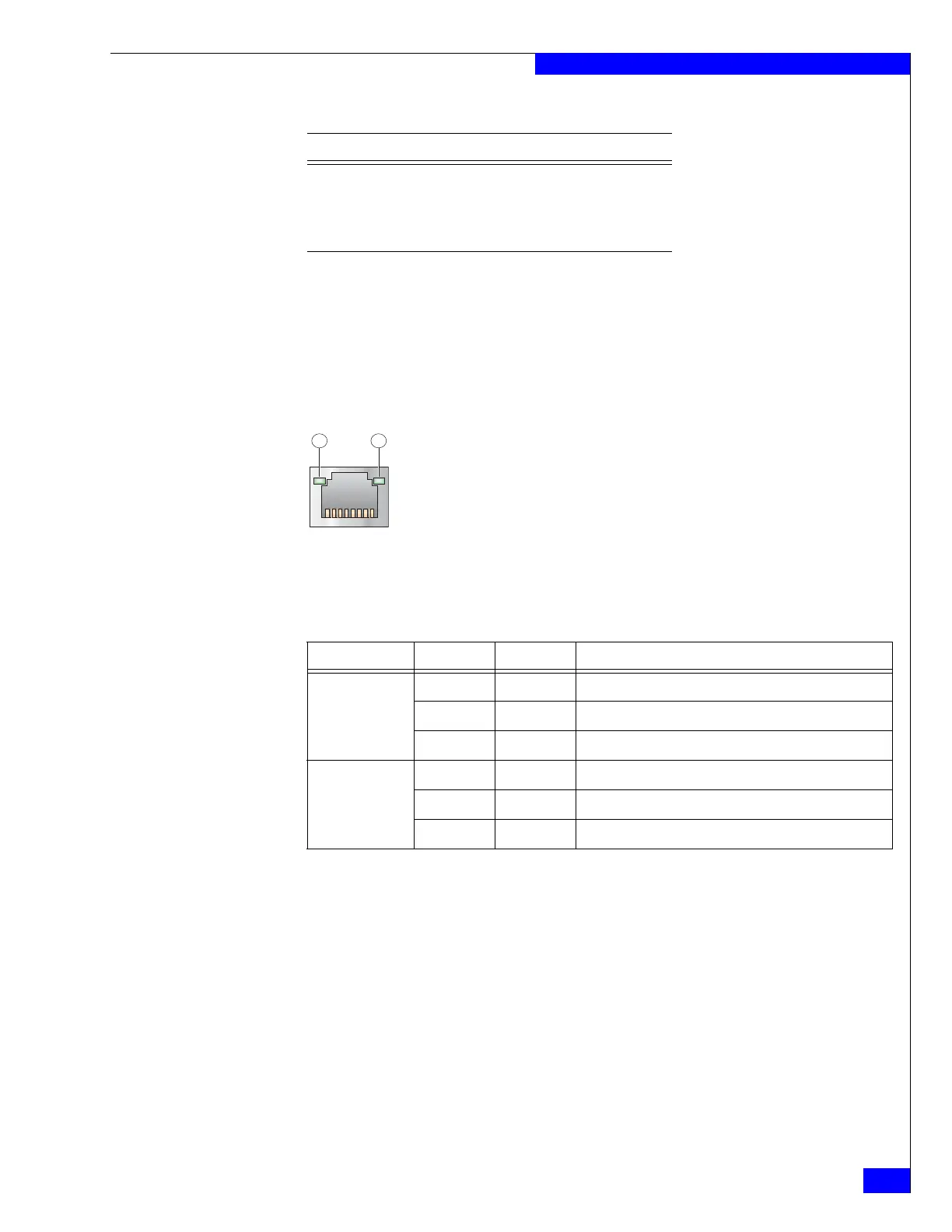
Control Station Ethernet (RJ-45) port LEDs
The Control Station (RJ-45) NICs include LEDs—a green LED to the left of the
connector and a bi-color (green/amber) LED to the right of the connector—that
indicate the link/activity and speed of the Control Station (RJ-45) NIC ports,
respectively, as shown in Figure 32.
Table 23 describes the link/activity and connection speed associated with the Control
Station (RJ-45) port LEDs.
Figure 32 Control Station Ethernet (RJ-45) port LEDs
Ethernet cable extensions for the Control Station B and MGMT ports
Each Block and File VNX5300 platform Control Station (CS 0) comes with two
modular Ethernet cable extensions (or patch cords) for the RJ-45 ports (labeled on the
CS as B and MGMT, respectively). These cables allow you to extend the length of the
Ethernet cables from the CS 0, port B to Data Mover Enclosure 0, management
module B, port 1 and CS 0, MGMT port to the public LAN. Each cable includes a
corresponding label wrap to assist you during system cabling (Figure 33).
If your Block and File VNX5300 platform includes a second optional Control Station
(CS 1), another set of Ethernet cable extensions for the RJ-45 ports is provided. These
cables allow you to extend the length of the Ethernet cables from the CS 1, port B to
Data Mover Enclosure 0, management module B, port 2 and CS 1, MGMT port to the
public LAN. Each cable includes a corresponding label clip to assist you during
system cabling.
6 BI_DB- Bidirectional pair B, -
7 BI_DD+ Bidirectional pair D, +
8 BI_DD- Bidirectional pair D, -
Table 22 Control Station Ethernet (RJ-45) port and connector pinout
RJ-45 pin Signal Description
Table 23 Control Station RJ-45 port LEDs
Led Color State Description
Left, link/activity
(location 1)
— Off No network/link connection
Green On Network/link connection
Green Blinking Transmit/receive activity
Right, link speed
(location 2)
— Off 10-Mb/s connection (if left LED is on or blinking)
Green On 100-Mb/s connection
Amber On 1000-Mb/s (or 1-Gb/s) connection



 To Next Page