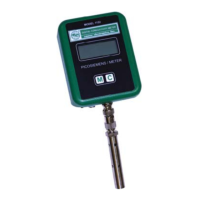
DIGITAL CONDUCTIVITY METER
The information contained in the accompanying document is proprietary and confidential, and
may not be copied in any manner whatsoever without prior written consent of Emcee
Electronics, Inc. The document and the material therein may not be used for any purpose other
than that intended by Emcee Electronics, Inc.
COPYRIGHT 2005 EMCEE ELECTRONICS, INC.
REVISION DATE: October 23, 2014
Page 10 of 11
Note: The stored data will not be affected even if the batteries are replaced.
WARNING! To prevent ignition of flammable or combustible atmospheres,
disconnect power before servicing.
WARNING! To reduce the risk of ignition of a flammable or explosive atmosphere,
batteries must be changed only in a location known to be non-hazardous. Do not mix
new batteries with used batteries, or mix batteries from different manufactures.
Battery requirements: 3 - batteries Panasonic type CR 2016
10.2 When battery replacement is required, using the TOOL (See Fig. 2), remove the
two screws (Allen head) that secure the top (cap) of the meter to the body. The
screws are located on the lateral sides of the meter cap. (See Figs. 1 and 4)
10.2.1 Remove the cap. Some degree of force will be required to overcome the drag
caused by the “O” ring.
10.2.2 The batteries (3) are located behind the printed circuit boards adjacent to the
back of the meter. Fig. 2 Shows the location of the batteries in the meter.
10.2.3 Remove the batteries using the TOOL (See Fig. 2) that was furnished with the
meter.
10.2.4 Insert the new batteries (the TOOL is not required). Assure that the polarity of
the batteries is correct (positive faces to the back of the meter which is the side
opposite of the display). See Fig. 2 for battery location in meter.
10.2.5 Replace the cap and secure it using the 2-screws.
10.2.6 Check by depressing the pressure sensitive switch once to assure that the
batteries corrected the problem. If the display does not illuminate, this may be an
indication that the meter requires factory repair.


 To Next Page