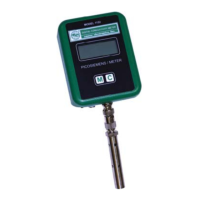
The Emcee Model 1153 Digital Conductivity Meter is a portable, hand-held instrument designed for measuring the electrical conductivity of fuels and other products with very low electrical conductivities. It is a reliable, convenient, and inexpensive device, featuring all solid-state components and a self-contained design.
Function Description
The primary function of the Model 1153 is to measure the electrical conductivity of liquids, particularly fuels, in picosiemens per meter (pS/m) or picosiemens per centimeter (pS/cm). This measurement is crucial for assessing a fuel's ability to dissipate static charge generated during pumping and filtering. Sufficient conductivity prevents charge accumulation, reducing the risk of dangerously high electrical potentials that could cause sparks, fires, or explosions. The meter is typically used to measure conductivity before and after the addition of anti-static additives. For conductivities below 1 pS/m, such as in clay-treated fuels or refined hydrocarbon solvents, the Emcee Model 1154 Precision Conductivity Meter (listed in ASTM Test Method D 4308) is recommended.
The meter operates using a probe with two concentric stainless steel electrodes. When immersed in the sample, a constant voltage is applied to these electrodes, resulting in an electrical current that is amplified and displayed on the meter's LCD.
Important Technical Specifications
- Conductivity Ranges:
- 0 to 2,000 picosiemens per meter (pS/m)
- 0 to 20,000 picosiemens per meter (pS/m)
- 0 to 2,000 picosiemens per centimeter (pS/cm)
- 0 to 20,000 picosiemens per centimeter (pS/cm)
- 0 to 100,000 picosiemens per centimeter (pS/cm)
- Unit of Measure: Picosiemens per meter (pS/m), also referred to as Conductivity Units (CU). A siemen is the Standard International (SI) definition of reciprocal ohm, sometimes called mho.
- 1 pS/m = 1 x 10^-12 ohms^-1 = 1 CU = 1 picomho/m
- Display: Alphanumeric Liquid Crystal Display (LCD) showing conductivity in whole numbers (pS/m or pS/cm).
- Temperature Sensor: Optional embedded temperature sensor available, displaying temperature in both Celsius and Fahrenheit.
- Power Source: Three standard (3-volt) Lithium Cylindrical Cells (Generic Code Panasonic CR 2016).
- Operational Status: Text presentation of operational status, including automatic Over Range (OVER) and Low Battery (LOW BAT) indications.
- Safety: Approved as intrinsically safe, fuel and water resistant.
- Standards: Listed in American Society of Test and Materials (ASTM) Standard Test Method D 2624.
- Precision: Factory calibrated to 1% of reading. Repeatability (r) and Reproducibility (R) values are provided in a table for various pS/m readings, based on an Inter-laboratory Test (ILT) Program conducted in November 2004 under ASTM auspices at room temperature (23°C – 73.4°F). Precision may vary at other temperatures.
Usage Features
- Single Switch Operation: The meter is operated by a single pressure-sensitive switch located beneath the Emcee green/white logo.
- Test Cycle:
- To initiate a test, the user presses the switch once, then again when "EMCEE" is displayed.
- A red LED illuminates during the automatic 3-second test cycle.
- During the test, "READ NEW DATA" is displayed, followed by a blinking red LED and a blinking broken line (----------) for 3 seconds.
- At the end of the test, the red LED extinguishes, and "NEW DATA PS/M" is displayed, along with the measured conductivity value and temperature (e.g., 28.8C, 83.8F).
- Data Storage: Data from the most recent test (conductivity and temperature) is stored in non-volatile memory and retained until the next test cycle is performed.
- Viewing Previous Data: Depressing the pressure-sensitive switch once displays the previously stored conductivity (pS/m) and temperature (C and F).
- Zero Check: To perform a zero check, the probe is held out of any sample. Pressing the switch twice (once, then again when "EMCEE" is displayed) should result in a "0" conductivity reading, indicating proper operation. If a non-zero reading appears, the probe likely needs cleaning.
- Over-Range Check: Inserting the probe into isopropanol and initiating a test should result in an "OVER" display, confirming the meter's ability to detect over-range conditions.
- Grounding: CAUTION: The device must be grounded before and after introducing the probe into the tank and remain grounded until after complete withdrawal from the tank to prevent ignition of flammable or combustible atmospheres.
Maintenance Features
- Cleaning Procedures:
- After use, the probe should be cleaned with toluene or a mixture of heptane and isopropanol and air-dried to prevent contamination and erroneous results.
- The probe can be disassembled by rotating the outer conductor counterclockwise for thorough cleaning.
- If the cell has been in contact with water, it must be thoroughly rinsed with cleaning solvent (preferably isopropyl alcohol) and dried with a stream of air.
- To avoid non-zero readings caused by condensation in hot, humid conditions, store the cell at a temperature 2 to 5°C in excess of the ambient temperature when practicable.
- Battery Replacement:
- The meter includes an internal battery check circuit. A "LOW BAT" message will be displayed if batteries are weak, and the meter will not allow a measurement. If batteries are too weak, the meter will not turn on.
- Stored data is not affected by battery replacement.
- WARNING: To prevent ignition in flammable or explosive atmospheres, batteries must be changed only in a known non-hazardous location. Do not mix new and used batteries or batteries from different manufacturers.
- To replace batteries, use the provided TOOL (an Allen wrench) to remove the two Allen head screws securing the top cap to the meter body.
- Remove the cap, overcoming the drag of the "O" ring.
- The three CR 2016 batteries are located behind the printed circuit boards. Use the TOOL to extract them.
- Insert new batteries, ensuring correct polarity (positive faces towards the back of the meter, opposite the display).
- Replace the cap and secure it with the screws.
- After replacement, depress the pressure-sensitive switch once to confirm the display illuminates, indicating successful battery replacement. If the display does not illuminate, factory repair may be required.

 Need help?
 General

 To Next Page