DIGITAL CONDUCTIVITY METER
The information contained in the accompanying document is proprietary and confidential, and
may not be copied in any manner whatsoever without prior written consent of Emcee
Electronics, Inc. The document and the material therein may not be used for any purpose other
than that intended by Emcee Electronics, Inc.
COPYRIGHT 2005 EMCEE ELECTRONICS, INC.
REVISION DATE: October 23, 2014
Page 6 of 11
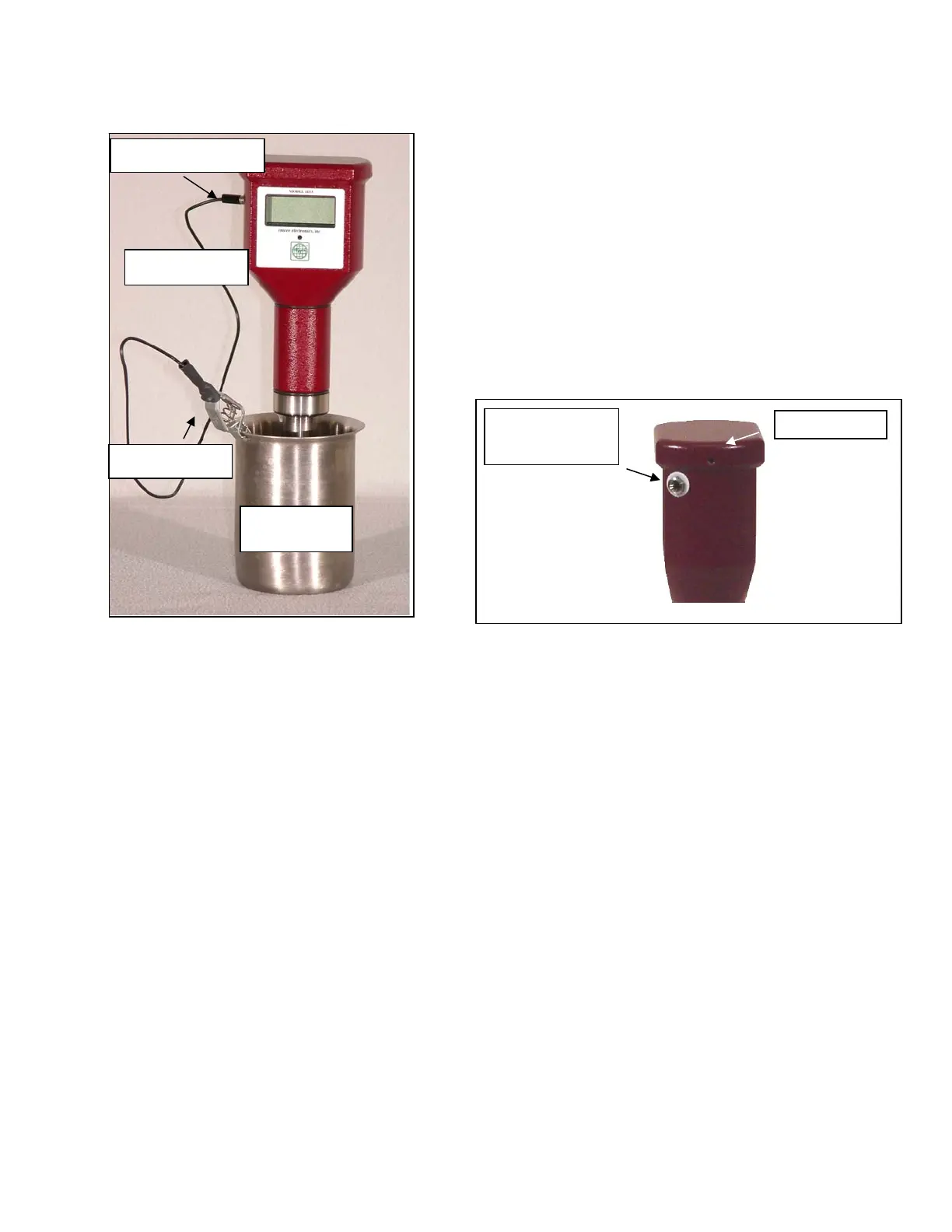
5.5 The probe Inserted in the sample that is
being
tested with the ground lead attached to the Meter
and
to the sample container is shown in Fig. 3. The
location of the female banana plug on the Meter
and
the Allen screw is also shown in Fig. 4.
Figure 3 – Test Set Up Figure 4 – Female Banana
Jack and Allen Screw
6. OPERATIONAL CHARACTERISTICS
6.1 To view the previous measurement that is stored in memory, depress the pressure
sensitive switch (MC Logo) once. Both the conductivity (pS/m) and the temperature
(C and F) will be displayed and retained until another test is performed.
6.2 To initiate a test, depress the pressure sensitive switch (MC Logo) once and then
again when EMCEE is displayed. The test will measure conductivity and the
temperature of the sample and store the results in memory.
Male Banana Plug
Ground Lead
Alligator Clip
Stainless
Steel Beaker
Female Banana
Jack
Allen Screw


 To Next Page