ENGLISH MANUAL (model 4)
10
4 Using the EMDR Kit
4.1 General usage information
All parts of the EMDR Kit can be used simultaneously or separately.
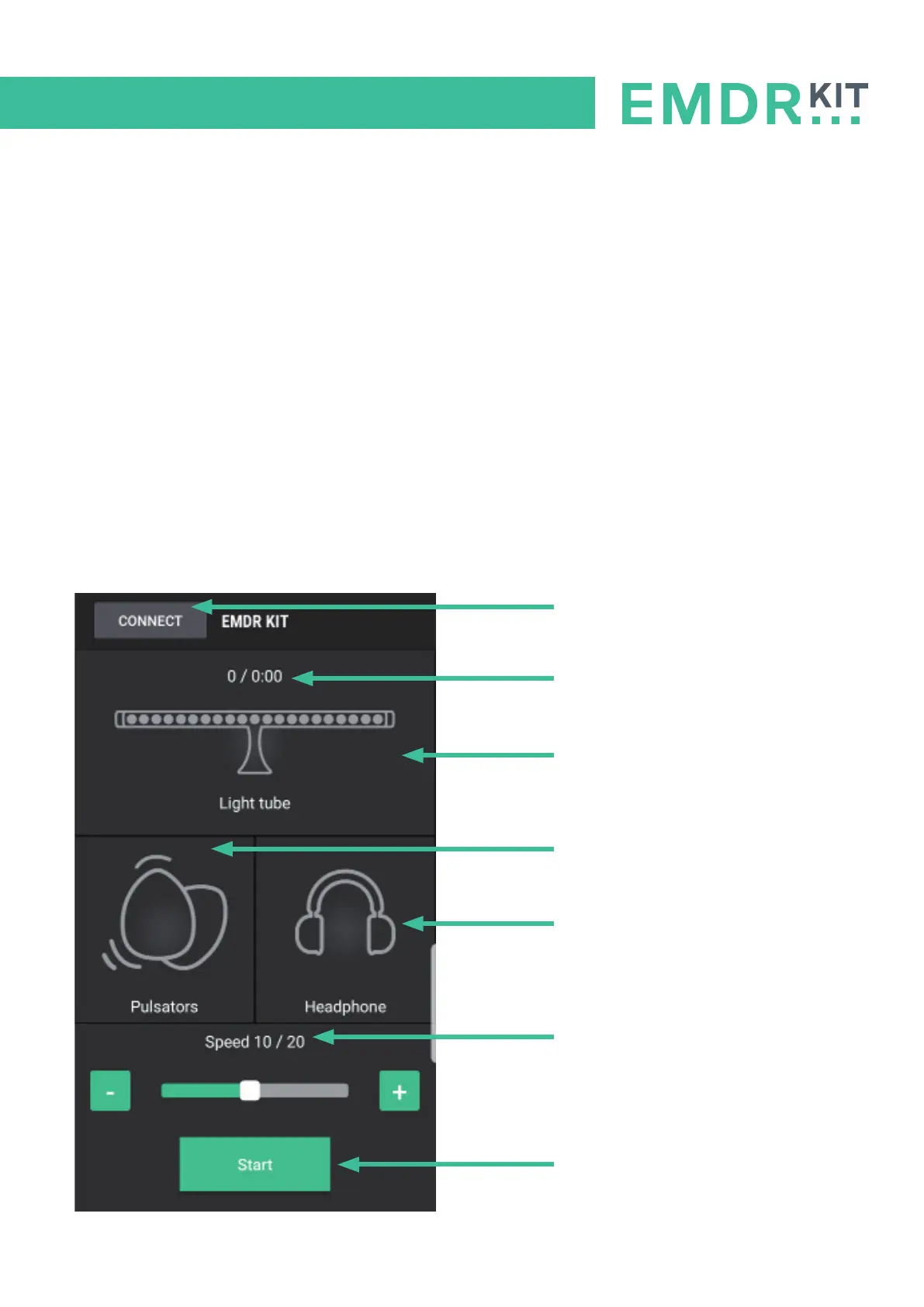
To start a session, press on Start. All functions that are connected and turned ON will start working.
The time of the set as well as the pass count are indicated in the meain menu.
Use the +/- buttons to adjust the speed of the stimuli.
When an icon in the main menu is grey, that part is currently not connected.
When an icon in the main menu is green, that part is connected and turned on.
When an icon in the main menu is orange, that part is connected, but turned off.
Tap the icon of to enter the corresponding part’s sub-menu. There you can turn it on/off and adjust
other settings
Connect menu
Pass counter / Set timer
Light Tube
(Click to enter sub-menu)
Pulsators
(Click to enter sub-menu)
Headphone
(Click to enter sub-menu)
Speed of the stimuli
(Adjust with the -/+ buttons)
Start / Stop button


 To Next Page