ENGLISH MANUAL (model 4)
11
4.2 Using the Light Tube
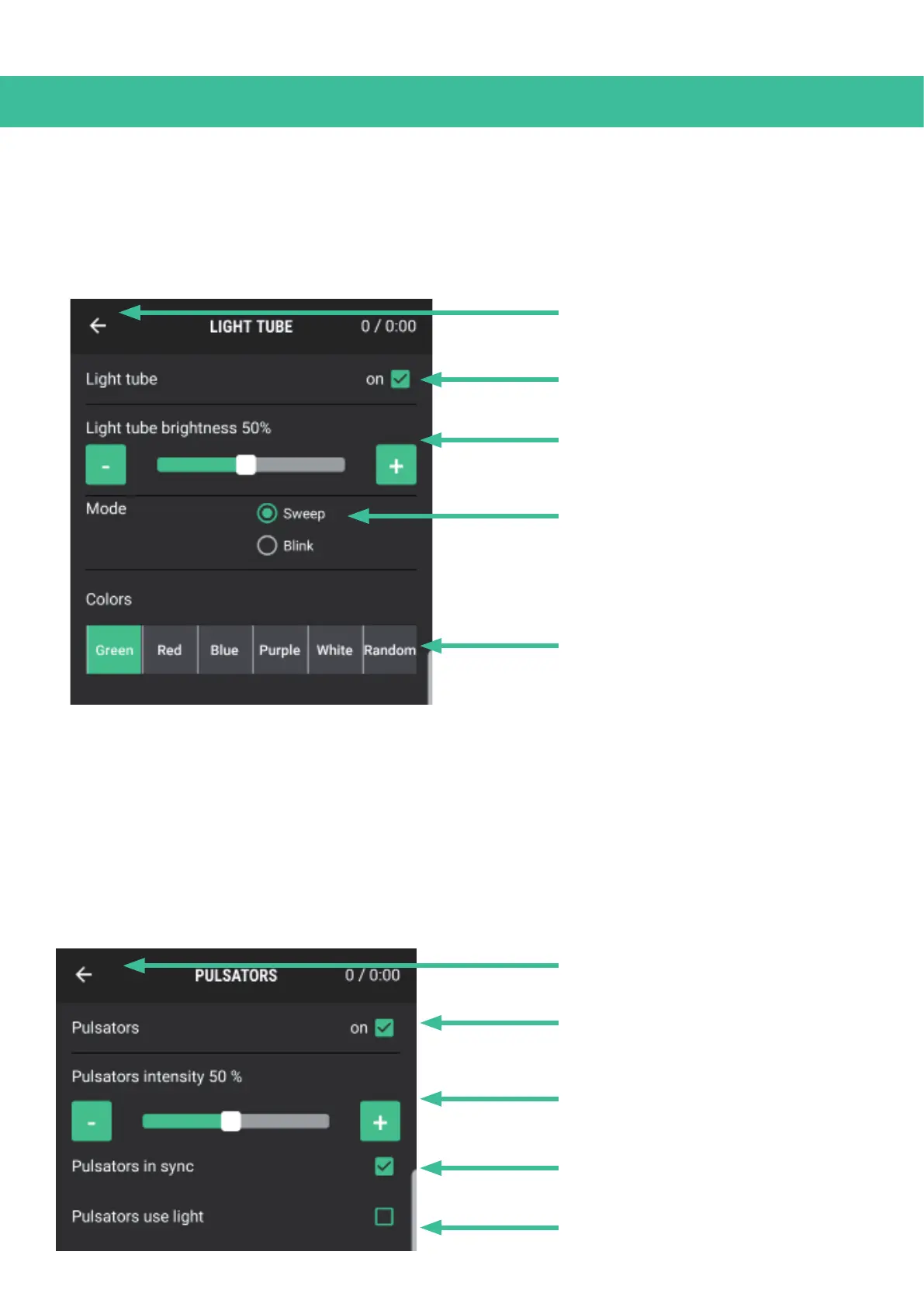
In the main menu, click on the Light Tube icon to open the Light Tube’s sub-menu. All of the settings
for the Light Tube can be adjusted in this menu.
4.3 Using the Pulsators
In the main menu, click on the Pulsator icon to open the Pulsator sub-menu. In this menu, you can
switch the Pulsators on and off and adjust their intensity.
Furthermore, you can set the speed of the Pulsators independently from the Light tube with the ‘Pul-
sators in sync’ option and you can let the LED lights blink with the selected rhythm.
Back button
Turn Light Tube on/off
Light Tube brightness
(Adjust with the - and + buttons)
Light Tube mode
Light Tube color
Back button
Turn Pulsators on/off
Pulsator intensity
(Adjust with the - and + buttons)
Pulsators in/out sync with Light Tube
(Turn off to adjust speed seperately)
Light stimuli on Pulsators


 To Next Page