ENGLISH MANUAL (model 4)
12
4.4 Using the Headphone
Once the Headphone is connected to your tablet (see 3.3), the next time you turn on Bluetooth and
the Headphone is turned ON your tablet will automatically connect with the Headphones again.
To turn on the Headphone, simply briefly press the big button on the Headphone. When held closely
or over your ears, you can hear an uprising tone indicating the headphone is turned ON. When you
press the button and you hear a descending tone, it indicates it is shutting down.
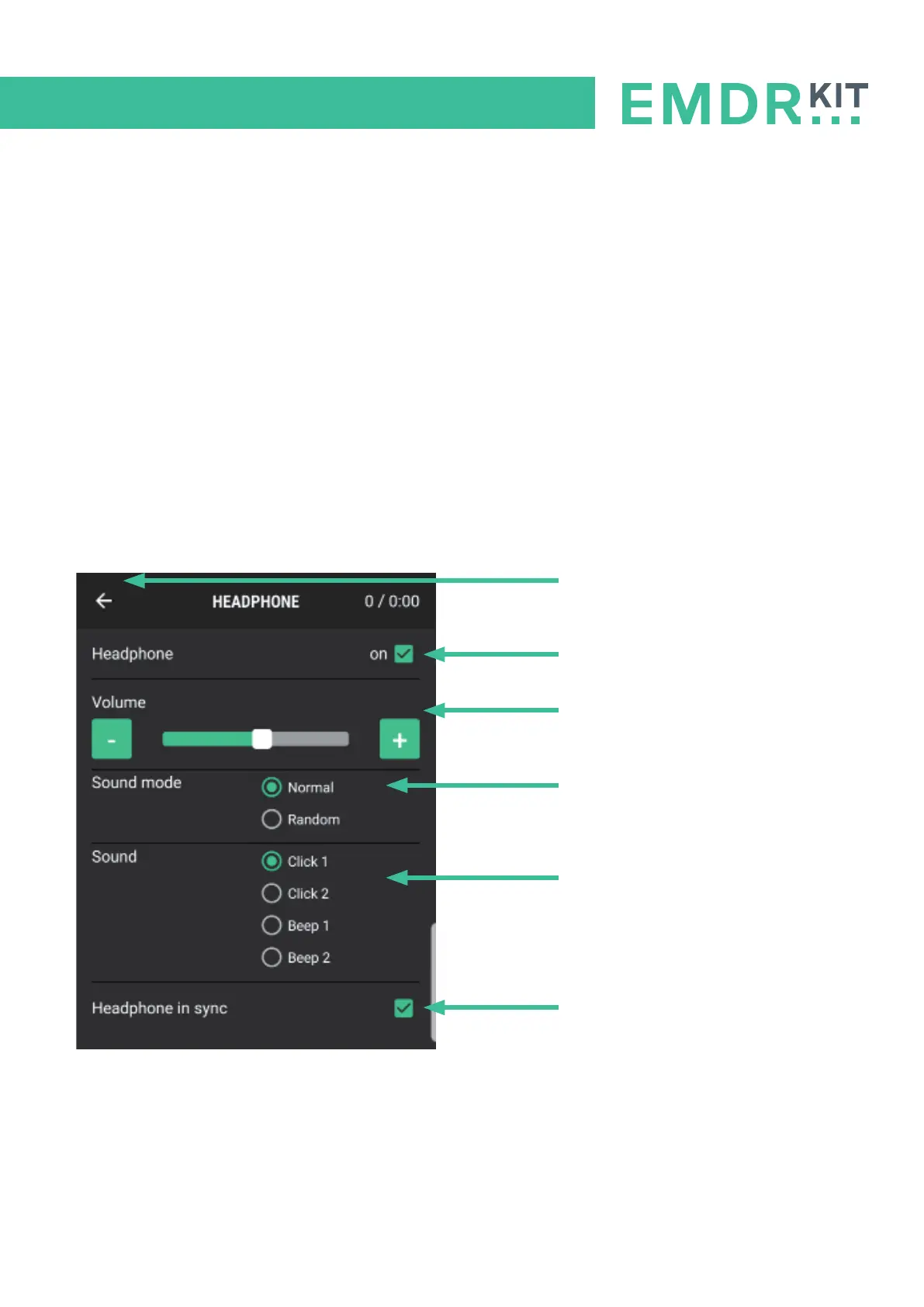
Click on the Headphone icon in the main menu of the app to open the corresponding submenu. The
settings for the headphones can be adjusted in this menu. This allows you to adjust the volume and
choose from different sounds. You can also choose a random interval sound and you can set the
speed of the headphones independently of the Lightbar with the option ‘Headphone in sync’.
Please note: The volume of the Headphone can be adjusted in the app as well as on the
tablet itself. Make sure the sound on the tablet is set at maximum volume, so the Headphone’s vol-
ume can be controlled, using only the app.
Back button
Turn Sound on/off
Sound Volume
(Adjust with the - and + buttons)
Sound mode
- Normal for regular interval
- Random for irregular interval
Sound type
Sound in/out sync with Light tube
(Turn off to adjust speed seperately)


 To Next Page