ENGLISH MANUAL (model 4)
7
3.2 Connecting the Pulsators
Make sure Bluetooth is turned on on your tablet. When connecting, hold your tablet close to the Pul-
sators.
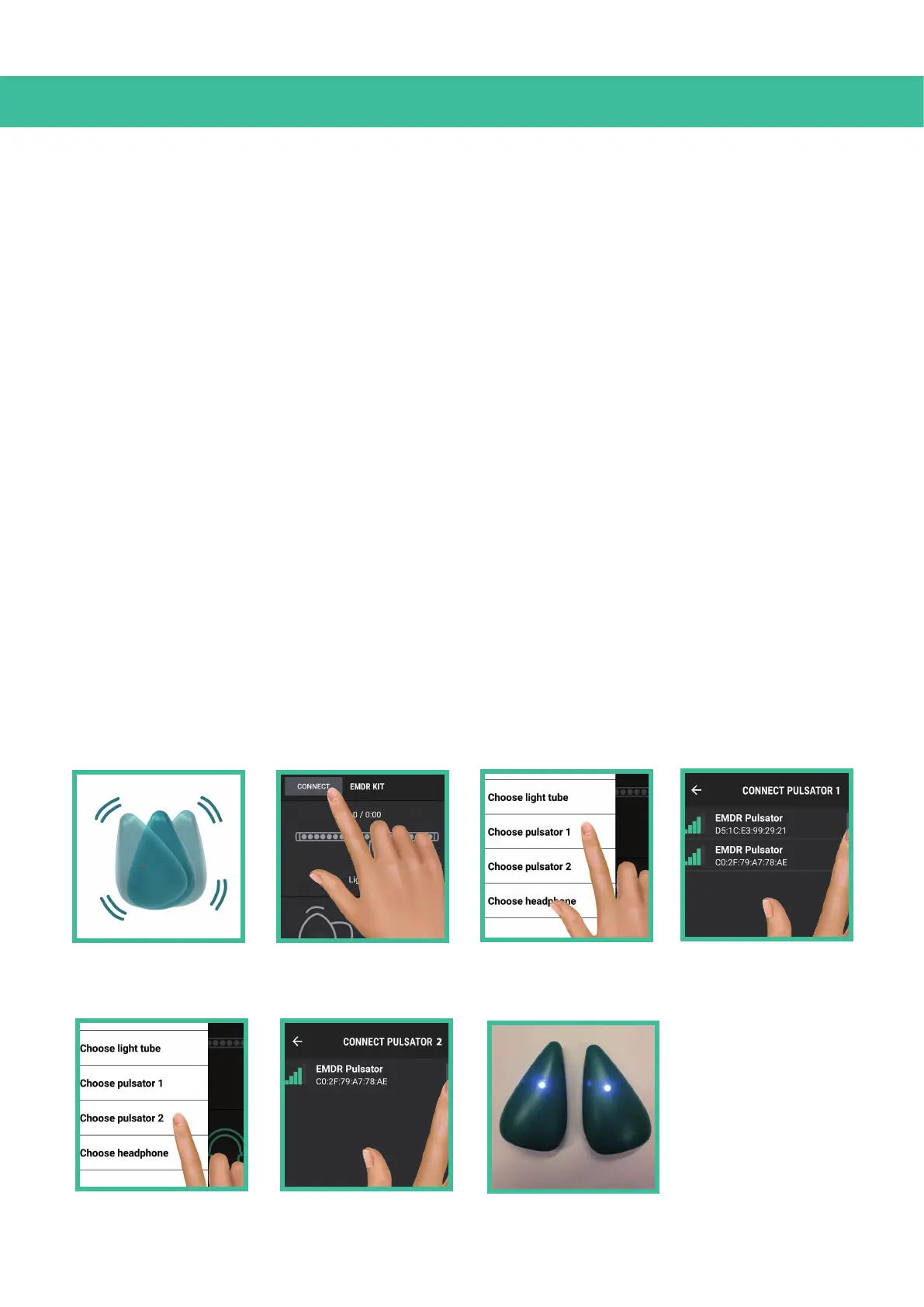
To connect with the Pulsators, follow these steps:
1. Shake the pulsators. This will activate them and they will be able to connect. The Lights on the
Pulsators will flash blue, indicating they are ready to connect.
The Pulsators will be able to connect for a period of 30 seconds. After that they will shut down
again. If you did not connect with them yet, simply shake them to activate them again.
2. Click on the CONNECT button in the top left corner of the screen.
3. Click on the option Choose Pulsator 1.
4. Select one of the Pulsators with the strongest Bluetooth signal indicated by the green bars.
5. Then click on Choose Pulsator 2.
6. Select the other Pulsator.
7. The Pulsators are now connected. To verify if the Pulsators are connected, take them out of the
dockingstations. When connected, the lights on the Pulsators turn a stable Blue.
1
2
3
5
4
6
7


 To Next Page