Why does my Emerson UPS alarm buzzer beep continuously when mains is normal?
- EelliottjohnAug 2, 2025
The Emerson UPS may be overloaded. Check LED 2 to confirm. To resolve this, disconnect some equipment from the UPS to reduce the load.
Why does my Emerson UPS alarm buzzer beep continuously when mains is normal?
The Emerson UPS may be overloaded. Check LED 2 to confirm. To resolve this, disconnect some equipment from the UPS to reduce the load.
What to do if Emerson Liebert PSA 1000VA does not provide expected backup time?
The most likely cause is that the Emerson UPS battery has reached the end of its life. The solution is to replace the internal battery.
How to fix Emerson Liebert PSA 1000VA UPS when mains is normal, but LED 1 is not illuminated?
Several reasons could cause this: * The Emerson UPS might not be turned on. * The power cord may not be properly connected. * The upstream mains circuit breaker may be tripped. Here’s how to address these: 1. Press the On/Off button to turn on the UPS. 2. Ensure the power cord is securely connected to a wall socket. 3. Reset the circuit breaker.
What to do if LED 2 flashes on my Emerson UPS but there is no output power?
The battery voltage of your Emerson UPS may be too low. Recharge the UPS for 8 hours to resolve this issue.
Inspect UPS package upon receipt and report any visible damage to the carrier and dealer.
Place UPS indoors, protected from elements, with 100mm clearance for ventilation.
Charge the UPS battery for at least eight hours before initial use as it ships uncharged.
Turn on the UPS by pressing the On/Off button after battery is fully charged; LED 1 indicates normal mode.
Connect loads to the UPS battery backup sockets on the rear, avoiding laser printers.
Connect network cables to RJ-45 jacks for surge protection on network lines.
Install shutdown software and connect UPS USB cable to computer for operation.
Overview of front panel LEDs, On/Off button, and indicator symbols like Fault and Overload.
Details rear panel connections: USB, battery sockets, RJ-45 network ports, and AC mains inlet.
Inspect UPS package upon receipt and report any visible damage to the carrier and dealer.
Place UPS indoors, protected from elements, with 100mm clearance for ventilation.
Charge the UPS battery for at least eight hours before initial use as it ships uncharged.
Turn on the UPS by pressing the On/Off button after battery is fully charged; LED 1 indicates normal mode.
Connect loads to the UPS battery backup sockets on the rear, avoiding laser printers.
Connect network cables to RJ-45 jacks for surge protection on network lines.
Install shutdown software and connect UPS USB cable to computer for operation.
Overview of front panel LEDs, On/Off button, and indicator symbols like Fault and Overload.
Details rear panel connections: USB, battery sockets, RJ-45 network ports, and AC mains inlet.
This document describes the Liebert PSA, a Quick-Start Guide for 1000VA/1500VA, 230V uninterruptible power supplies (UPS) designed by Emerson Network Power. The Liebert PSA is intended for small office/home office use, providing essential power protection for connected equipment.
The Liebert PSA functions as an uninterruptible power supply, designed to provide backup power and surge protection for electronic devices. Its primary role is to ensure continuous operation of connected loads during power outages, fluctuations, or other electrical disturbances. When the main AC power is present and stable, the UPS operates in Normal Mode, supplying power to the connected equipment and simultaneously charging its internal battery. In the event of a power failure or significant voltage deviation, the UPS automatically switches to Battery Mode, drawing power from its internal battery to keep the connected equipment running. This seamless transition prevents data loss, system shutdowns, and potential hardware damage that can result from sudden power interruptions.
Beyond basic power backup, the Liebert PSA also offers surge protection for network lines. It includes RJ-45 jacks that allow network cables to pass through the UPS, protecting connected PCs, routers, or other network devices from damaging power surges that can travel through data lines. This comprehensive protection ensures the integrity of both power and data connections. The UPS is equipped with an audible alarm system and LED indicators that provide real-time status updates, alerting users to various conditions such as battery mode, low battery, overload, battery replacement warnings, and fault conditions. These alerts help users understand the operational status of the UPS and take necessary actions.
The device is designed to be user-friendly, with a single On/Off button for easy operation. It features multiple battery backup sockets, ensuring that critical equipment remains powered during outages. The inclusion of a USB interface allows for communication with a computer, enabling the use of Liebert shutdown software. This software facilitates controlled shutdowns of connected systems, preventing data corruption when the UPS battery is depleted or during extended power outages. The software also provides monitoring capabilities, giving users insights into the UPS's performance and status.
To begin using the Liebert PSA, users must first inspect the package for any visible damage and then decide on an appropriate placement. The UPS should be placed indoors, away from water, direct sunlight, and excessive heat, with at least 100mm (4 inches) of clearance on all sides for proper ventilation. Before initial use, the UPS battery must be fully charged. This involves connecting the UPS to a wall socket using a user-supplied power cord and allowing it to charge for at least eight hours. Once charged, the UPS can be started by pressing the On/Off button, which will illuminate a green LED (LED 1) indicating Normal Mode operation.
Connecting loads to the UPS is straightforward. The Liebert PSA features multiple battery backup sockets, into which critical equipment should be plugged. It is important to note that laser printers should not be connected to the UPS, as they can overload the unit or demand half-wave rectification, which is incompatible with the UPS's design. For network surge protection, a network cable should be connected from the wall into the "IN" RJ-45 jack on the rear of the UPS, and another cable from the "OUT" jack to the PC or network device. This setup ensures that network lines are protected from surges.
The Liebert shutdown software enhances the UPS's functionality. To use it, the software must first be installed on a computer. Then, the supplied USB cable connects the UPS to the computer's USB port. This allows the software to monitor the UPS status and initiate controlled shutdowns of the computer when necessary, preventing data loss during prolonged power outages. The software user manual provides detailed instructions for installation and operation.
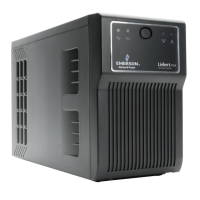
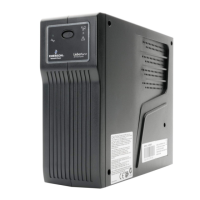
The front panel of the UPS features several LEDs and an On/Off button, providing visual cues about its operational status. LED 1 (green) indicates Normal Mode, while LED 2 (amber) signifies Battery Mode. LED 3 (amber) indicates an overload condition, and LED 4 (red) warns of a fault or the need for battery replacement. These indicators, combined with audible alarms, provide comprehensive status information to the user. For instance, a continuous beep indicates an overload, while a beep every 3 seconds signals Battery Mode.
Maintenance of the Liebert PSA primarily involves battery management and periodic checks. The UPS battery is not hot-swappable, meaning that all connected loads must be turned off, and the UPS itself must be powered down before attempting a battery replacement. The replacement process involves removing two top cover screws with a Phillips head screwdriver, sliding the top and front panels to access the battery compartment, gently pulling out the old batteries, and disconnecting the wires (black from negative, red from positive). When installing new batteries, users must ensure they match the dimensions and type specified in the product's specifications. The new battery wires are then connected (red to positive, black to negative), and the panels are reassembled. Small sparks may occur during battery reconnection, which is normal. Old batteries must be disposed of properly at an appropriate recycling facility.
The battery also requires charging if the UPS is stored for extended periods. If kept at temperatures between -15°C to +29°C (5°F to 85°F), the battery should be charged every six months. For storage at 30°C (86°F) or higher, it should be charged every three months. This helps maintain battery health and ensures it is ready for use when needed.
Troubleshooting common issues is facilitated by a chart provided in the manual. This chart lists potential problems, their possible causes, and recommended solutions. For example, if the UPS is not turned on, the solution is to press the On/Off button. If LED 1 is not illuminated despite mains being normal, the power cord might not be connected properly, or the upstream mains circuit breaker might be tripped. Solutions include securely connecting the power cord or resetting the circuit breaker. If the UPS provides less than the expected backup time, it indicates that the battery may have reached its end of life and needs replacement. For issues beyond basic troubleshooting, users are advised to contact their local Emerson Network Power representative for further assistance. Adhering to safety instructions, such as not attempting to service internal parts other than the batteries, is crucial to prevent personal injury, equipment malfunction, and to avoid voiding the warranty.
| Output Power | 600 W |
|---|---|
| Form Factor | Tower |
| Capacity | 1000 VA |
| Output Voltage | 120 V |
| Output Frequency | 50/60 Hz |
| Battery Type | Sealed Lead Acid |
| Typical Recharge Time | 4-6 hours |
| Outlets | 6 |
| Communication Interface | USB |
| Operating Temperature | 0°C to 40°C |
| Storage Temperature | -15°C to 45°C |
| Humidity | 0% to 95% non-condensing |
| Transfer Time | 4-6 ms typical |


Loading...