www.enviromaster.com
23
Cassette Air Handler
SEQUENCE OF OPERATION
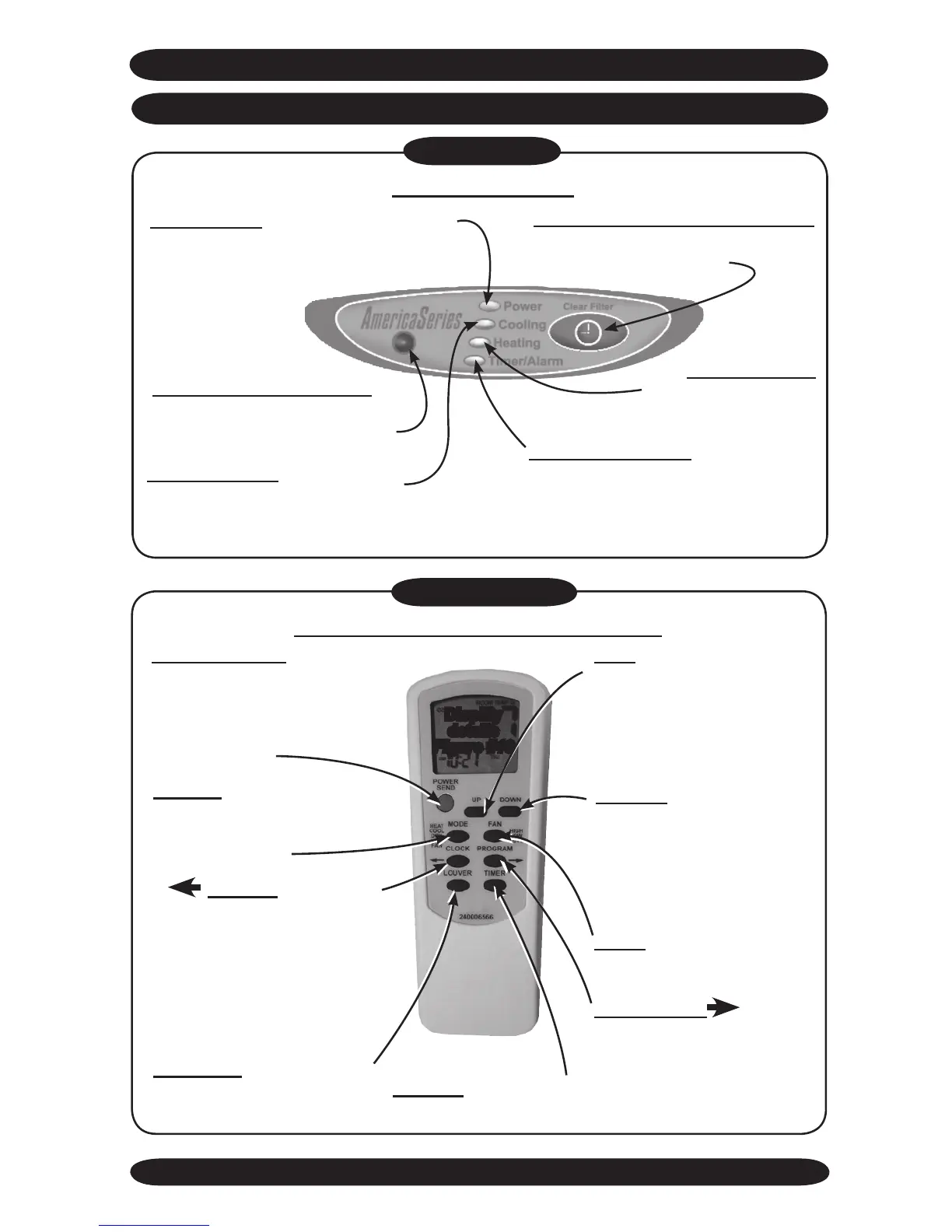
CASSETTE USER INTERFACE
Figure #8
“Power LED” In Remote Thermostat
Mode, will illuminate when power is ap-
plied to the unit. In Hand Held Controller
Mode, will illumi-
nate while the
Cassette is in
the On Mode.
“Infrared receiver window”
Receives Infrared signals from the
Optional Hand Held Controller.
“Cooling LED” Will illuminate
when the system is running in
Cooling.
“Heating LED”
Will illuminate while
calling for heat.
“Clear Filter Warning Button”
When held for 3 seconds will clear
the Clean Filter warning.
“Timer/Alarm LED” Will illuminate
steady when the Cassette is in Sleep
Timer Mode. Will also ash to indicate
a fault code.
Unit Mount Control
Figure #9
“POWER/SEND” When
pressed momentarily, used
to turn the Cassette on or off.
When held for two seconds,
transmits all settings to the
main controller.
“MODE” Used to select
mode of operation, Heat,
Cool, Auto Change Over, Dry
and Fan Modes.
“LOUVER” Used to turn the
motorized louver ON or OFF
(CAHB24, CACB36 only).
“UP” arrow button, Used
to increased the set point
temperature. Also used to
increment the settings in
Conguration, Set Time and
Program Modes.
“DOWN” arrow button,
Used to decrease the set
point temperature. Also used
to decrement the settings in
Conguration, Set Time and
Program Modes.
“FAN” Used to select fan
speed High or Low.
“TIMER” Used to enter
or exit Timer Mode.
“ CLOCK” When held
for 3 seconds used to enter
the Set Time Mode. When
pressed again momentarily,
will exit the Set Time Mode.
Also used to enter the pre-
vious selection in Program
Mode.
“PROGRAM ” Used
to enter or exit the Pre-pro-
gram Run Mode. Also used
to enter the next selection in
Conguration, Set Time and
Program Mode.
Optional Infrared Hand Held Controller
Display
details
Figure #10



 To Next Page