6
|
ENGLISH
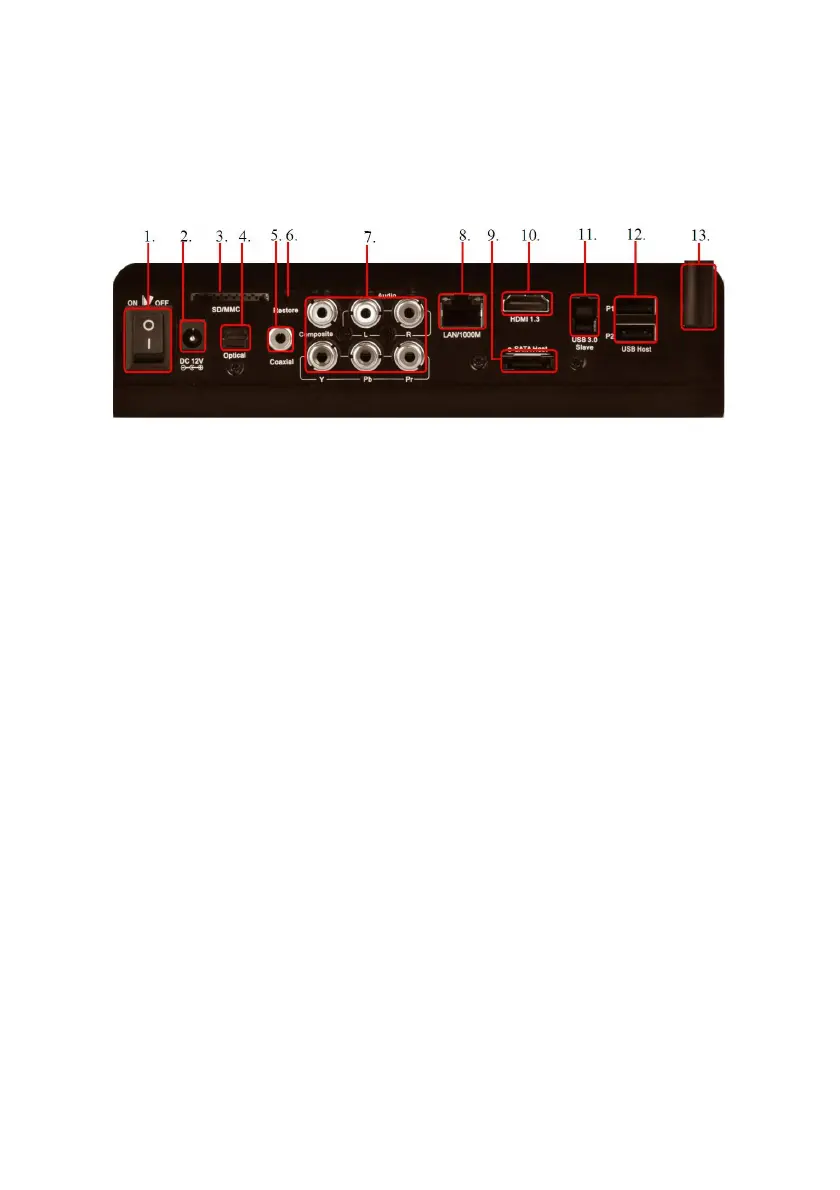
3.0 Explanation of the connections
1. On/Off switch: Used to switch the media player on and off
2. Power connection: Connection for the power supply
3. Card reader: Connection for external memory cards such as SD cards
4. Optical S/PDIF connection: Audio connection to connect to your digital S/PDIF
receiver
5. Coaxial connection: Audio connection to connect to your digital coaxial receiver
6. Restore button: Possibly used for future firmware updates
7. Composite and component connections: Yellow connection can be used to
connect a CRT television. The Red/White cables can also be used to connect to
an analog receiver for 2.0 stereo sound. The component connections can be
used to receive HD signals on a HD television with component port.
8. Gigabit LAN connection: Connection used to connect to your (gigabit) LAN
9. Esata: Connection used to connect an external SATA hard disk
10. HDMI connection: Connection for the HDMI cable
11. USB 3.0: Used to connect to your computer using the supplied USB 3.0 cable
12. USB host connection: Used to connect USB devices such as a USB hard disk,
USB memory sticks etc.
13. Wi-Fi Antenna
4.0 Mounting a SATA hard disk (Optional)
The following steps describe how to connect a SATA hard disk into the media player.
The EM7285 uses a patented hard disk locking system which makes it very easy to
mount a hard disk.
1. Take the EM7285 out of the packaging.
2. Open the hard disk slot on the side of the EM7285 using the handle. The hard
disk slot opens.



 To Next Page