2(12)
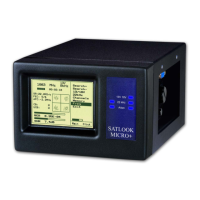
Thank You for purchasing an Emitor SATLOOK Micro + instrument.
This manual covers the operation and maintenance of the SATLOOK Micro + instrument.
All information in this publication is based on the latest product information available at the
time of printing.
Emitor AB reserves the right to make changes at any time without notice and without incurring
any obligation.
No part of this publication may be reproduced without written permission.
This manual should be considered a permanent part of the instrument and should remain with
it if it is resold.
If a problem should arise, or if You have any questions about the instrument, consult an
authorized Emitor dealer.
! Notice !
Operating a SATLOOK Micro + instrument requires special skills. Please read this owner's
manual thoroughly before operating the instrument.
Content:
1 Description............................................................................................................................................ 3
2 Operation............................................................................................................................................... 3
2.1 Unpacking ..................................................................................................................................... 3
2.2 On – Off ........................................................................................................................................ 4
2.3 Batterycheck.................................................................................................................................. 5
3 Functions............................................................................................................................................... 5
3.1 Connection and installing a satellite dish – Signalmeter mode .................................................... 5
3.1.1 Beeper ................................................................................................................................... 6
3.1.2 13/18V , 22 kHz and DiSEqC............................................................................................... 6
3.1.3 DiSEqC 1.2 actuator control ................................................................................................. 6
3.1.4 Attenuator.............................................................................................................................. 7
3.1.5 Maxhold ................................................................................................................................ 7
3.2 Digital Readout – Digital mode .................................................................................................... 7
3.2.1 NIT - Network Information Table ........................................................................................ 8
3.3 Matching function - New!............................................................................................................. 8
3.4 Satellite-Identification / Memory positions/ Transfer of transponder information to PC............. 9
3.5 Setup ........................................................................................................................................... 10
4 Maintenance........................................................................................................................................ 11
5 Technical specification ....................................................................................................................... 12
DiSEqC is a trademark of EUTELSAT


 To Next Page