6(12)
3.1.1 Beeper
If the loudspeaker (Beeper function) is switched on, it will present higher and higher tones as
the signal level is getting better.
3.1.2 13/18V , 22 kHz and DiSEqC
It is easy to set up 13/18V, 22 kHz on/off and DiSEqC-signals with help of the control knob and
the control buttons.
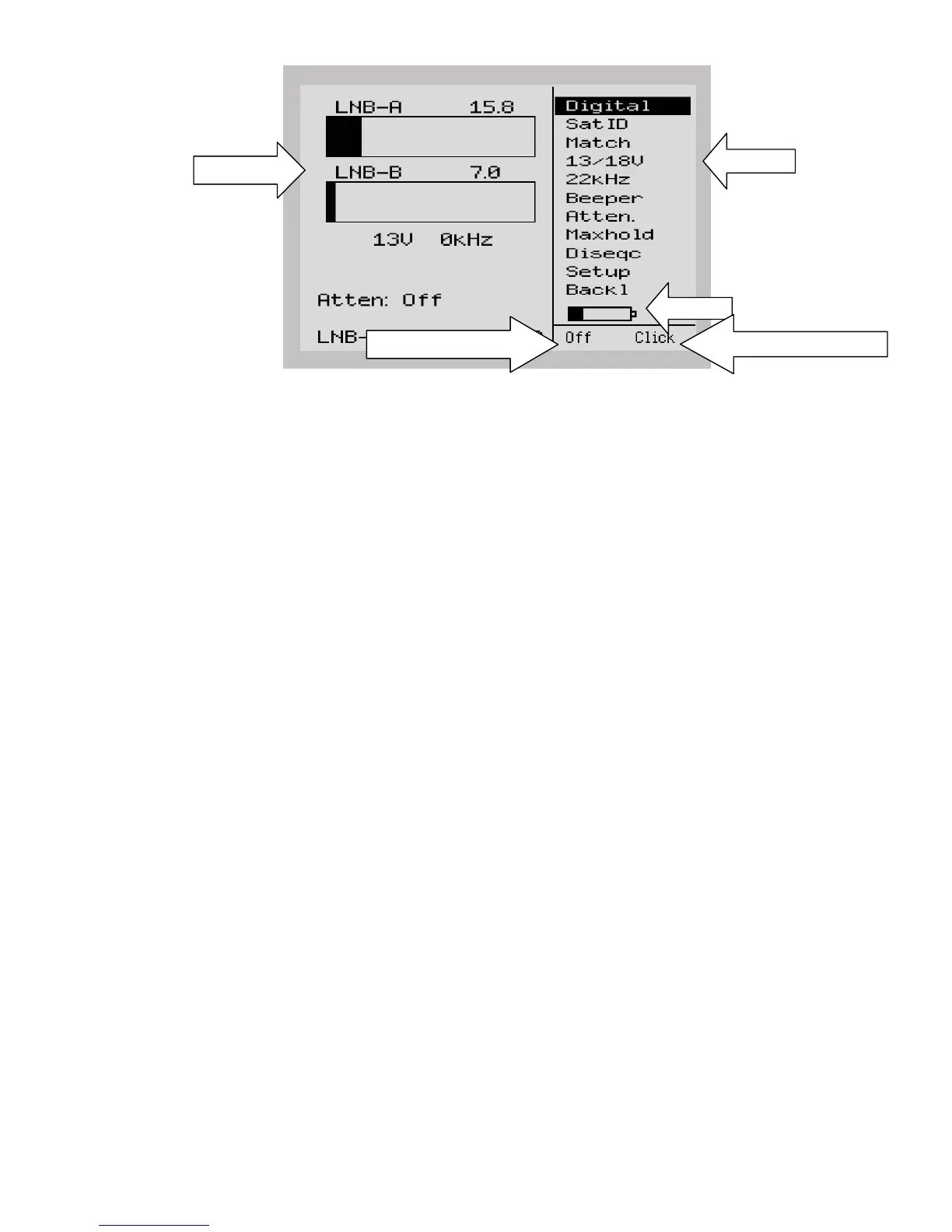
Simply place the marker over 13/18V with the control knob. Push the right (black) control
button and the supply voltage will switch. Current status (13/18V, 22 kHz on/off and the
voltage draw (mA) of the LNB) are displayed on the LCD-screen below the bar-graphs.
Notice that the control-signals are only available at LNB-A (all tones are blocked at LNB-B).
The instrument support the DiSEqC level 1.0 (and Toneburst), 1.1 and 1.2 standard (only
LNB-A input). Activate the function by entering the DiSEqC position in the menu.
3.1.3 DiSEqC 1.2 actuator control
The SATLOOK Micro + controls DiSEqC 1.2-actuators
Enter the function via “DiseqC” in the main menu and then via “Motor” in the sub-menu. The
unit runs such an actuator east/west with the “Go East” and “Go West” functions.
Notice that the actuator-control is only available at the LNB-A input.
Signal-strength is also shown in this mode.
Some motors can be calibrated with the “Calibr.”-command.
The “Limits”- function sets East and West limits. They can be erased with the “Clr. Limit”-
command. Actuator positions can be stored with the “Position”-command.
Signal bars
Menu
Battery
Right (black) controlbutton
Left (red) controlbutton


 To Next Page