7(12)
3.1.4 Attenuator
If the incoming signal is so strong that the bargraphs show max-values, reduce the incoming
signal with the “Atten”-function.
3.1.5 Maxhold
Shows the max-peakes of the signalvalues and will only change when higher values are
received (makes it easier to align a dish and find max signal).
3.2 Digital Readout – Digital mode
Enter the Digital part of the meter via the “Digital”-command in the main-menu.
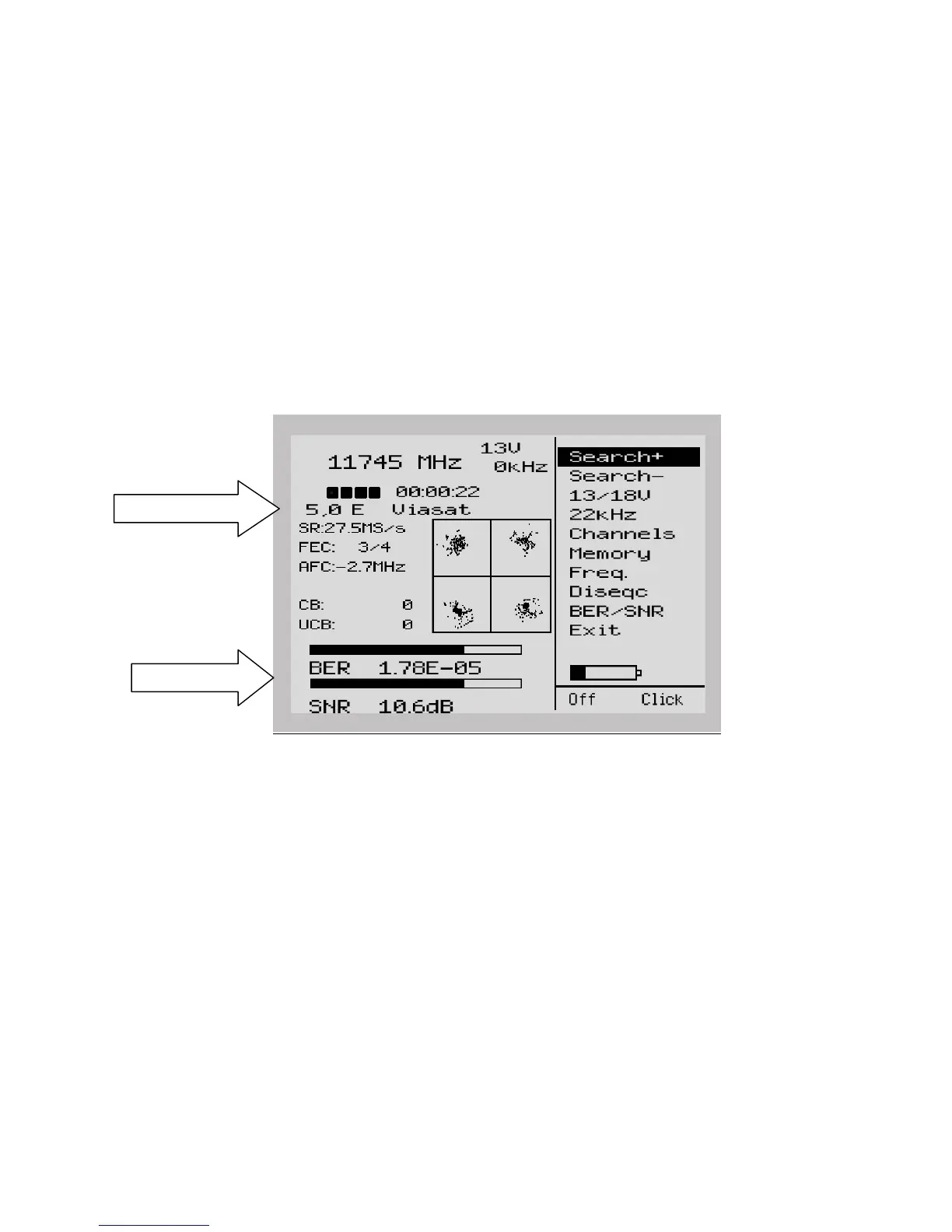
The following picture will be displayed.
The window displays the following Digital readout:
Freq: The tuned in frequency.
SR: Symbol rate. The instrument readout, automatically, the correct symbol rate of the
transmission.
FEC: Forward Error Correction. The instrument readout, automatically, the correct FEC.
AFC: Automatic frequency control -the instrument automatically adjust the frequency
and tells the offset frequency from center of carrier.
CB: Corrected Bits –Bits that have been corrected in Viterbi.
Should be as low as possible.
UCB: Uncorrected Blocks – Blocks unable to be repaired. Value should be zero.
Very small numbers of uncorrected block will result in loss of picture (mosaic).
BER: Bit Error Rate.
SNR: The Signal/Noise Ratio.
NIT-Information
BER and SNR


 To Next Page