5sec
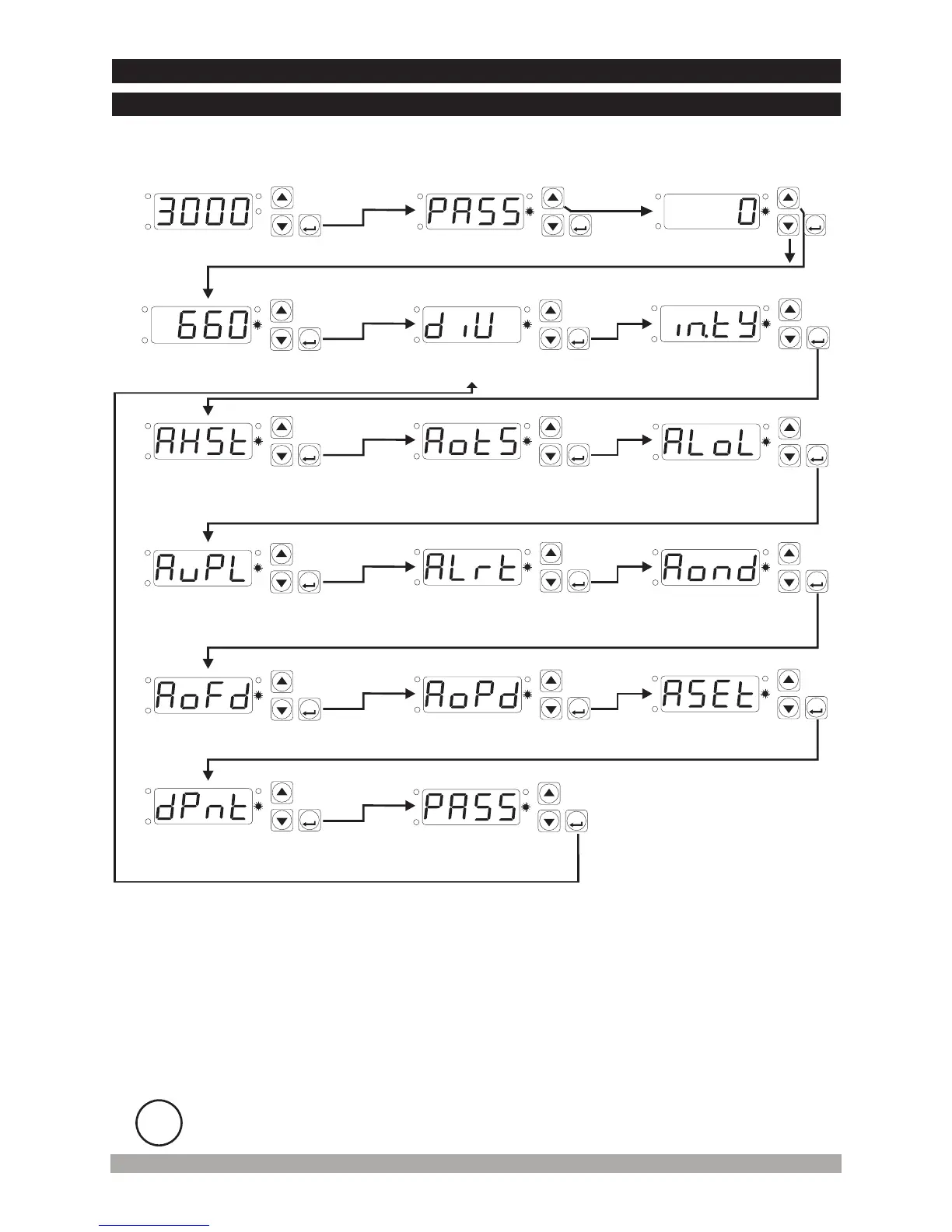
ProgrammingModeEnteringScreen
PasswordEntering
Screen
AlarmHysteresis
AlarmTypeSelection
AlarmSetValueUp
Limit
AlarmOperationType
4.7Easy AccessDiagramForProgramParameters
AlarmSetValueLow
Limit
AlarmDelayafter
energisingthedevice
AlarmSetValue
Mainoperationscreen
DecimalPoint
Position
AlarmOnDelay
Divisionrate
InputTypeSelection
EnterthepasswordwithIncrementandDecrementButtons.
Confirmthepassword
withSET/OKButton
25
ProgrammingMode
AccessingPassword
SET
P
OP
SIG
SV
SET
P
OP
SIG
SV
SET
P
OP
SIG
SV
SET
P
OP
SIG
SV
SET
P
OP
SIG
SV
SET
P
OP
SIG
SV
SET
P
OP
SIG
SV
SET
P
OP
SIG
SV
SET
P
OP
SIG
SV
SET
P
OP
SIG
SV
SET
P
OP
SIG
SV
SET
P
OP
SIG
SV
AlarmOffDelay
SET
P
OP
SIG
SV
SET
P
OP
SIG
SV
SET
P
OP
SIG
SV
SET
P
OP
SIG
SV
SET
P
OP
SIG
SV
4.7.1DeviceWith AlarmOutput
PasswordEntering
Screen
i
If no operation is performed in Programming mode for 20 seconds, device turns to
main operation screen automatically.


 To Next Page