4.8EnteringtotheProgrammingMode,ChangingandSavingParameters
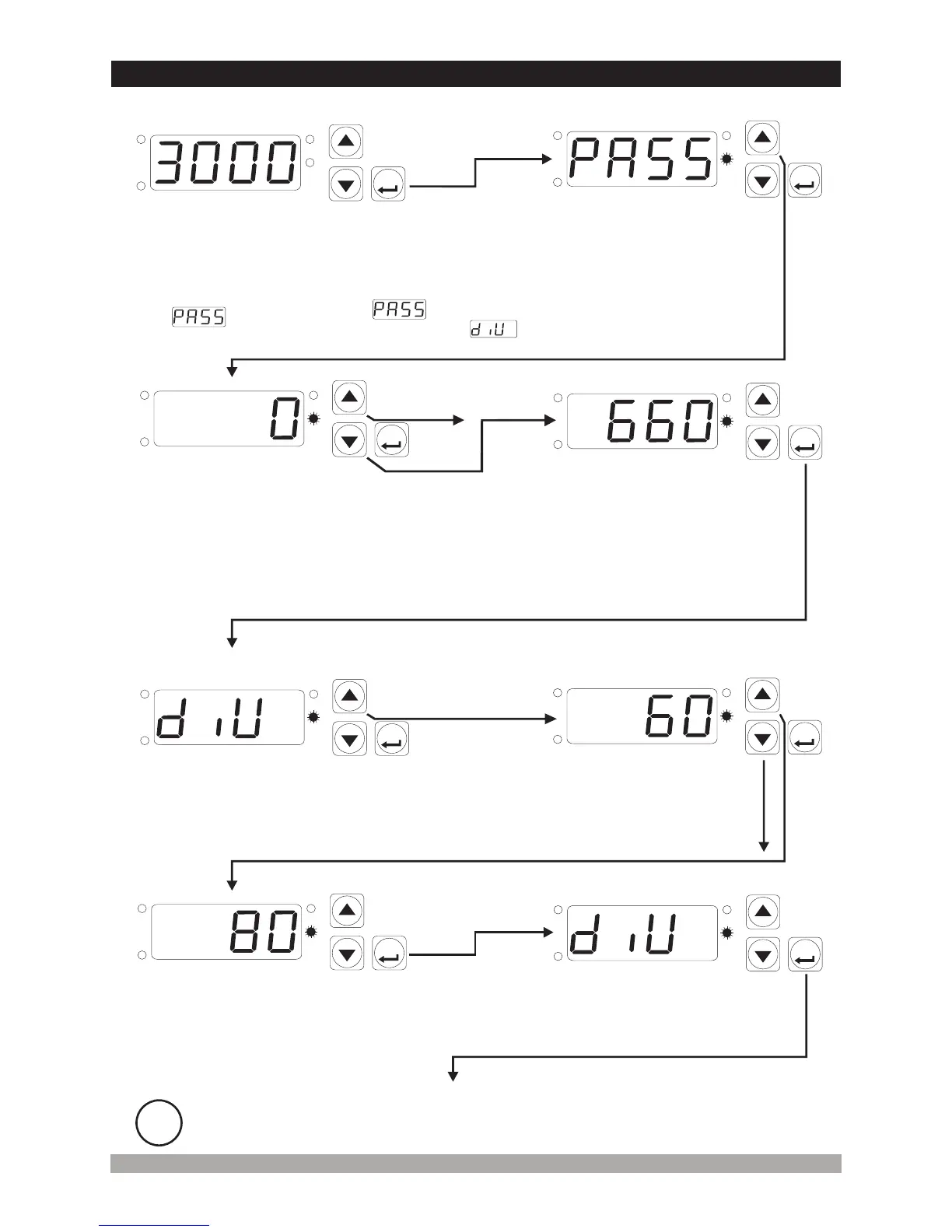
WhenSet/OKispressedfor5
sec.“P”ledstartsflashing.If
ProgrammingModeaccessing
passwordisdefined,then
ProgramModeEntering
screenisshownonthe
screen.
MainOperationScreen
DivisionRateParameter
ProgrammingScreen
DivisionRateParameter
Value
ProgrammingScreen
ProgrammingMode
EnteringScreen
PressIncrement
buttonforaccessing
toPassword
EnteringScreen
PasswordEnteringScreen
EnterProgrammingmodeaccessingpassword
withIncrementanddecrementbuttons.
Confirmthepasswordwith
usingtheSet/OKbutton.
Note-1: If
ProgrammingMode
Accesspasswordis0,
thenProgramming
modeenteringscreen
isnotseen.
Divisionrate
parameterisseen
27
SET
P
OP
SIG
SV
SET
P
OP
SIG
SV
SET
P
OP
SIG
SV
SET
P
OP
SIG
SV
SET
P
OP
SIG
SV
SET
P
OP
SIG
SV
SET
P
OP
SIG
SV
SET
P
OP
SIG
SV
PasswordEnteringScreen
Note-2: Parameters can be observed by pressing SET/OK button in password entering
screen without entering the programming mode entering password. But parameters can
not be changed.
Press increment button for accessing to the
parameter value. Press Set/OK button for
accessing to the next parameter.
Changethevaluewithincrement
anddecrementbuttons.
DivisionRateParameter
Value
PressSet/OKbuttonfor
savingtheparameter.
DivisionRateParameter
PressSet/OKbuttonfor
accessingtothenextparameter.
i
If no operation is performed in Programming mode for 20 seconds, device turns to
main operation screen automatically.


 To Next Page