© 2024 EMM Labs, All Rights Reserved. EMM Labs reserves the right to amend specifications & design without notice.
027
Network & Streaming
DA2i STEREO D/A CONVERTER OWNER’S MANUAL
Network & Streaming
mConnect Control App - Setup & Information
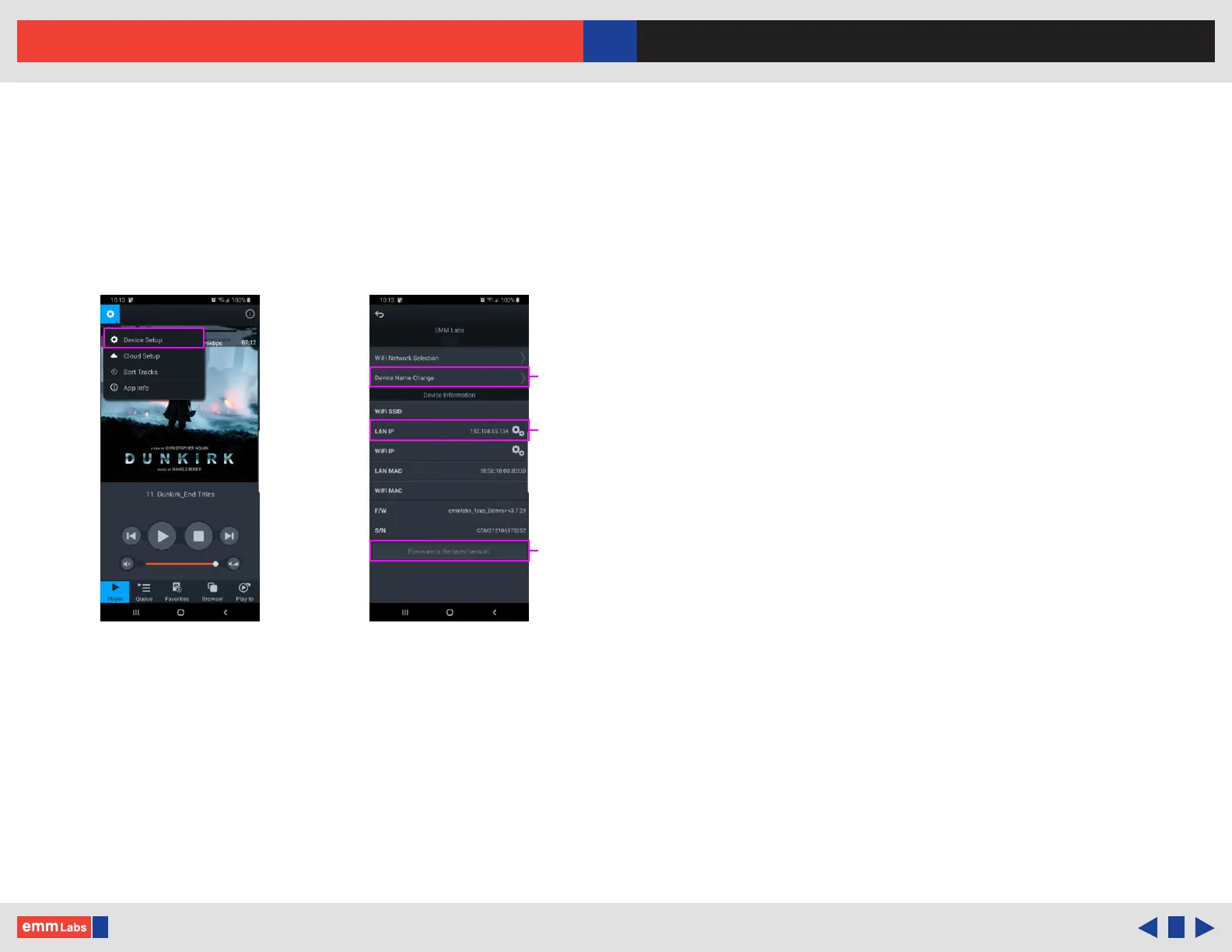
1. Access the DA2i/DV2i’s device setup for detailed network information, change the
DA2i/DV2i’s network name, set a static IP or to update the DA2i/DV2i’s rmware.
2. DA2i/DV2i has a pre-assigned default factory set network name, in this case it is
“EMM_DA2i”. You can change this by selecting the “Device Name Change”
option.
3. Set a static IP for the DA2i/DV2i by pressing the cog on right of the “LAN IP”
setting.
4. If a rmware update is available you will be notied at the bottom of the page,
and you can just press this option to update.
Setting a
static IP
Firmware
update
Changing
the network
name
EMM-DA2iEMM-DA2i
DA2i
Device settings



 To Next Page