English
- 41 -
Chronothermostat with Humidistat User Manual
PROGRAMS SETTING
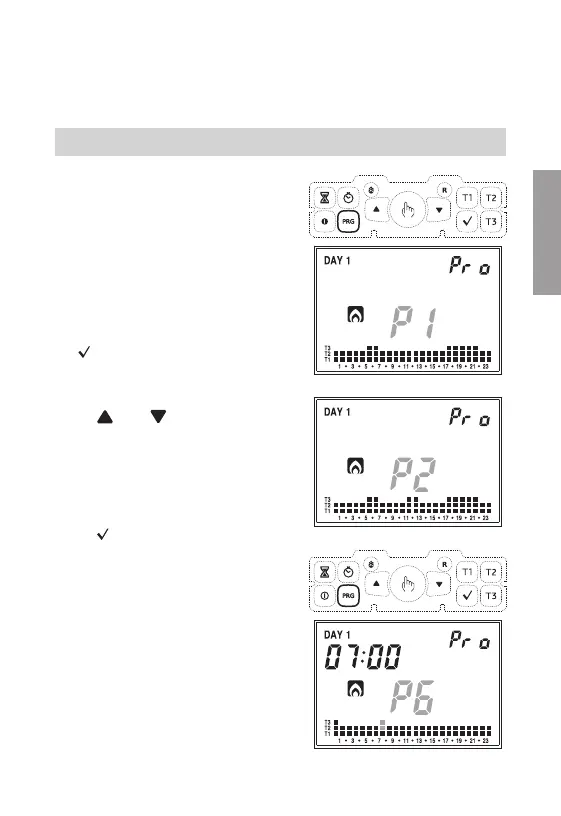
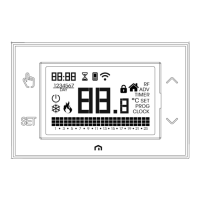
• Pressing the "PRG" key on field (14) will
display the indication regarding Monday,
field (16) will display the selected program
flashing (in the example: P1), field (15) will
display "Pro", field (17) will display the
graphic trend of the corresponding program
and will activate symbol (20) or (21)
depending on the set operation (summer or
winter).
If the selected program is correct, press the
"
” key to continue to the next day.
• If the selected program is not correct for
that day, you can create another one using
the "
" and " " keys which modify
value "Px" contained in field (16); as the
program changes, so does the content of
field (17) regarding the selected program.
The default programs are listed at the end
of this manual.
Once the correct program is selected, press
the "
” key to move on to the next day.
•
If no program satisfies the user's needs,
choose any program and press the
"PRG"
key again; this will bring the segment of
the corresponding field
(17)
to flash.
The chapters “Programs setting”, Temperature settings”, “Manual operation”,
“Summer / winter operation”, “Keypad on-off command”, and “Timings” are related
only to the part of the chronothermostat.
For the setting of humidistat parameters see advanced programming.


 To Next Page