6
P5602 T105-man-100x126 0-0-0-K
EMOS spol. s r. o.
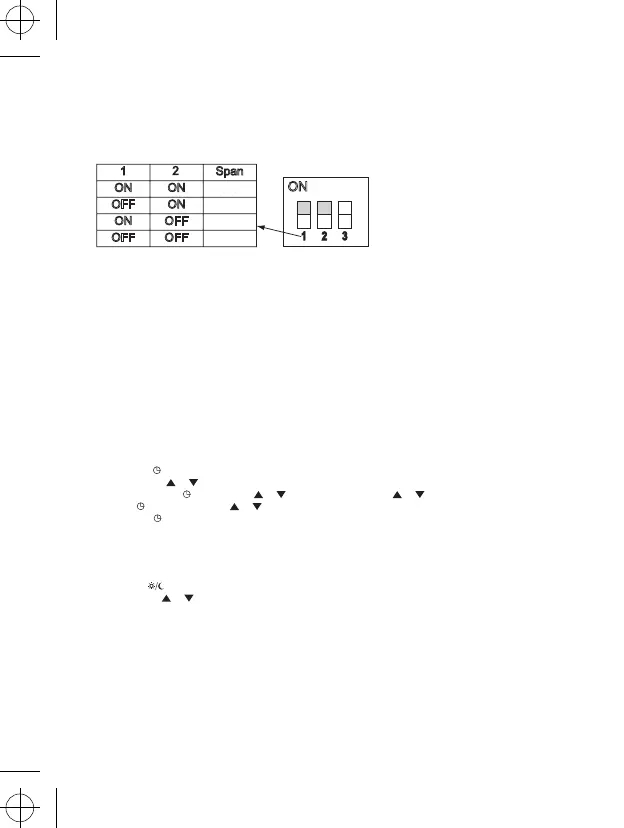
Temperature range selection
The range is a thermal difference between the on and off temperatures. For example, if you set the temperature of the
heating system at 20°C and the range is 0,8°C, the heater starts working, if the room temperature drops to 19.6°C
and it turns off, if the temperature reaches 20.4°C. Set the DIP switch (position 1 & 2) according to your choice of
temperature range, as shown in the diagram.
(ON – active, OFF – inactive)
1
ON
OFF
ON
OFF
ON
ON
OFF
OFF
Span
ON
1ºC
2ºC
3ºC
4ºC
Battery installation
The thermostat T105 is powered by two AA, 1.5V batteries. Insert the two AA batteries into the battery compartment
on the inner side of the front cover. During the first start-up the display must show the time and room temperatures
(such as 28.5°C).
If different sort of data appear on the display, gently push the RESET button. Use a thin straight object to do so, for
instance a straightened office paperclip.
After the installation put the rear cover back. Before switching the main system switch on, push the RESET button
once. Now the thermostat is ready for use.
If a battery icon appears on the display, replace the batteries.
When replacing the batteries:
1. Turn off the power supply and remove the thermostat’s rear cover.
2. Replace the original batteries with new alkali AA batteries, do not use rechargeable batteries.
4. Put the rear cover back.
5. Push the RESET button once and the re-establish the power supply.
Clock setting
1. Push the button to set the day and time. Day indicator (number 1-7) is blinking.
2. Use buttons or to choose the number of the day.
3. Push the button and by arrows or set the clock. By holding or the set-up will go faster.
4. Push and use the arrows or to set the minutes. If you hold the arrow, it will be faster.
5. Push the button to return to the operation mode. If no button is touched for 10 seconds, the unit will return
automatically to the operation mode.
Control temperature setting
1. Use the TEMPERATURE SETTING button to display the temperature setting.
2. Use the button to toggle the economy and comfort mode.
3. The arrows or increase/ decrease the temperatures in 0.2°C steps.
4. The TEMPERATURE SETTING button stores the selected temperatures. If no button is touched for 10 seconds,
the unit will return to the operation mode automatically.
The pre-set comfort mode is 21°C for the heating system and 23°C for air conditioning.
The economy mode is 18°C for the heating system and 26°C for the air conditioning. The values can be changed
as needed.
0,4°C
0,8°C
1,4°C
1,8°C


 To Next Page