7
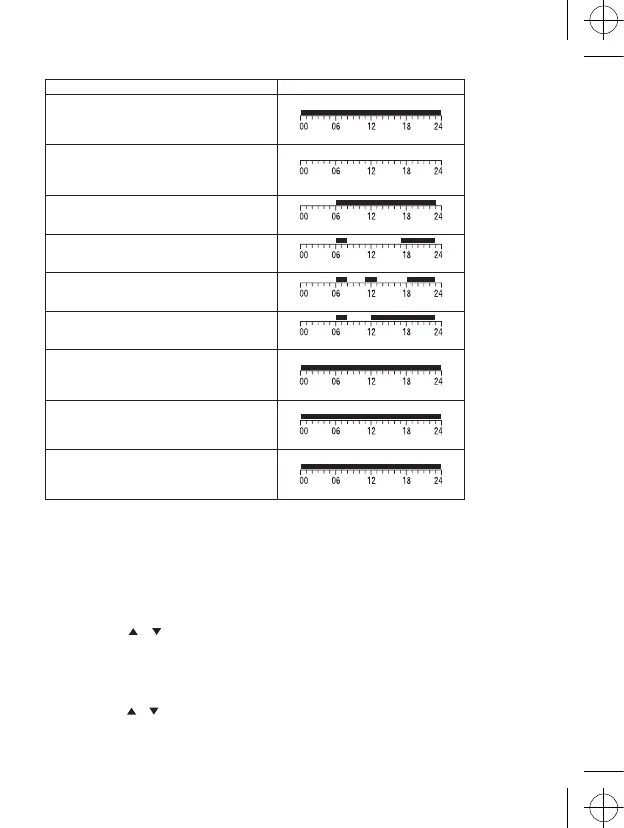
The dark fields show the setting of the comfort mode.
The others show the economy mode.
PROGRAMME SETTING
Selection of week – day
1. Push the “P“ button and the day indicator will show the programmed day.
2. Use the arrows or to select the day you wish to programme. For programming you can choose the whole
week, working day, weekend or an individual day
3. When you push “P” again, the thermostat will switch to set the programme:
Selection of a pre-set programme
1. Push the “P” button again to set the programme.
2. Use the arrows or to select one of the programmes P1 - P6. They are preset and their profiles are shown in
the picture.
3. By another push of the “P” button you confirm the programme for the specific day and return to the operation mode.
Programme number programme prole
Programme 1:
All day comfort temperature
Programme 2:
All day economy temperature
Programme 3:
Combination of comfort and economy temperature
Programme 4:
Combination of comfort and economy temperature
Programme 5:
Combination of comfort and economy temperature
Programme 6:
Combination of comfort and economy temperature
Programme 7:
User dened
Programme 8:
User dened
Programme 9:
User dened


 To Next Page