24
Online update
In order to see if a new version is available, connect your Wi-Fi HDD as a router (see section:
“Internet settings” to allow Internet access.
Click on “Online update”. The system will search to see if a new firmware version is available.
If there is a higher version than the system firmware version, the upgrade prompt box will pop-up.
Follow the indicated instructions to upgrade the firmware.
4.2. Cache
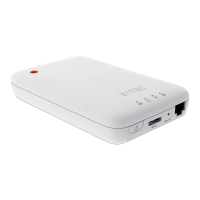
Set the cache size of the application on your smartphone/ tablet.
To clear cache, click on the button “Clear Cache”.
4.3. Language
Choose your language among the list.


 To Next Page